Wireless Router RNX-N150RT User Manual
nu “System Tools”, you can see the submenus under the main menu: Time Settings,
g function. The detailed explanations for each submenu are provided below.
Choose me
Diagnostic, Firm
ware Upgrade, Factory Defaults, Backup & Restore, Reboot, Password,
System Log and Statistics. Click any of them, and you will be able to configure the
correspondin
4.18.1 Time Settings
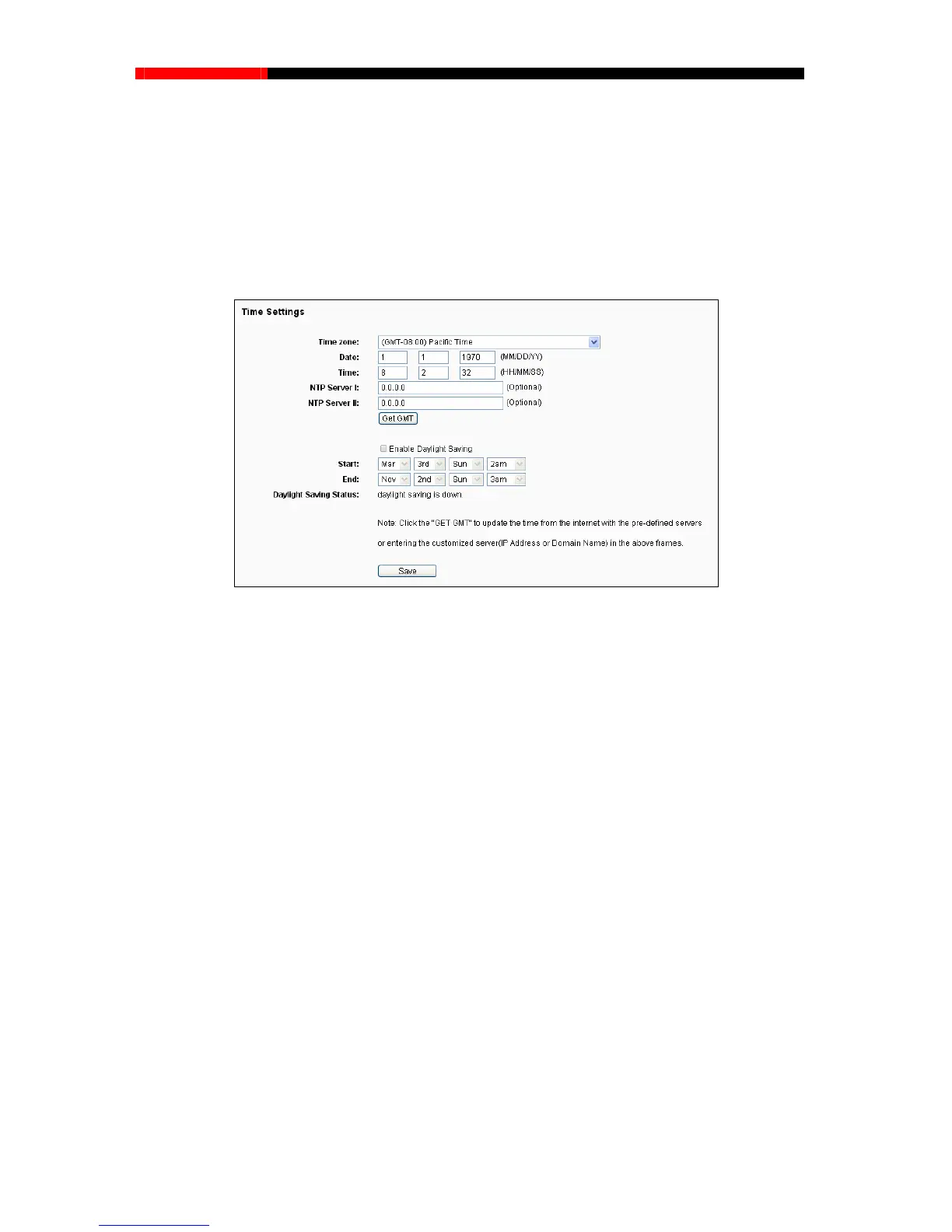
Choose menu “System Tools→Time Settings”, you can configure the time on the following
screen.
Figure 4-84 Time settings
Time Zone - Select your local time zone from this pull down list.
Date - Enter your local date in MM/DD/YY into the right blanks.
Time - Enter your local time in HH/MM/SS into the right blanks.
NTP Server Prior - Enter the address for the NTP Server, then the router will get the time
from the NTP Server preferentially. In addition, for some built-in common NTP Servers, the
router can get time automatically once it connects the Internet.
To configure the system manually:
1. Select your local time zone.
y:
ct your local time zone.
P address for NTP Server Prior.
3. Click
Internet.
2. Enter date and time in the right blanks.
3. Click Save to save the configuration.
To configure the system automaticall
1. Sele
2. Enter the I
the Get GMT button to get system time from Internet if you have connected to the
- 103 -



 To Next Page