Wireless Router RNX-N150RT User Manual
er the Wireless menu (shown in Figure 4-17): Wireless Settings,
e to configure the corresponding function.
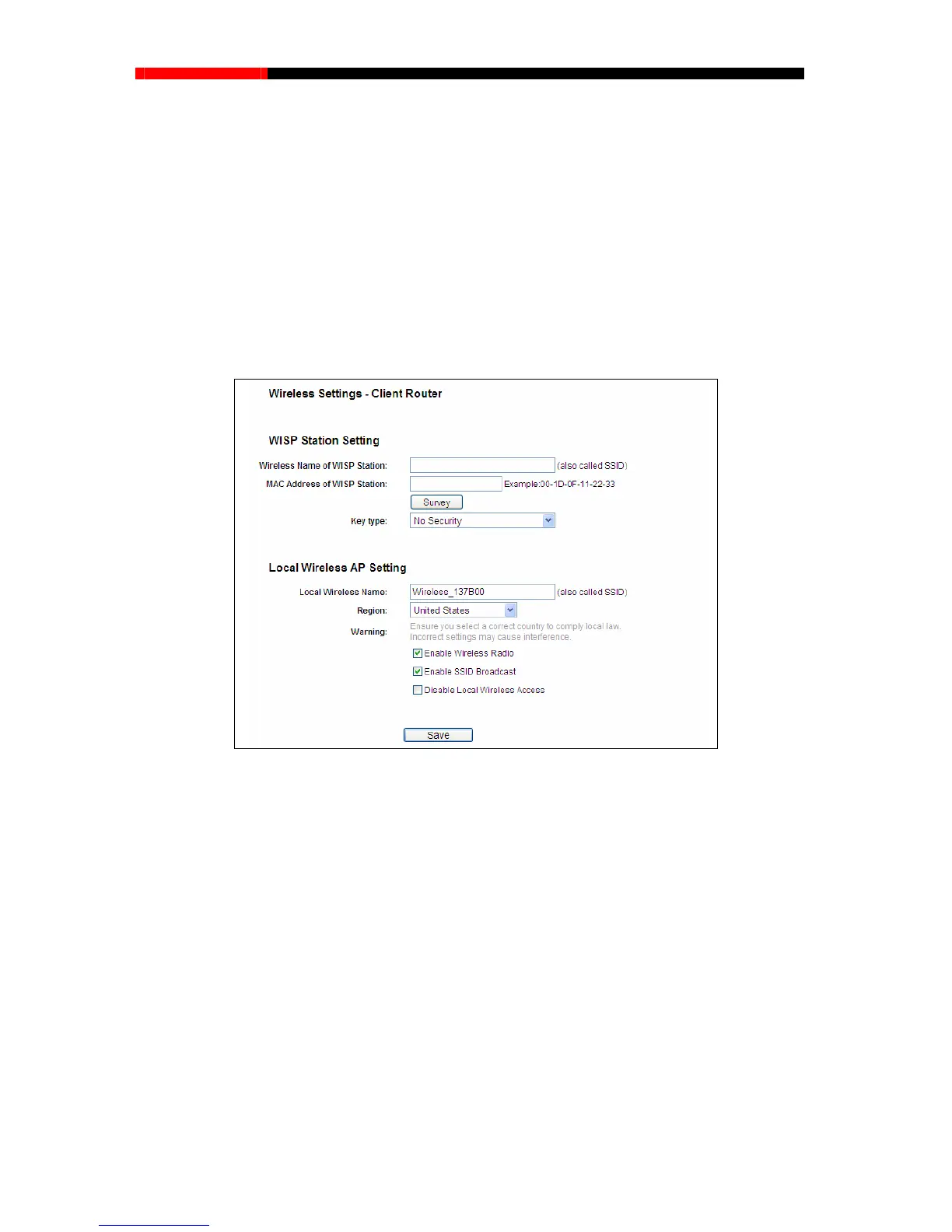
4.7.1.1. Wireless Settings in Client Router Mode
If y
ou select Client Router mode in Figure 3-6 or Client Router mode in Figure 4-3, the Wireless
Settings p
age will display as Figure 4-18.
There are five submenus und
W
ireless Security, Wireless MAC Filtering, Wireless Advanced and Wireless Statistics. Click
any of them, and you will be abl
4.7.1 Wireless Settings
Choose menu “Wireless→Wireless Settings”, you can configure the basic settings for the
wireless network on this page.
Figure 4-18 Wireless Settings
Wireless Name of WISP Station (SSID) - The SSID of the AP your router is going to connect
r
ding to the AP's security configuration. It is
hosen if the key type is WEP (ASCII) or WEP (HEX).It
to as a
client. You can also use the search function to select the SSID to join.
MAC Address of WISP Station (BSSID) - The BSSID of the AP your router is going to
connect to as a client. You can also use the search function to select the BSSID to join.
Survey - Click this button, you can survey the AP which runs in the current channel.
Key type - This option should be chosen acco
recommended that the security type is the same as your AP's security type.
Auth type - This option should be c
indicates the authorization type of the Root AP.
- 47 -



 To Next Page