Wireless Router RNX-N150RT User Manual
ame (SSID) must
o of the router can be enabled or disabled
Enable SSID Broadcast checkbox, the wir
eless
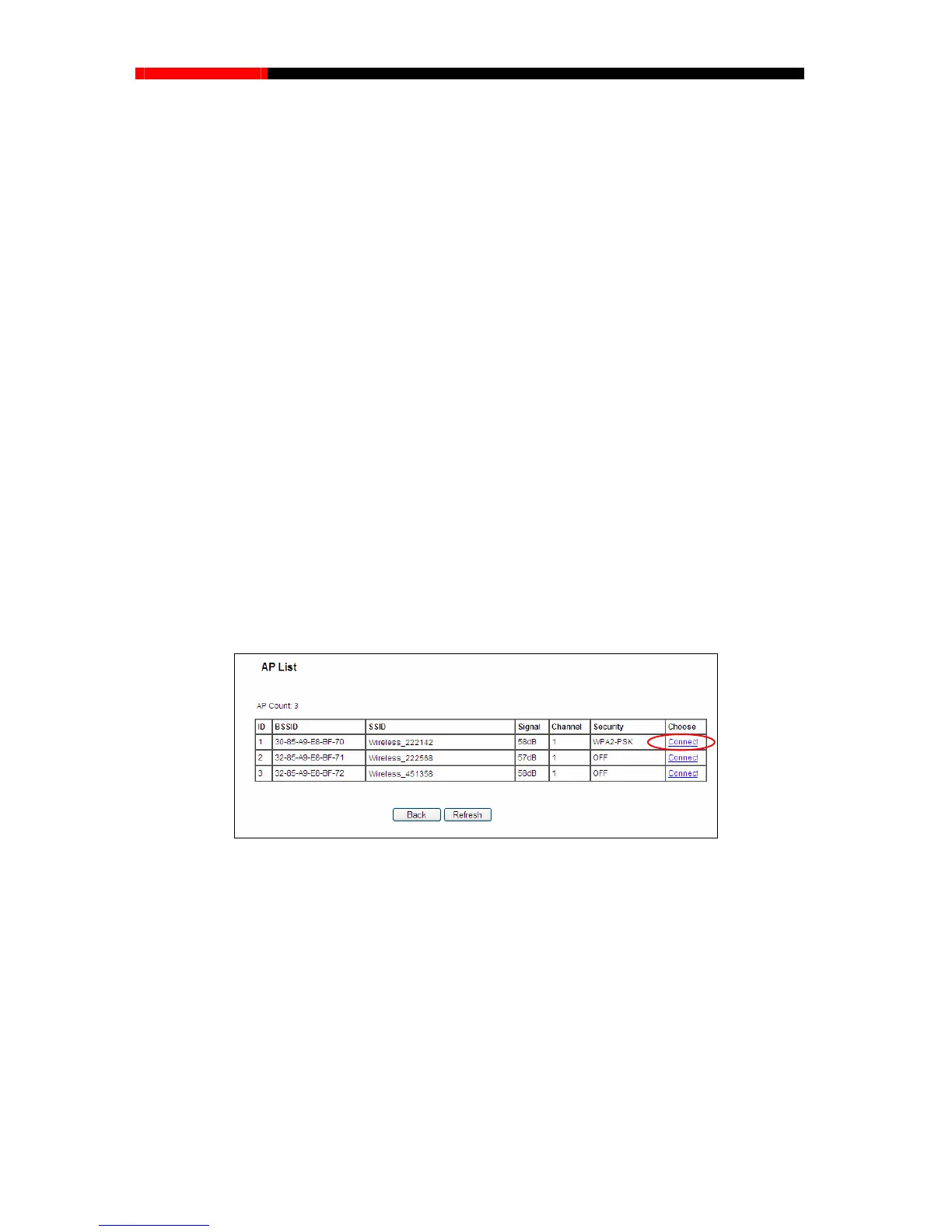
Click Survey button on the Wireless page shown as Figure 4-18, and then AP List page will
appe
ar, as shown in Figure 4-19. Find the SSID of the Access Point you wan
t to access, and click
Connect in the corresponding row. For example, the desired item is selected rget network’s
SSID will be automatically filled into the corresponding box which is shown as the Figure 4-20.
WEP Index - This option should be chosen if the key type is WEP (ASCII) or WEP (HEX). It
indicates the index of the WEP key.
Password - If the AP your router is going to connect needs password, you need to fill the
password in this blank.
Local Wireless Name - Enter a value of up to 32 characters. The same N
be assigned to all wireless devices in your network.
Enable Wireless Router Radio - The wireless radi
to allow wireless stations access. If enabled, the wireless stations will be able to access the
router. Otherwise, wireless stations will not be able to access the router.
Enable SSID Broadcast - If you select the
router will broadcast its name (SSID) on the air.
Disable Local Wireless Access - If you select the Disable Local Wireless Access
checkbox, the wireless router will disable local wireless access; other stations will not be able
to access the router by wireless.
. The ta
Figure 4-19 AP List
- 48 -



 To Next Page