Wireless Router RNX-N150RT User Manual
DMZ host in the
sed to the
conferencing. DMZ host
forwards all the ports at the same time. Any PC whose port is being forwarded must have its
s
3. Incoming Port Range cannot overlap each other.
4.10.3 DMZ
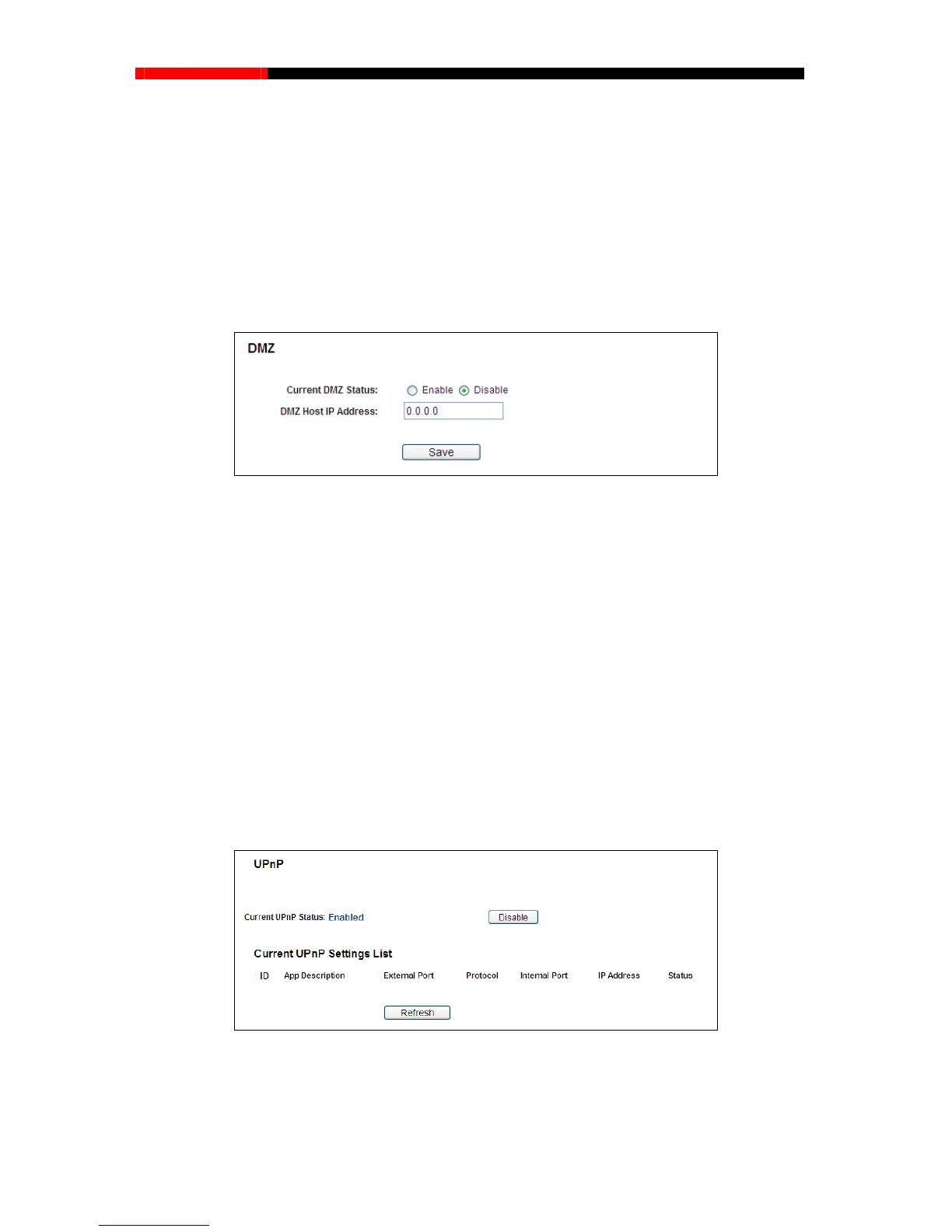
Choose menu “Forwarding → DMZ”, and then you can view and configure
screen as shown in Figure 4-46. The DMZ host feature allows one local ho
st to be expo
Internet for a special-purpose service such as Internet gaming or video
DHCP client function disabled and should have a new static IP Address assigned to it because it
IP Address may be changed when using the DHCP function.
Figure 4-46 DMZ
To assign a computer or server to be a DMZ server:
1. Che
After you set the DMZ host, the firewall related to the host will not work.
Choose menu “For
warding → UPnP”, and then you can view the information about UPnP
(Universal Plug and Play) in the screen as shown in Figure 4-47. The UPnP feature allows the
devices, such as In
ternet computers, to access the local host resources or devices as needed.
UPnP devices can be automatically discovered by the UPnP service application on the LAN.
ck
the Enable radio button
2. Enter the IP Address of a local host in the DMZ Host IP Address field
3. Click the Save button.
Note:
4.10.4 UPnP
Figure 4-47 UPnP
Current UPnP Status - UPnP can be enabled or disabled by clicking the Enable or Disable
button.
- 76 -



 To Next Page