Wireless Router RNX-N150RT User Manual
DNS) queries.
IP Address/Domain Name –Type the destination IP address (such as 202.108.22.5) or
Pings Count -
acket.
y of each Ping packet. If there is no reply in the
specified time, the connection is overtime.
e Max TM-The max number of hops for a Traceroute connection.
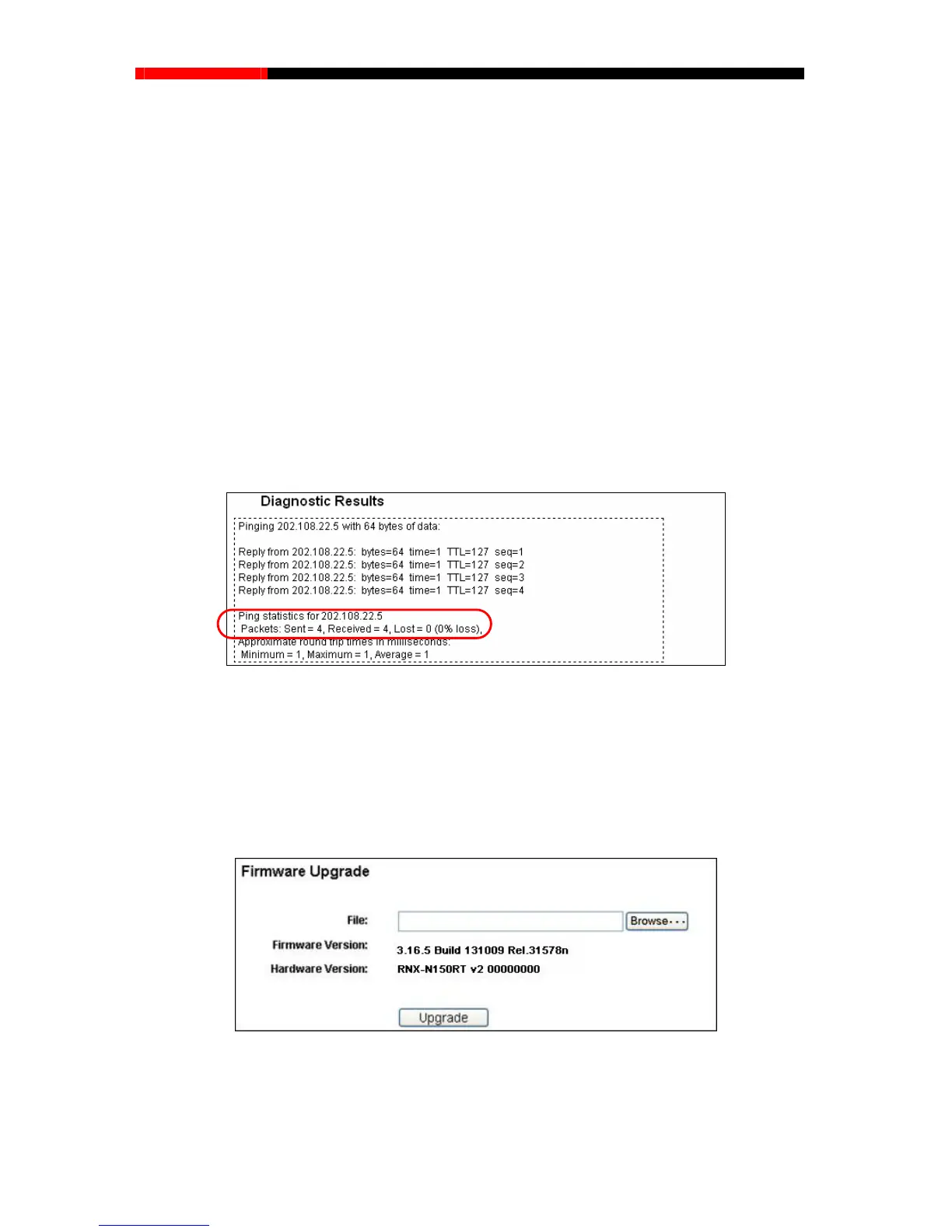
If the result is similar to the following screen, the connectivity of the Internet is fine.
not, you might have a name resolution problem. In this case, ensure that the domain name
you are specifying can be resolved by using Domain Name System (
Domain name.
The number of Ping packets for a Ping connection.
Ping Packet Size -The size of Ping p
Ping Timeout -Set the waiting time for the repl
Tracerout
Click Start to check the connectivity of the Internet.
The Diagnostic Results page displays the result of diagnosis.
Only one user can use this tool at one time. Options “Number of Pings”, “Ping Size” and “Ping
Timeout” are used for Ping function. Option “Tracert Hops” are used for Tracert function.
4.18.3 Firmware Upgrade
Choose menu “System Tools→Firmware Upgrade”, you can update the latest version of
firmware for the router on the following screen.
Figure
4-86 Diagnostic Results
Note:
Figure 4-87 Firmware Upgrade
Firmware Version-This displays the current firmware version.
- 105 -



 To Next Page