Wireless Router RNX-N150RT User Manual
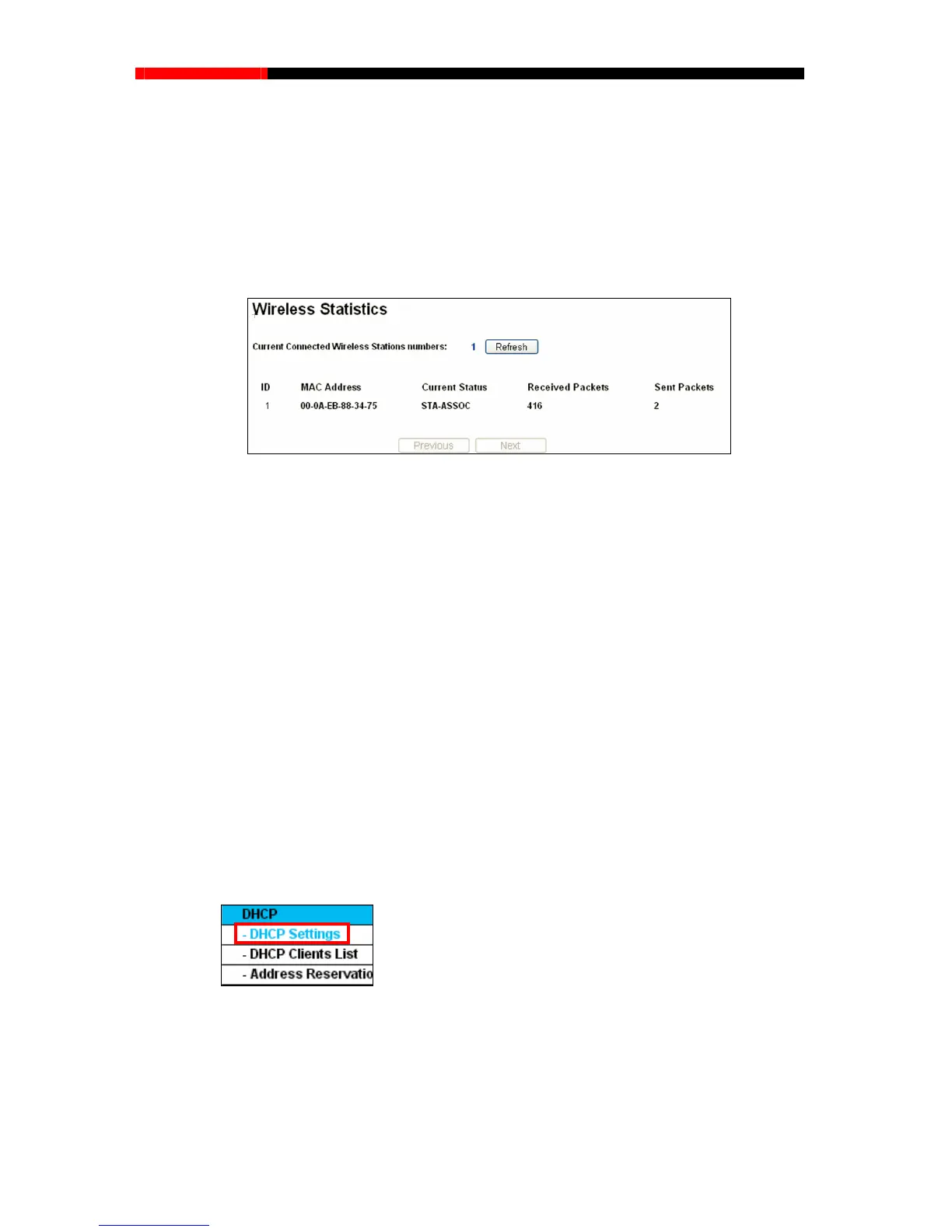
Choose menu “Wireless→Wireless Statistics”, you can see the MAC Address, Current Status,
Received Packets and Sent Packets for each connected wireless station.
Note:
If you are not familiar with the setting items in this page, it's strongly recommended to keep
the provided default values; otherwise it may result in lower wireless network performance.
4.7.5 Wireless Statistics
Figure 4-34 Wireless Statistics
MAC Address - The connected wireless station's MAC address
Current Status-The connec ning status, one ofSTA-AUTH /
ets-Packets sent by the station
e page, click the Next button to go to
the next page and click the Previous button to return the previous page.
ted wireless station's run
S
TA-ASSOC / STA-JOINED / WPA / WPA-PSK / WPA2 / WPA2-PSK / AP-UP / AP-DOWN / Disconnected
Received Packets-Packets received by the station
Sent Pack
You cannot change any of the values on this page. To update this page and to show the current
connected wireless stations, click on the Refresh button.
If the numbers of connected wireless stations go beyond on
Note:
This page will be refreshed automatically every 5 seconds.
4.8 DHCP
Figure 4-35 The DHCP menu
There are three submenus under the DHCP menu (shown in Figure 4-35), DHCP
Settings, DHCP
Clients List and Address Reservation. Click any of them, and you will be able to configure the
corresponding function.
- 68 -



 To Next Page