Wireless Router RNX-N150RT User Manual
support address and port translation for certain application layer "control/data"
FTP
clients and servers to transfer data across NAT, keep the default
ALG - To allow TFTP clients and servers to transfer data across NAT, keep th
e
screen as
shown in Figure 4-50.
gateway to
protocols su
ch as FTP, TFTP, H323 etc.
FTP ALG -To allow
Enable.
TFTP
default Enable.
H323 ALG -To allow Microsoft NetMeeting clients to communicate across NAT, keep the
default Enable.
Click the Save button to save your settings.
4.11.2 Advanced Security
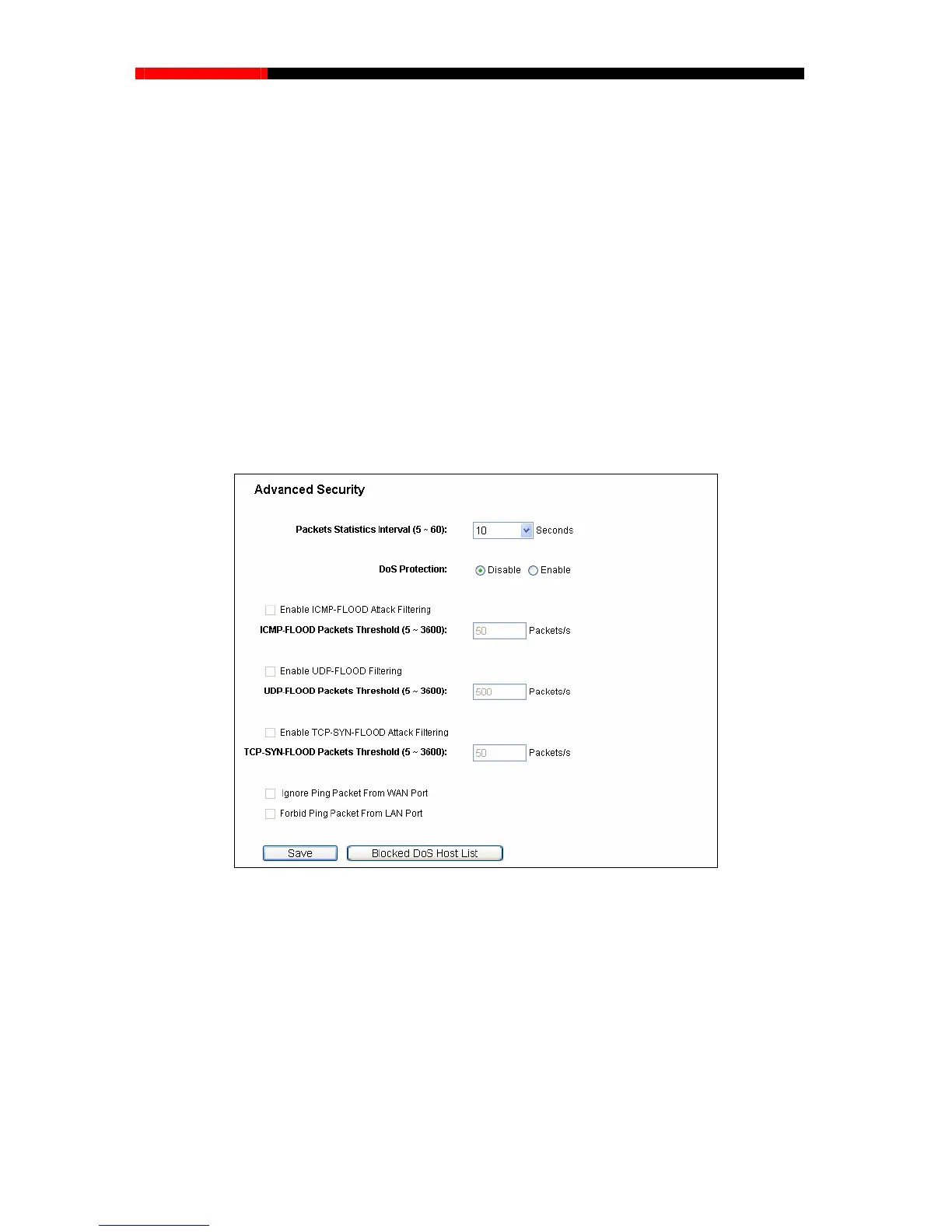
Choose menu “Security→Advanced Security”, you can protect the router from being attacked by
TCP-SYN Flood, UDP Flood and ICMP-Flood in the
Figure 4-50 Advanced Security
Packets Statistics Interval (5~60) - The default value is 10. Select a value between 5 and
60 seconds from the drop-down list. The Packets Statistics Interval value indicates the time
section of the packets statistics. The result of the statistics is used for analysis by SYN Flood,
UDP Flood and ICMP-Flood.
DoS protection-Denial of Service protection. Check the Enable or Disable button to enable
or disable the DoS protection function. Only when it is enabled, will the flood filters be
enabled.
- 79 -



 To Next Page