Wireless Router RNX-N150RT User Manual
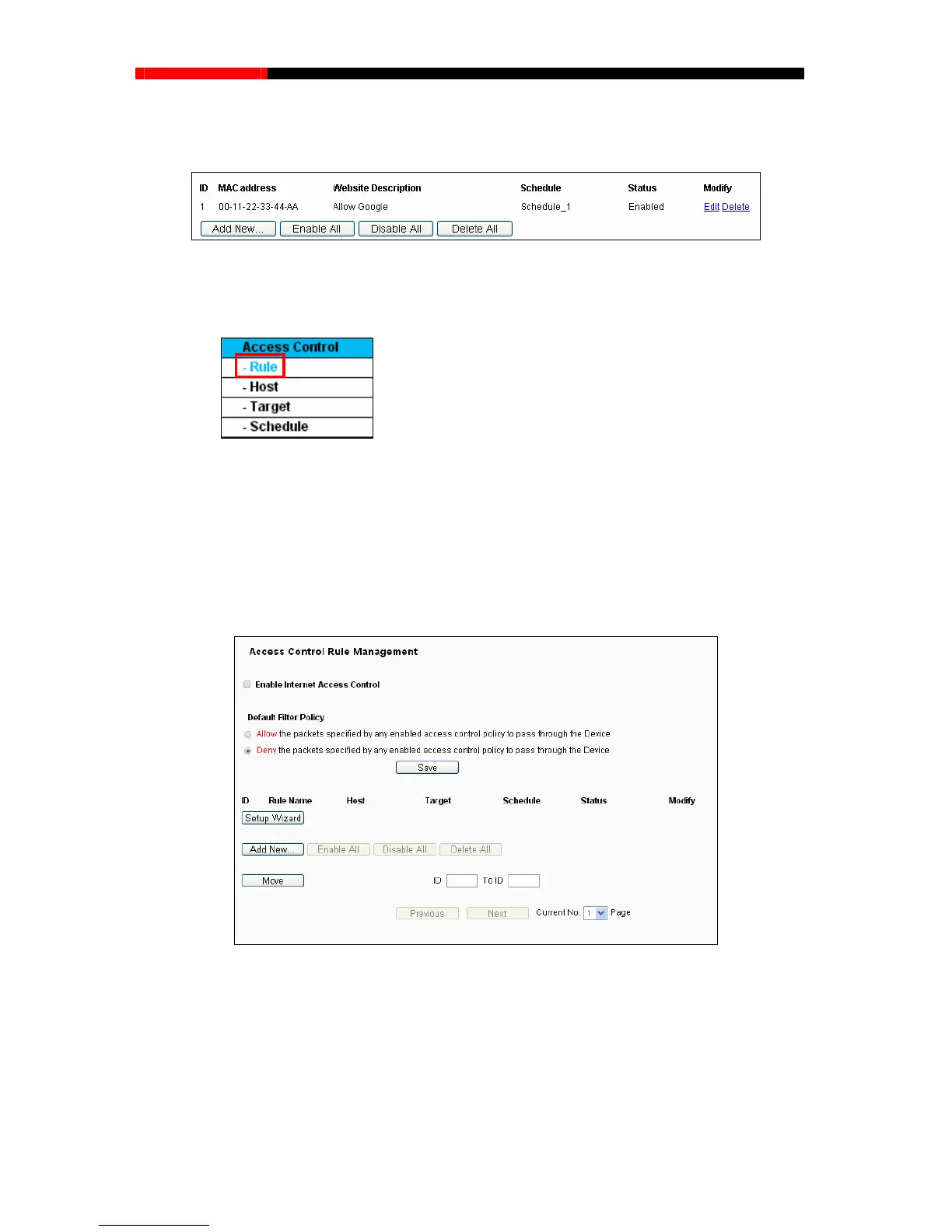
following list, as Then you will go back to the Parental Control Settings page and see the
shown in Figure 4-55.
ntrol Settings
4.13 Access Control
Figure 4-55 Parental Co
Figure 4-
56 Access Control
There are four submenus under the Access Control menu as shown in Figure 4-56: Rule, Host,
orrespondi
ng
4.13.1 Rule
Ta
rget and Schedule. Click any of them, and you will be able to configure the c
function.
Choose menu “Acc
ess Control→Rule”, you can view and set Access Control rules in the screen
as shown in Figure 4-57.
Figure 4-57 Access Control Rule Management
Enable Internet Access Control - Select the check box to enable the Internet Access
Control function, so the Default Filter Policy can take effect.
Rule Name - Her .
Host - Here displays the host selected in the corresponding rule.
Target - Here displays the target selected in the corresponding rule.
e displays the name of the rule and
this name is unique
- 85 -



 To Next Page