Wireless Router RNX-N150RT User Manual
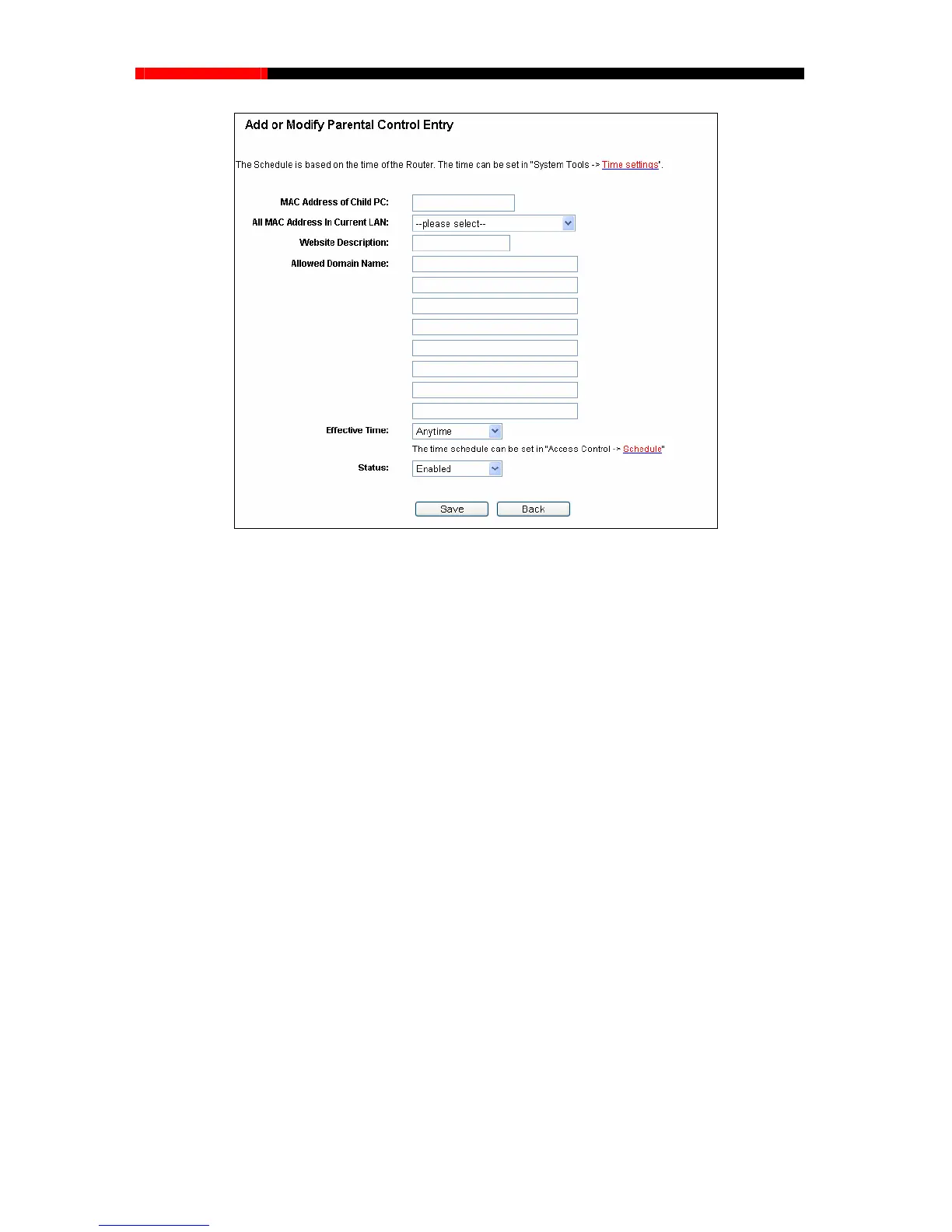
Figure 4-54 Add or Modify Parental Control Entry
should follow the settings below.
1. Click “Parental Control” menu on the left to enter the Parental Control Settings page.
Check Enable and enter the MAC address 00-11-22-33-44-BB in the MAC Address of
Parental PC field.
2. Click “Access Control → Schedule” on the left to enter the Schedule Settings page.
Click Add New... button to create a new schedule with Schedule Description is
Schedule_1, Day is Sat and Time is all day-24 hours.
3. Click “Parental Control” menu on the left to go back to the Add or Modify Parental
Control Entry page:
Click Add New... button.
Enter 00-11-22-33-44-AA in the MAC Address of Child PC field.
Enter “Allow Google” in the Website Description field.
ective Ti
me drop-down list.
For example: If you desire that
the child PC with MAC address 00-11-22-33-44-AA can access
www.google.com on Saturday only while the parent PC with MAC address 00-11-22-33-44-BB is
without any restriction, you
Enter “www.google.com” in the Allowed Domain Name field.
Select “Schedule_1” you create just now from the Eff
In Status field, select Enable.
4. Click Save to complete the settings.
- 84 -



 To Next Page