Wireless Router RNX-N150RT User Manual
Note:
If you know the SSID of the desired AP, you can also input it into the field "Wireless Name of
Remote AP" manually.
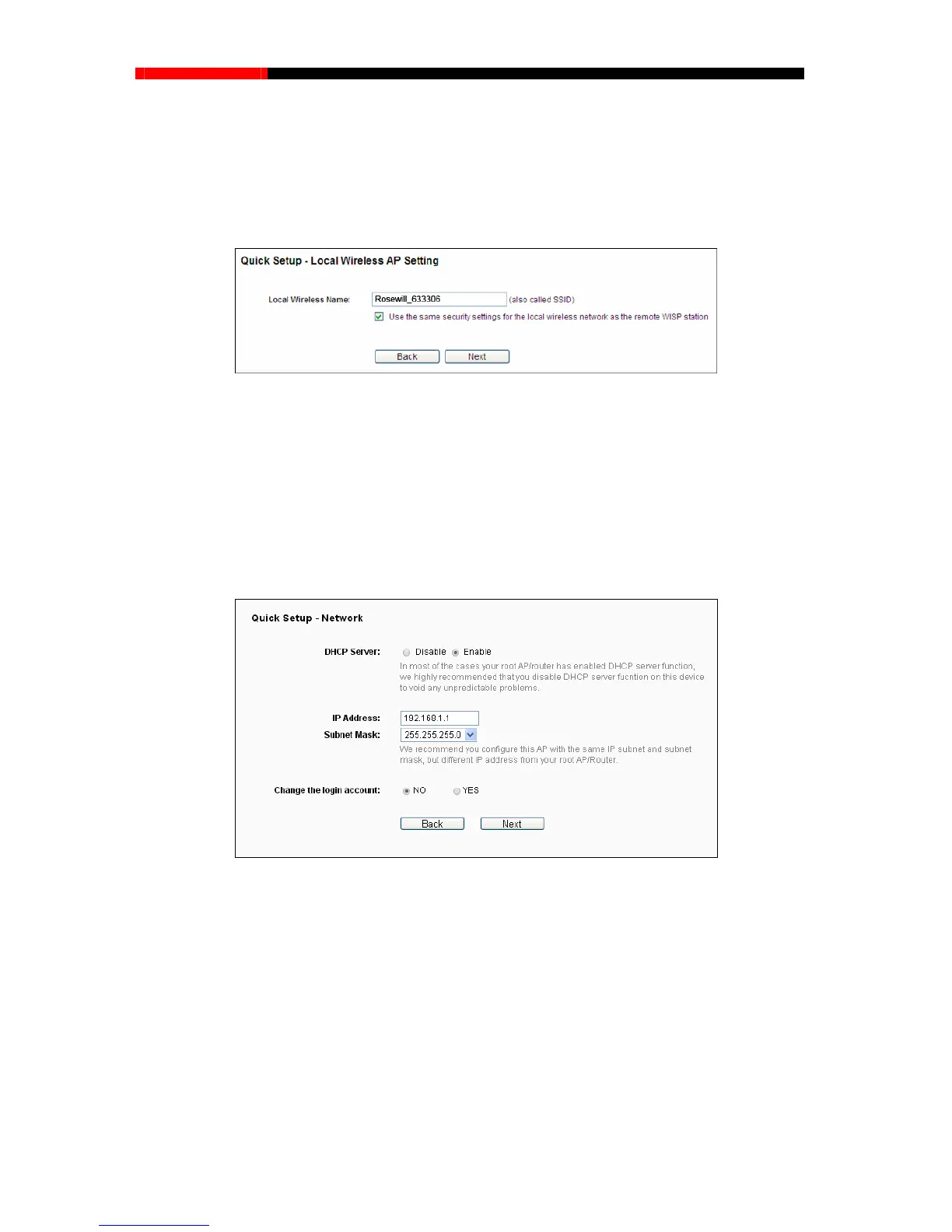
2. The Local Wireless AP Setting page will appear as shown in Figure 3-30. Please confirm
Local Wirele
ss AP Setting, and then click Next.
Figure 3-30 Local Wireless AP Setting
Local Wireless Name - Enter a string of up to 32 characters. The same Name (SSID) must
be assigned to all wireless devices in your network. The default SSID is set to be Rosewill
_xxxxxx(xxxxxx indicates the last unique six characters of each Device's MAC address),
which can ensure your wireless network security. But it is recommended strongly that you
change your networks name (SSID) to a different value. This value is case-sensitive. For
example, MYSSID is NOT the same as MySsid.
3. You will see the Network page as shown in Figure 3-31. Please configure the IP parameters of
LAN on this
page, and then click Next.
Figure 3-31 Quick Setup – Network
DHCP Server - Enable or Disable the server. If you disable the Server, you must have
another DHCP server within your network or else you must configure the IP address of the
computer manually.
IP Address - Enter the IP address of your system in dotted-decimal notation (factory default:
192.168.1.1).
Subnet Mask - An address code that determines the size of the network. Normally
255.255.255.0 is used as the subnet mask.
- 26 -



 To Next Page