Wireless Router RNX-N150RT User Manual
Connect Manually - You can configure the router to make it connect or disconnect manually.
After a specified period of inactivity (Max Idle Time), the router will disconnect from your
Internet connection, and you will not be able to re-establish your connection automatically as
soon as you attempt to access the Internet again. To use this option, check the radio button. If
you want your Internet connection to remain active at all times, enter "0" in the Max Idle Time
field. Otherwise, enter the number of minutes that you wish to have the Internet connecting
last unless a new link is requested.
Note:
Sometimes the connection cannot be disconnected although you specify a time to Max Idle Time,
because some applications are visiting the Internet continually in the background.
Click the Save button to save your settings.
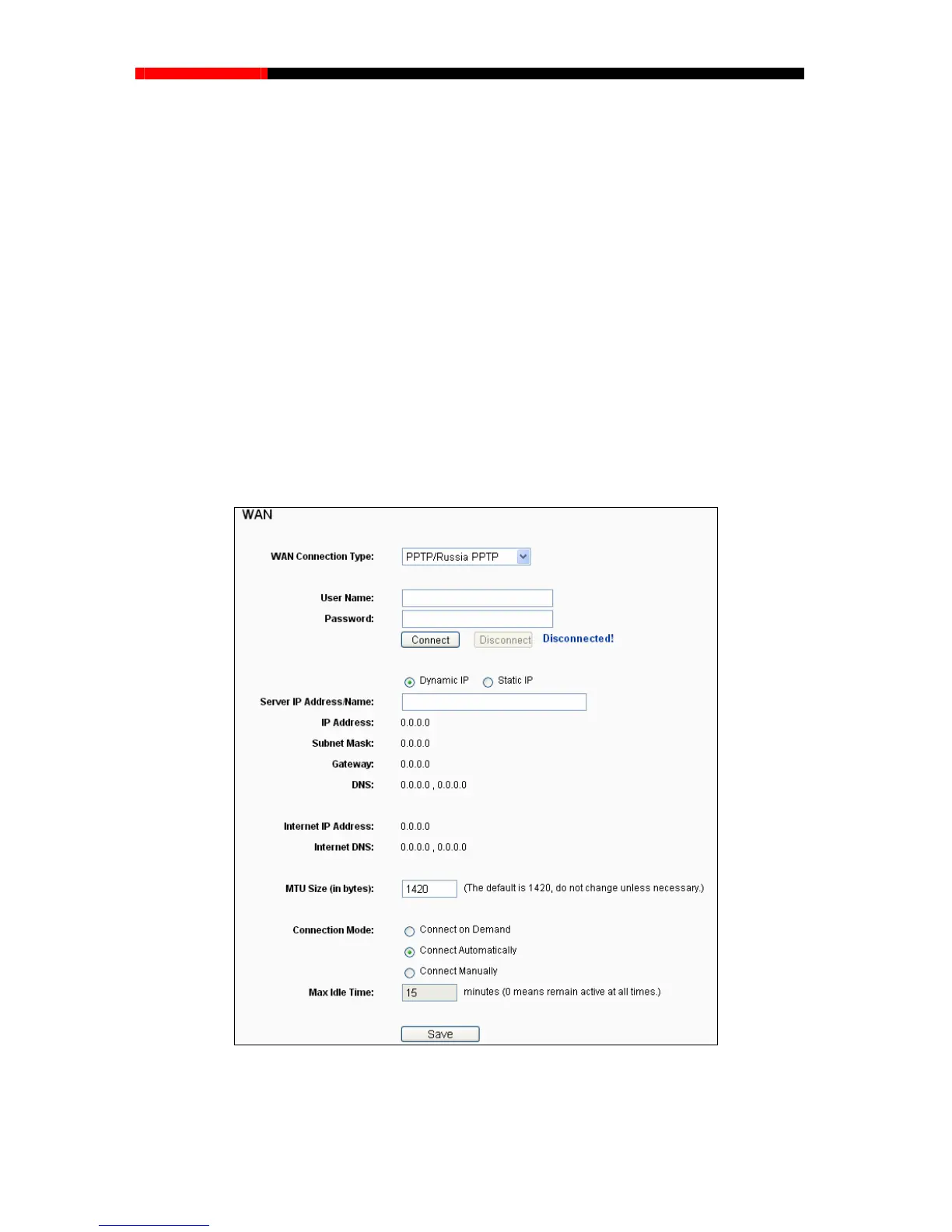
6. If your ISP provides PPTP connection, please select PPTP option. And you should enter the
following parameters (Figure 4-15):
Figure 4-15 PPTP Settings
User Name/Password -Enter the User Name and Password provided by your ISP. These
fields are case-sensitive.
- 44 -



 To Next Page