Wireless Router RNX-N150RT User Manual
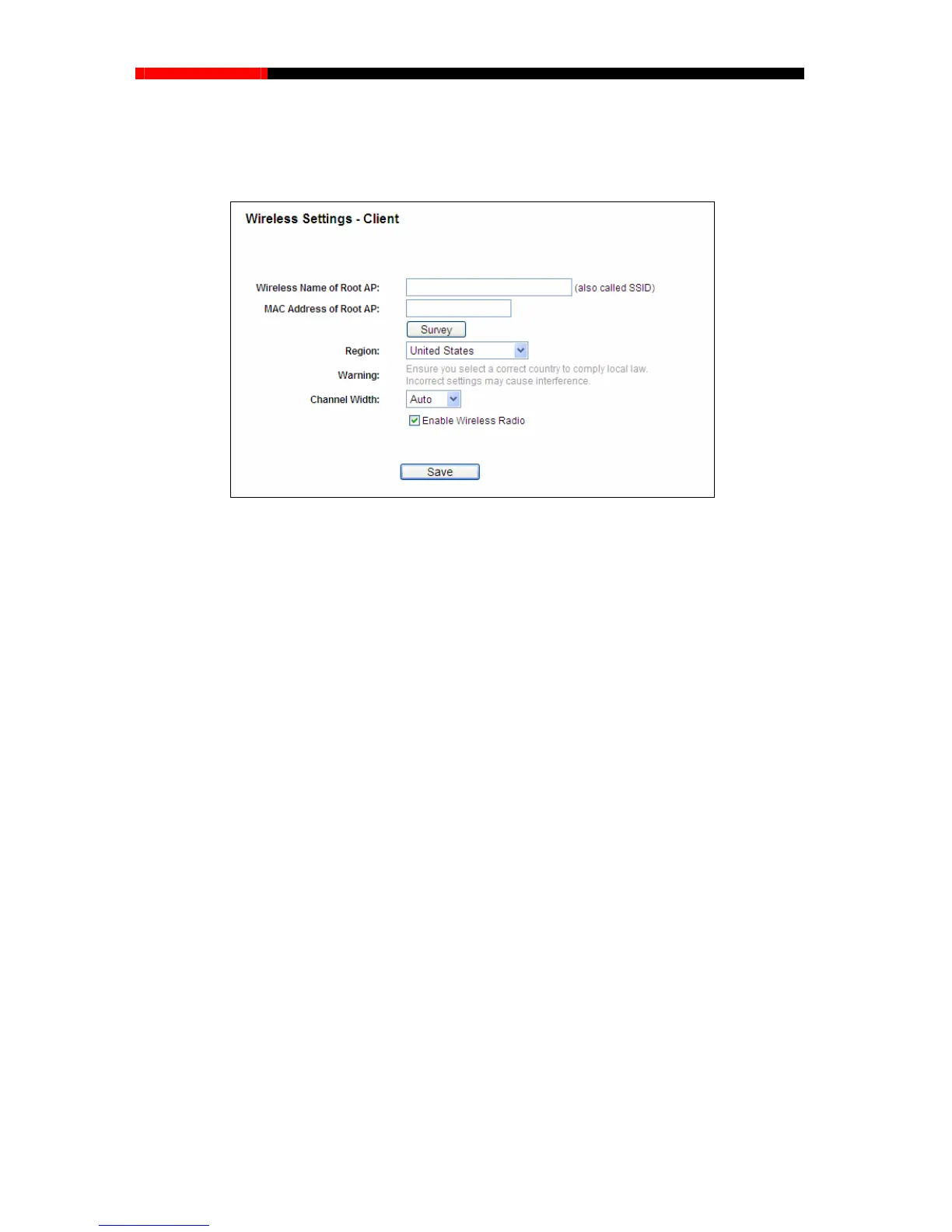
mode in Figure 3-6 or Client mode in Figure 4-3, the Wireless Settings page
4.7.1.6. Wireless Settings in Client Mode
If y
ou select Client
will display as Figure 4-26.
Figure 4-26 Wireless Settings
Wireless Name of Root AP (SSID) - The Wireless Name of the AP your router is going to
connect to as a client. You can also use the survey function to select the SSID to join.
MAC Address of Root AP (BSSID) - The MAC Address of the AP your router is going to
connect to as a client. You can also use the survey function to select the BSSID to join.
Region - Select your region from the pull-down list. This field specifies the region where the
wireless function of the router can be used. It may be illegal to use the wireless function of
the router in a region other than one of those specified in this filed. If your country or region is
not listed, please contact your local government agency for assistance.
Channel Width - The bandwidth of the wireless channel.
Enable Wireless Radio - The wireless radio of the router can be enabled or disabled to
allow wireless stations access. If enabled, the wireless stations will be able to access the
router; otherwise, wireless stations will not be able to access the router.
Be sure to click the Save button to save your settings on this page.
Note:
1. The operating distance or rang varies significantly based on the e of your wireless connection
physical placement of the router. For best results, place your router.
Near the center of the area in which your wireless stations will operate.
In an elevated location such as a high shelf.
- 61 -



 To Next Page