Wireless Router RNX-N150RT User Manual
pported b
y the router).
The status of this entry, either Enabled or Disabled.
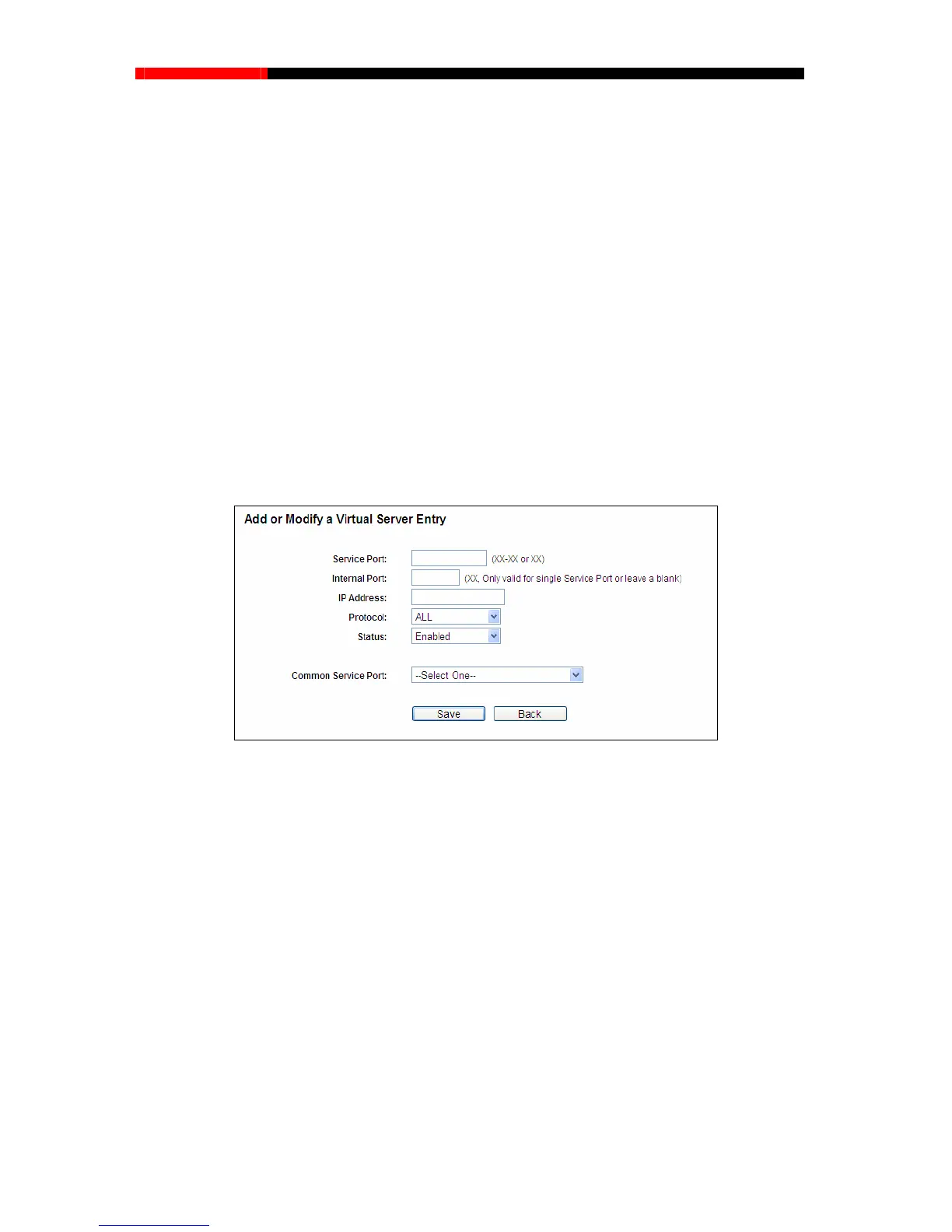
s shown in Figure 4-43.
you want to use from the Common Service Port list. If the Common
rotocol used for this application, either TCP, UDP, or All.
5. Select the Enable to enable the virtual server.
6. Click the Save button.
Protocol - The protocol used for this application, either TCP, UDP, or All (all protocols
su
Status -
To setup a virtual server entry:
1. Click the Add New… button, the next screen will pop-up a
2. Select the service port
Service Port list does not have the service that you want to use, type the service port
number or service port range in the Service Port box. For single Service Port, please enter a
specific port number in Internal Port box.
3. Type the IP Address of the computer in the IP Address box.
4. Select the p
Figure 4-43 Add or Modify a Virtual Server Entry
Note:
If your computer or server has more than one type of available service, please select another
service, and enter the same IP
Address for that computer or server.
ng entry:
Click the Enable/Disable All button to make all entries enabled/disabled.
To modify or delete an existi
1. Click the Modify in the entry you want to modify. If you want to delete the entry, click the
Delete.
2. Modify the information.
3. Click the Save button.
Click the Delete All button to delete all entries.
- 73 -



 To Next Page