Wireless Router RNX-N150RT User Manual
sting schedule.
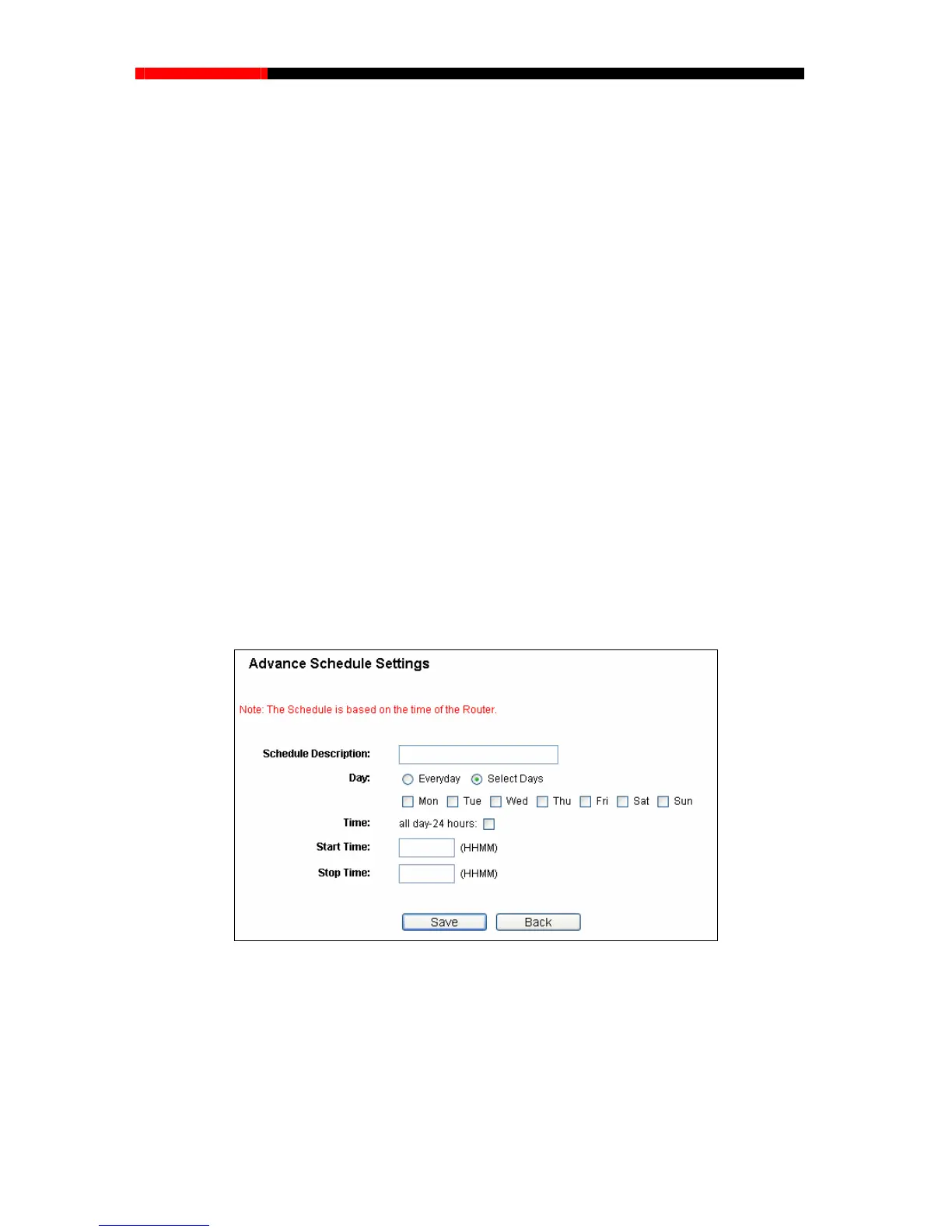
1. Click Add New... button shown in Figure 4-65and the next screen will pop-up as shown in
Figure 4-66.
2. In Schedule Description field,
create a unique description for the schedule (e.g.
Schedule_1).
u need.
day-24 hours or you may enter the Start Time and Stop Time
in the corresponding field.
5. Click Save to complete the settings.
Click the Delete All button to delete all the entries in the table.
Schedule Description- Here displays the description of the schedule and this description is
unique.
Day - Here displays the day(s) in a week.
Time - Here displays the time period in a day.
Modify- Here you can edit or delete an exi
To add a new schedule, follow the steps below.
3. In Day field, select the day or days yo
4. In Time field, you can select all
Click the Next button to go to the next page, or click the Previous button return to the previous
page.
Figure ttings
to restrict the internet activities of host with MAC address
00-11-22-33-44-AA to access www.google.com only from 18:00 to 20:00 on Saturday and
1. Click Add New... button shown in Figure 4-65 to enter the Advanced Schedule Settings
page.
4-66 Advanced Schedule Se
For example: If you desire
Sunday, you should first follow the settings below:
- 92 -



 To Next Page