BRP-Rotax
MAINTENANCE MANUAL LINE
INSTALLING NEW OIL FILTER
Procedure To mount the oil filter the following steps are necessary:
Step
Procedure
1
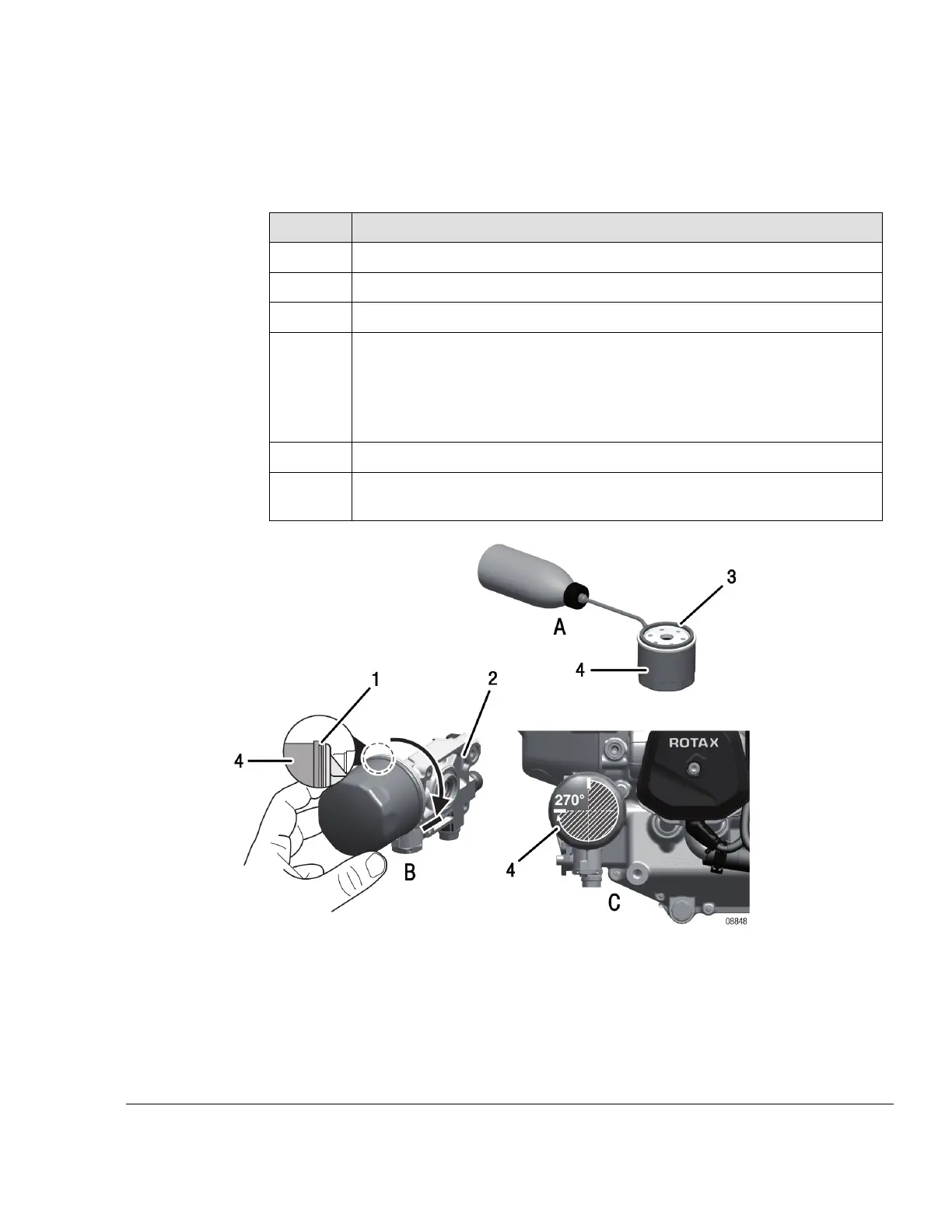
Clean the contact surface (1) of the oil pump housing (2) with a clean cloth.
2 Apply thin film engine oil on the gasket (3) of the oil filter (4).
3
Install the oil filter on the engine.
4
Screw on oil filter until oil filter gasket is seated solidly.
NOTE
Mark 270° - check mark on oil pump housing to control tightening of
oil filter.
5
Tighten oil filter with 3/4 turn (270°).
6
Inspection of the used oil filter.
See Chapter 12-20-00 section Inspection of the filter insert.
Figure 7.23: Install oil filter
1 Contact surface 2
Oil pump housing
3 Gasket 4 Oil filter
Effectivity: 912 i Series
Edition 2/Rev. 0
12–20–00
Page 39
September 01/2018



 To Next Page
 Loading...