Section 4 Control Denitions H85A Manual
www.rottlermfg.com
4-8
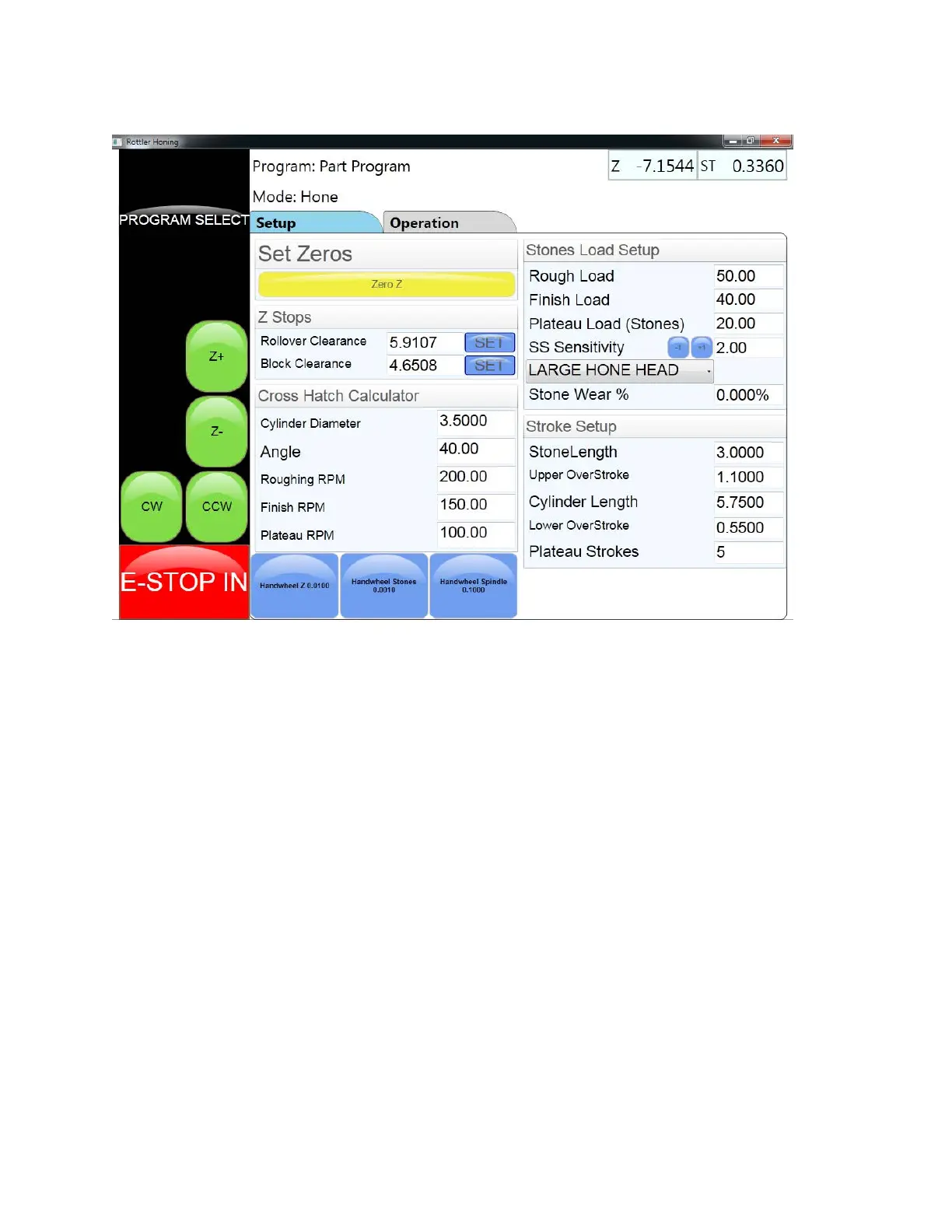
Operation Screen: Setup Tab
Set Zeros Buttons
These button will set the zero point for each axis that is indicated on the button. When touched a
conformation pop up screen will appear to conrm that the operator wants to set the zero point.
Z Stops
This section is where the clearance height for the hone head is set. A value can be entered by touching
the value box and keying in the value on the pop up number pad. Or the hone head can be moved to the
desired location using the Z Axis jog button or handwheel. When the hone head is in the desired position
the operator can touch the set button to enter the value that is in the value box.
Cross Hatch Calculator
This section is where the operator will enter values into the appropriate boxes to set up the auto cross
hatch function. After the values have been entered the operator will press the Calc button to determine
the proper RPM to achieve the desired cross hatch angle.
Stones Load Setup
This is the section where the operator will enter the desired running loads for different processes. Values
are entered by touching the proper value box and entering the desired value on the number pad that
appears. The operator will also indicate which hone head will be used for the job.
Stroke Setup
This is the section where the operator will enter information to determine how far the spindle will travel
while it is stroking up and down. The bottom value box is where the number of strokes to be used in the
plateau mode is entered.



 To Next Page