MCA-C3 Test Procedure
Page 40 of 77
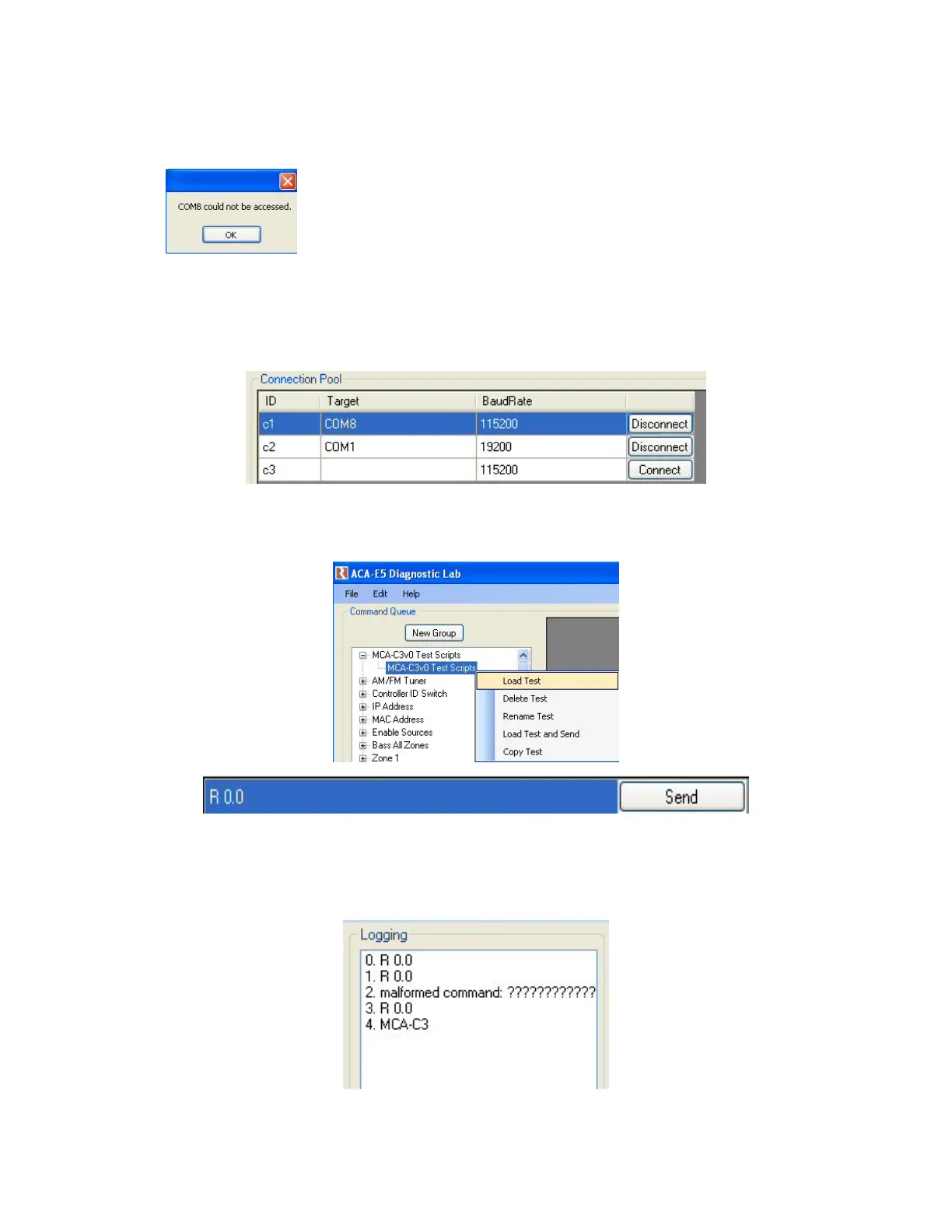
4. Click the “Connect” button next to the C1 and C2 Rows in the
“Connection Pool” of RVCLIScripter.
If you see this dialog for the C1 row click the “OK” button,
Unplug the USB Cable from the MCA-C3 and wait three seconds and
Plug the USB cable back into the MCA-C3 and click the “connect” button.
5. C1 and C2 will connect and display “Disconnect” in the button.
C3 is not connected and will display “Connect” in the button.
6. “Expand” and “left” click once “MCA-C3v* Test Scripts”.
You will see the Command and send button below in the grey window.
7. Click the “Send” button several times until the “Logging” window displays
“MCA-C3” at least one time.
Note: The USB Port of the MCA-C3 has connected properly for testing.



 To Next Page