7
Russound MCA-C3 User and Installation Manual
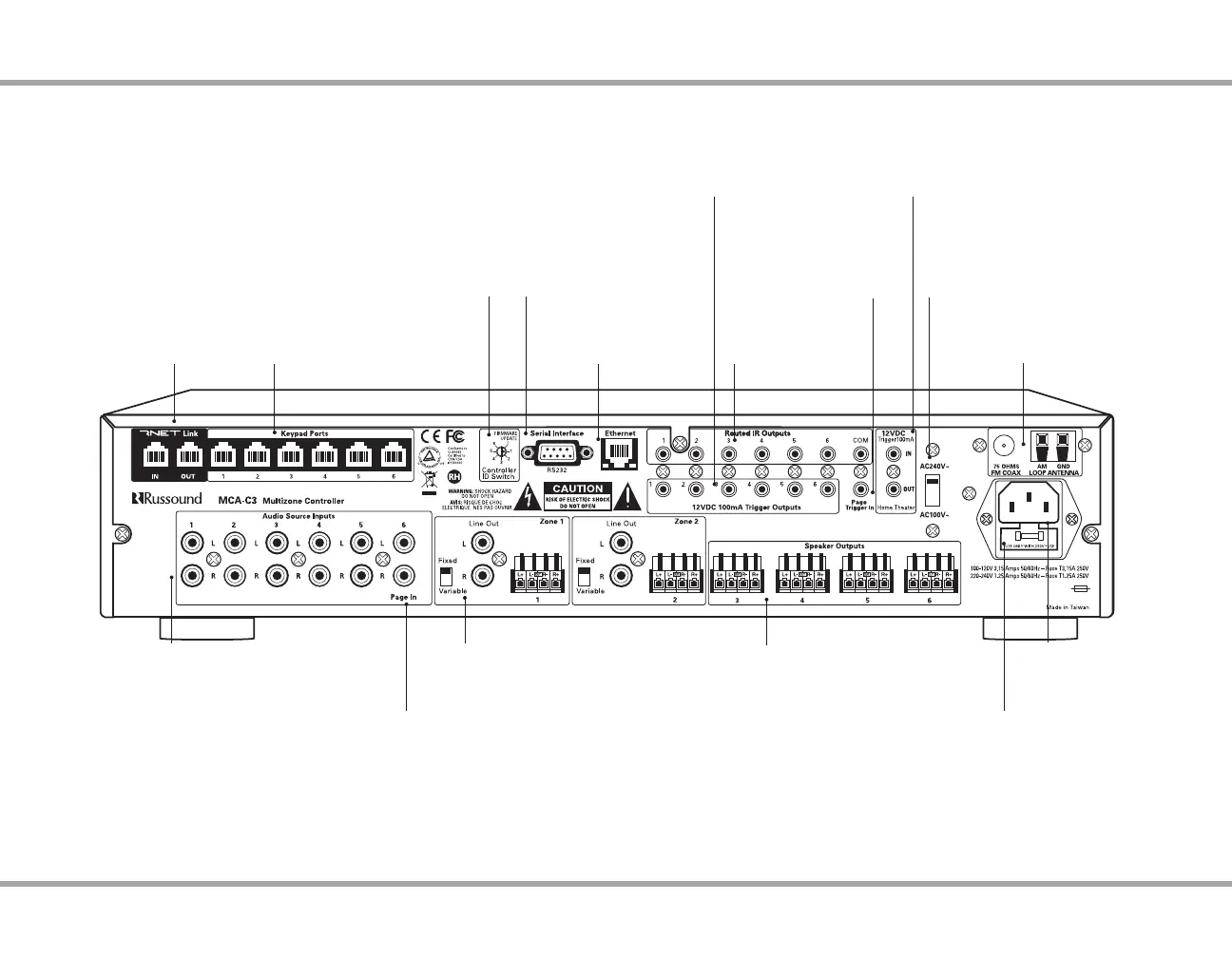
CONTROLLER REAR PANEL
Rear Panel
RNET Link - Links
multiple controllers
and RNET sources
Audio Source Connections
Signal sensing stereo line
level inputs
IR Outputs
6 routed, 1 common
Serial Interface
RS232 port for rmware
updates and communication
Keypad Ports - RJ45
Connections for zone keypads
Zone 12V Triggers
12VDC 100ma outputs ready when
corresponding zone is active
Page 12VDC Trigger
Accepts paging
device input
Home Theater 12 VDC Trigger
Activates source power management
when sharing sources with home theater
AC 120/240V Input
Detachable grounded
power cord connection
Controller ID Switch
Set ID for multiple controller
congurations or rmware updates
AC Voltage Switch
Select appropriate voltage
AM/FM Antenna
Antenna connections for
internal tuner
Line Level Outputs
Can be set Fixed or Variable for zones 1
and 2 (always Hot when set to Fixed)
Speaker Outputs - Connect
8 Ohm speakers for each of
the zones
Ethernet Port
For programming
and control
Fuse Holder
Holds replaceable fuse for
AC input connection
Page Audio In
Source 6 congurable as paging
audio input (right channel only)



 To Next Page