137
Member of Exel group
DRT582165110
A - 2023/03
6.4. Replacement
The following maintenance operations must be performed in the workshop.
6.4.1. Starting up the EtherCAT bus
6.4.1.1. Introduction
The main network of the machine is the EtherCAT protocol. It is essential because it allows the inter-card
communication and especially the control of the valves.
Therefore, it is important to check that the recorded bus configuration is correct.
6.4.1.2. Configuration screen
• Step 1:
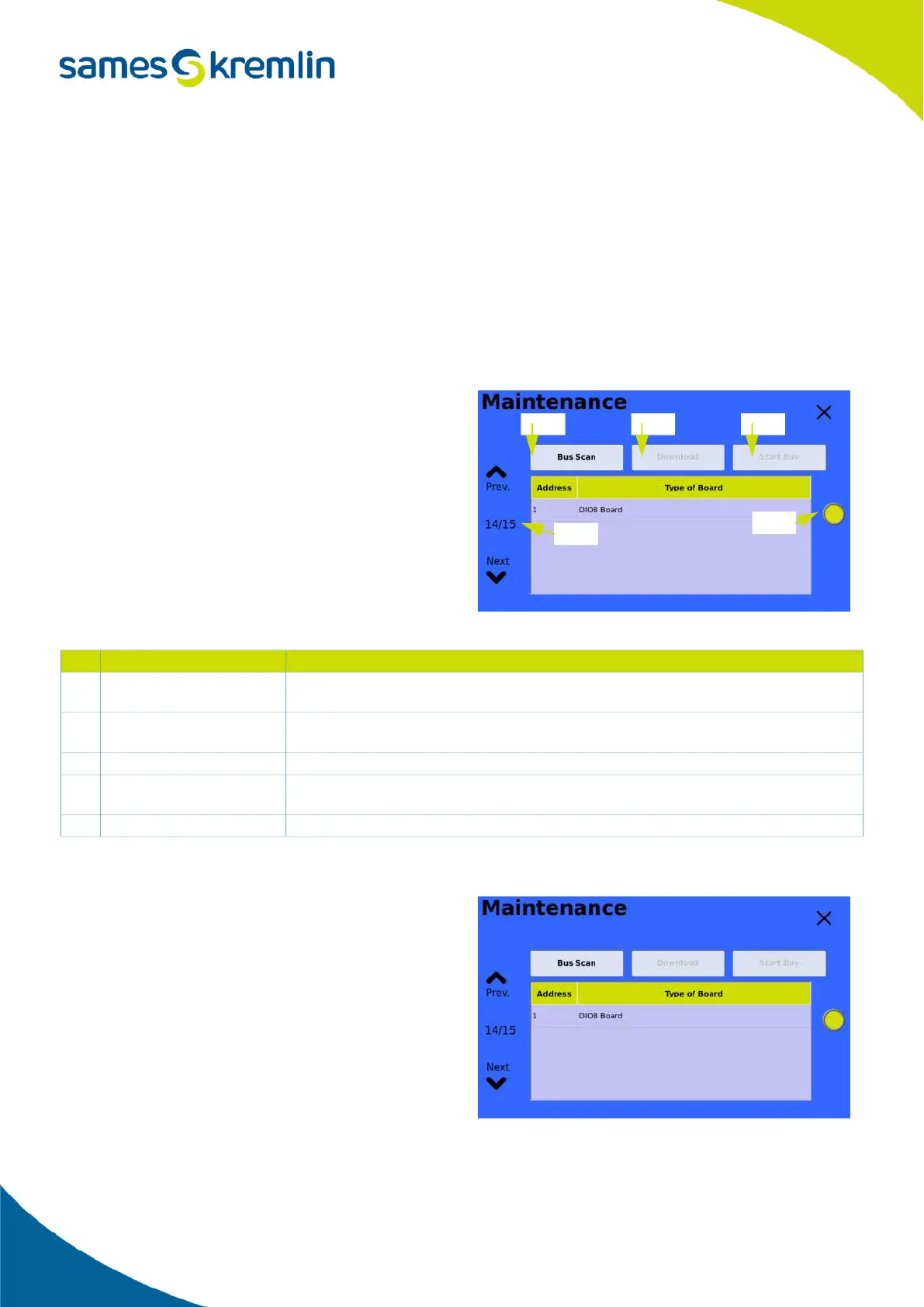
The bus is configured in the Maintenance menu
page 14.
6.4.1.3. Topology change (add/remove)
• Step 1:
For example, if the topology of the machine
contained only one card: DIOB, here is the screen
that would be visible in maintenance (opposite).
# LED status Description
1 Bus status
Red, when the bus is not started.
Green, when the bus is started. The machine can go to produce.
2 List of the cards
The list shows all the duaghter cards that are saved in the configuration.
After a scan (3), the list shows all the cards that are detected on the machine.
3 SCAN button Pressing the button starts a network scan (detection of branch cards).
4 Download This button allows you to save and load the topology (configuration) present at the
screen.
5 Start This button is used to restart the bus after its configuration.
4
15
2
3


 To Next Page