74
Member of Exel group
DRT582165110
A - 2023/03
2.5.12. Manage consumption
The Cyclomix
®
Evo records the volumes of all products flowing through the flowmeters.
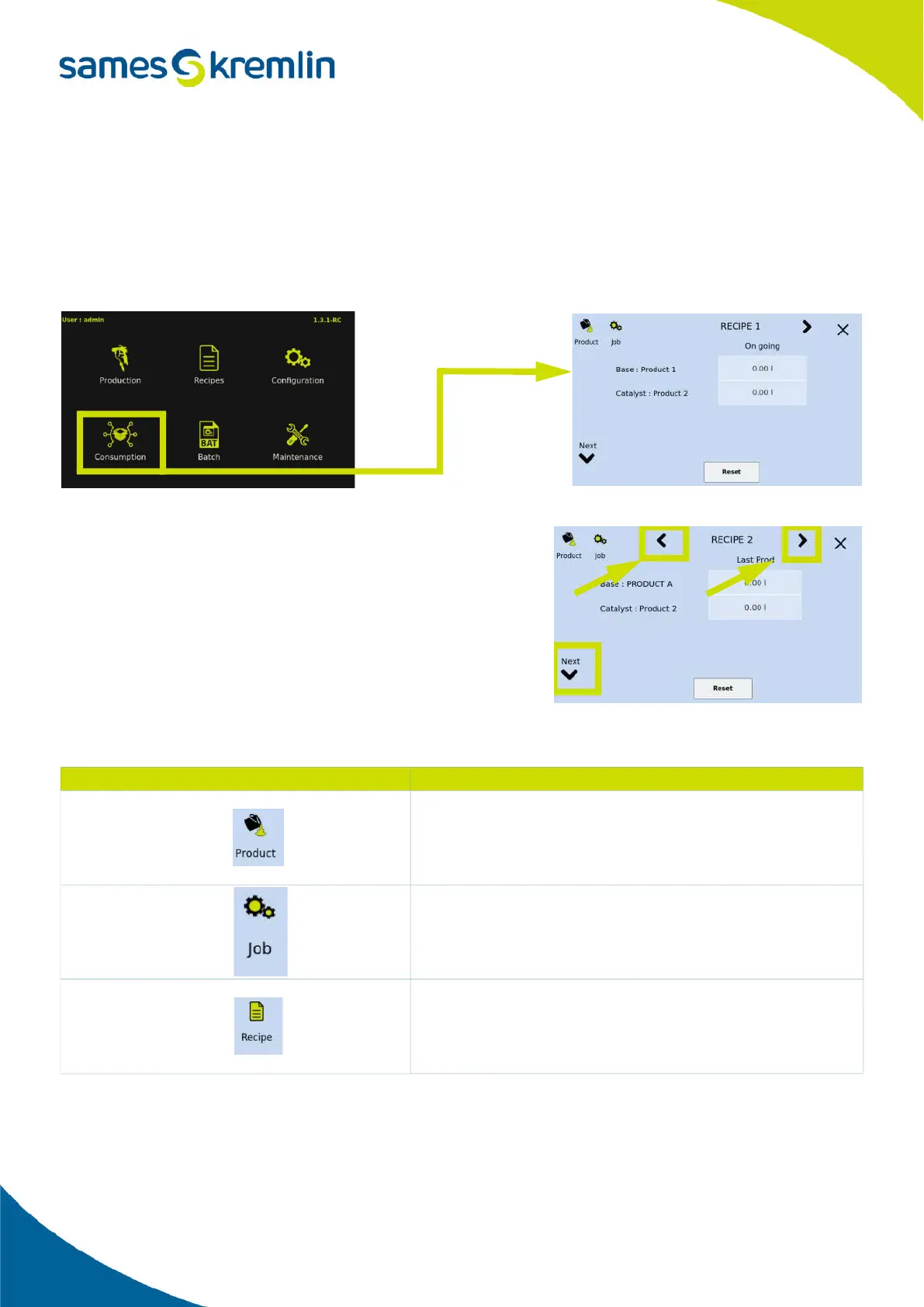
All volumes are divided into 3 categories: volumes by product, volumes by recipe and volumes by lot number.
The access to the consumptions is done from the main menu.
When opening this menu, the interface displays the consumption volumes by recipe.
Navigation in the different records.
A system of arrows allows you to navigate through the different
screens. The right and left arrows located on the top of the screen
allow you to navigate between the recipes and the up and down
arrows located on the left of the screen allow you to navigate
between the different products.
2.5.12.1. Different consumption display modes
The Cyclomix
®
Evo allows the display of consumption by recipe, by
product or by batch number (or production order). You can switch from one mode to the other using the icons located
on the top left of the screen.
Visual
Explanation
This icon gives access to the consumption per product.
That is to say, the volume spent in the machine for each product.
As a product can be used in different recipes, in this menu it is pos-
sible to see the total volume of this product.
This icon gives access to the consumption by batch number.
This allows you to know the total volume of paint deposited on a
batch of parts
This icon allows you to access the consumption by recipe and thus
see for each recipe the volume of each product and the COV.


 To Next Page