77
Member of Exel group
DRT582165110
A - 2023/03
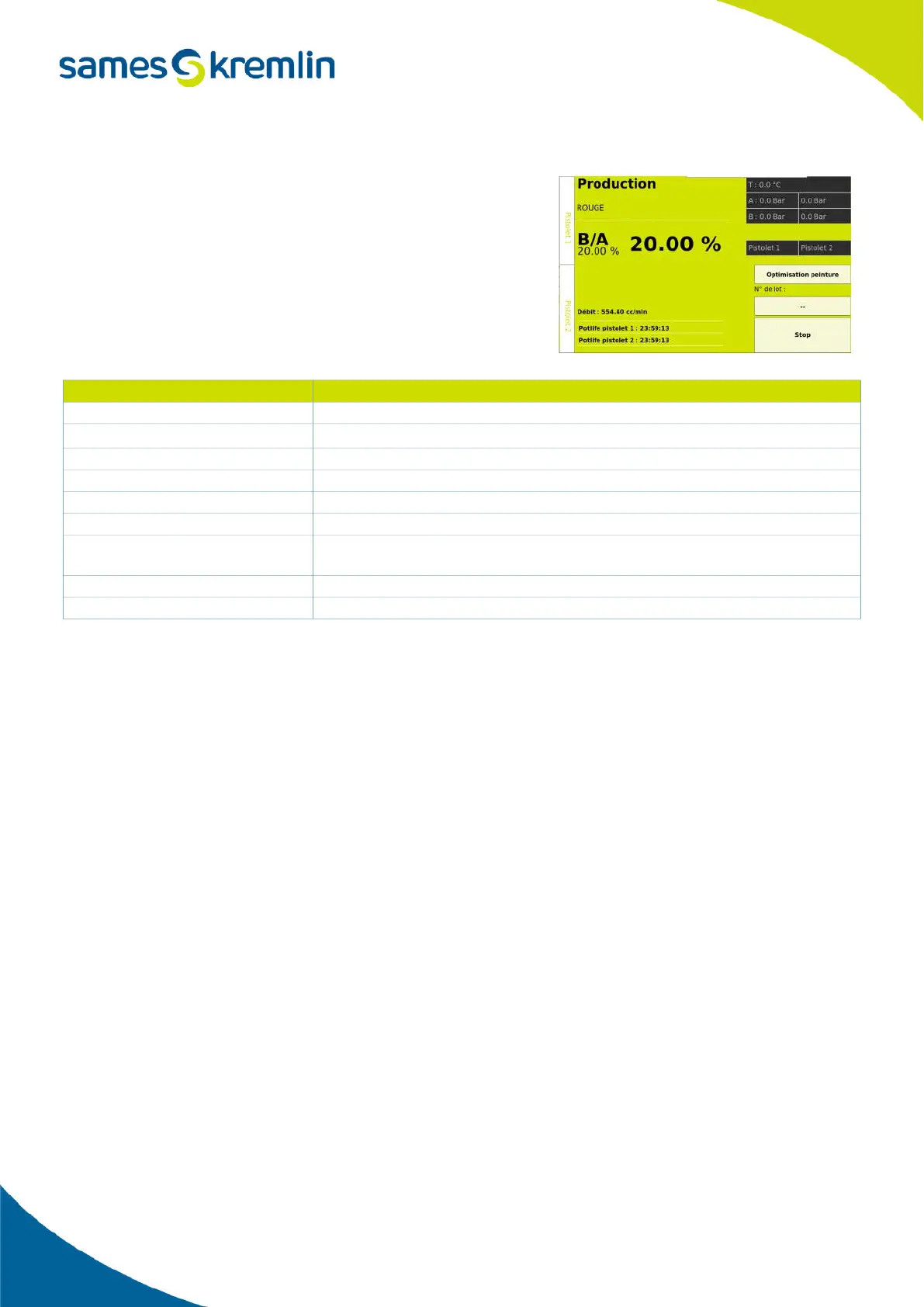
2.5.13.2. Production screen
The production screen contains a number of production-related
information.
2.5.14. Paint optimization function
In order to avoid throwing away the volume of paint contained in the hoses at the end of production, the Cyclomix®
Evo is equipped with the Paint Optimization function which allows the paint to be pushed with solvent while
maintaining the atomization air and high voltage activated.
2.5.14.1. Set the usable volume
The Paint Optimization function is activated from screen 3 of the configuration menu by selecting the corresponding
check mark.
Once the check mark is selected, it is possible to enter the percentage of the pipe volume that can be used by the
Paint Optimization function.
This volume corresponds to the volume of the hose between the mixer and the gun in the case of a 1-gun
configuration and to the volume of the hose between the 2-gun management block and the gun in the case of a 2-
gun configuration.
En sélectionnant la clef située à côté de la case volume, on peut alors choisir le mode d'activation de la fonction.
This can be done either from the HMI, or via a box connected to a digital input or via the remote box if this one is
present.
Reference points Designation
1 Indicates the name of the current recipe
2
Bar graph indicating the evolution of the Potlife per gun
3 Indicates the ratio requested in the recipe
4 Indicates the actual ratio during production
5 Indicates the total flow delivered by the machine
6 Indicates the Potlife count per gun
7
Indicates pressure and temperature information - value mentioned in the recipe on
the left and actual value on the right (if sensor present)
8 Indicator showing the gun(s) used in the recipe.
9 Button to stop the current production to return to the recipe selection screen.


 To Next Page