73
Member of Exel group
DRT582165110
A - 2023/03
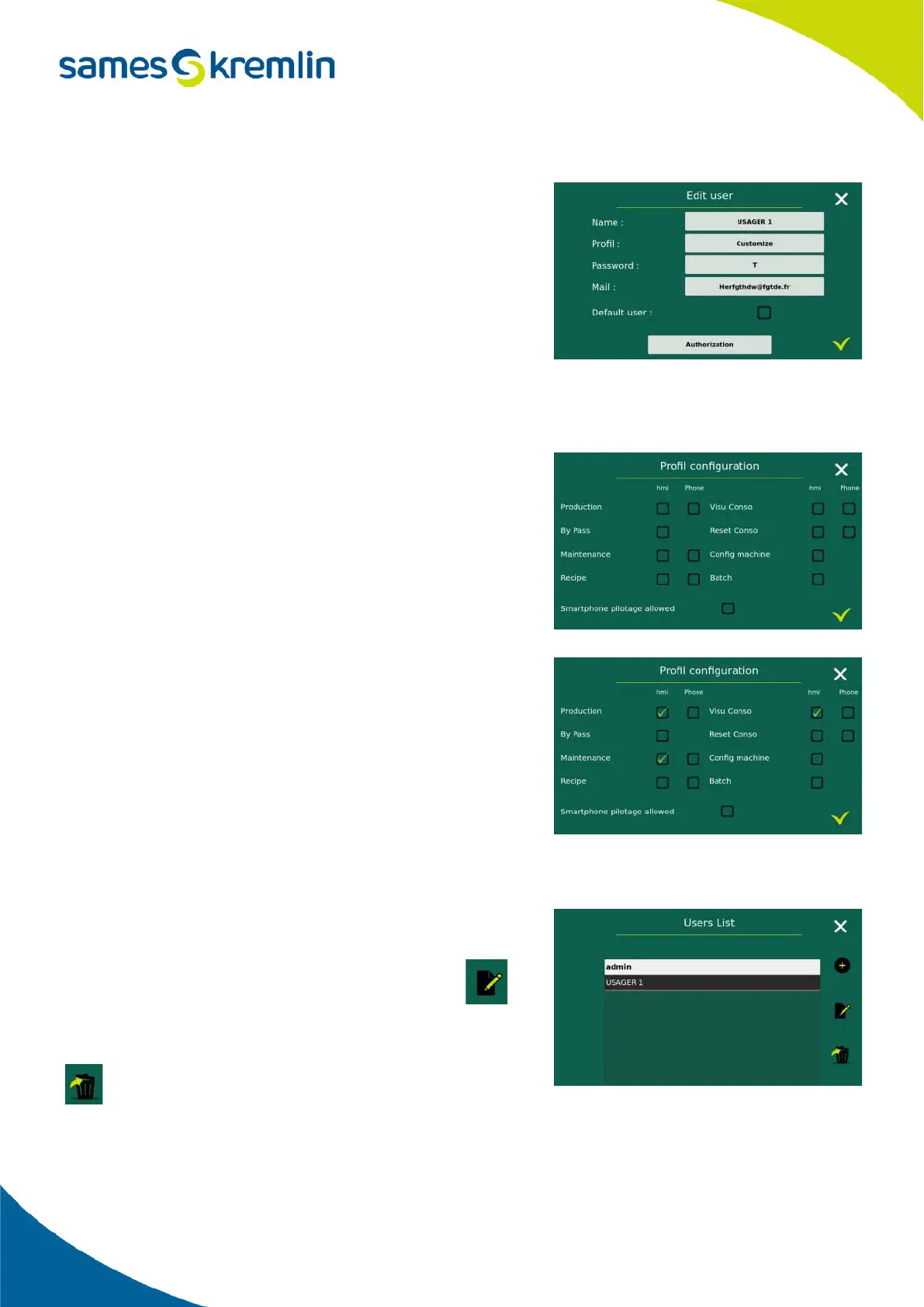
The default user is the user who will be automatically connected when the Cyclomix
®
Evo is started or when another
user is disconnected.
When the custom profile is defined then an Access Rights button
appears at the bottom of the screen.
This Access Rights button takes you to a new screen to define specific
user rights.
It is possible to define different rights for the HMI screens directly on
the box and the screens of the smartphone application.
If the boxes are not checked then it means that the user will not have
access to them.
In particular, it is possible to grant or not the right for a user to perform a bypass during the priming or flushing phases.
It is also possible to allow a user to visualize the consumptions but
without allowing the reset of the different volumes
2.5.11.3. Modify or delete a user
Just like creating a user, modifying or deleting a user can only be done by an administrator.
These 2 actions are performed from the User List screen.
After selecting the user concerned, simply select the icon
or to make a change to the user profile
or to delete a user.


 To Next Page