72
Member of Exel group
DRT582165110
A - 2023/03
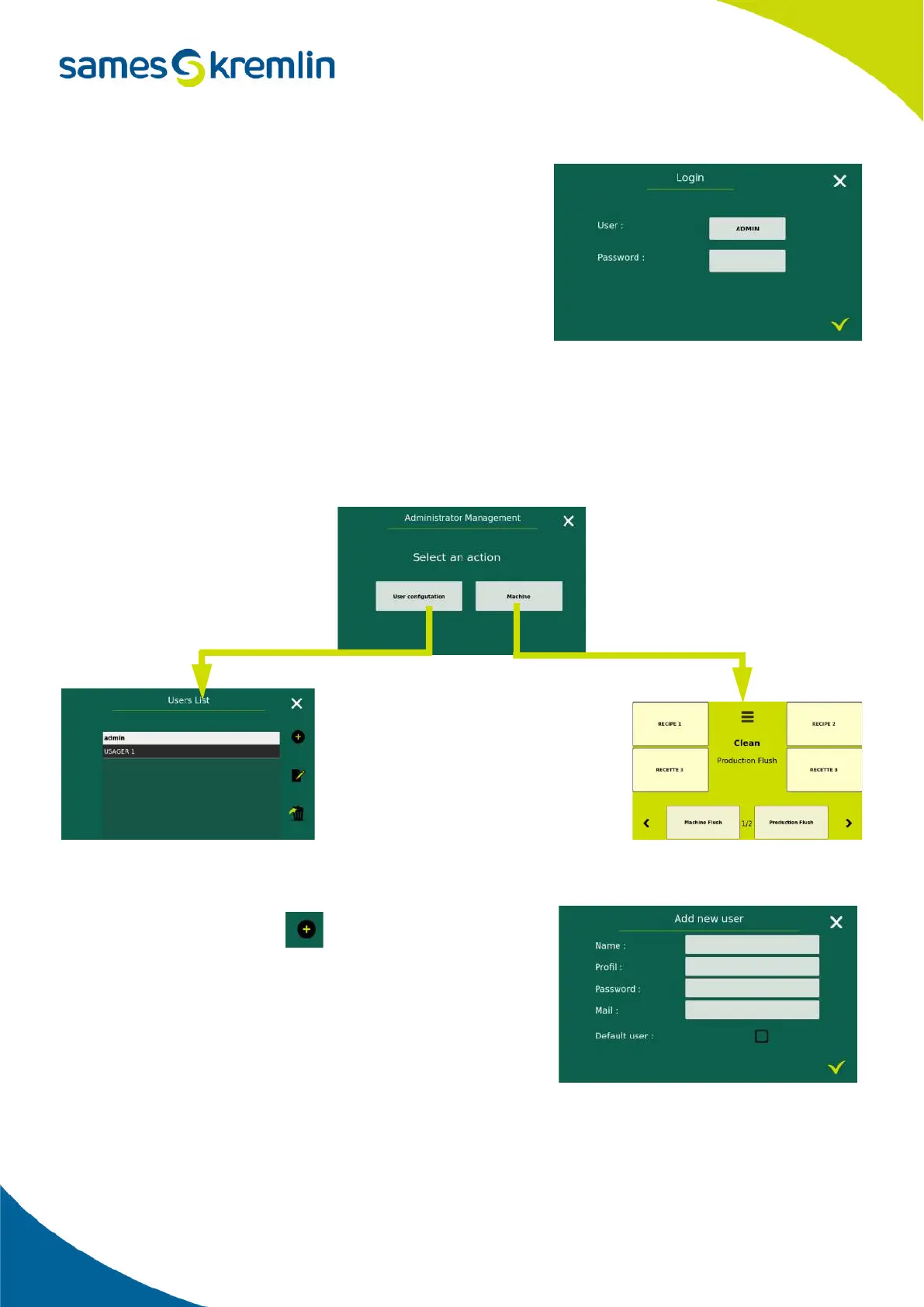
On this screen, it is possible either to disconnect the current user or to
connect a new user.
To do this, enter the user name and the associated password.
If the user has a ''personalized'' profile then after validation of his information the menu screen will appear and the
menus where the user cannot access will be grayed out.
If the user has an "administrator" profile, then after validation of his or her information, a screen will appear where the
user can either go to the user management pages or return to the main menu where he or she can access the various
menus of the Cyclomix
®
Evo.
2.5.11.2. Create a user
Only an administrator can create a user.
A user is created using the icon on the User List screen.
A first screen is displayed allowing you to fill in the main information
such as the name of the user and the profile of the user (administrator
or personalized).
Then the 2 following fields are optional, they are the email address
and the password. If there is no password, it means that it will be
enough to enter the name of the user on the access screen, the
security of the connection of this user is thus limited.
Finally a check mark allows you to define if this user is considered as the default user.


 To Next Page