5 - 32 HS70A Service Manual
User Interface Part
Control Panel
▐ Main Functions
The Control Panel serves as the interface between the user and the system.
Key Matrix Board, Touch Panel, Alpha-Numeric Keyboard, and Track Ball serve as User
Interface.
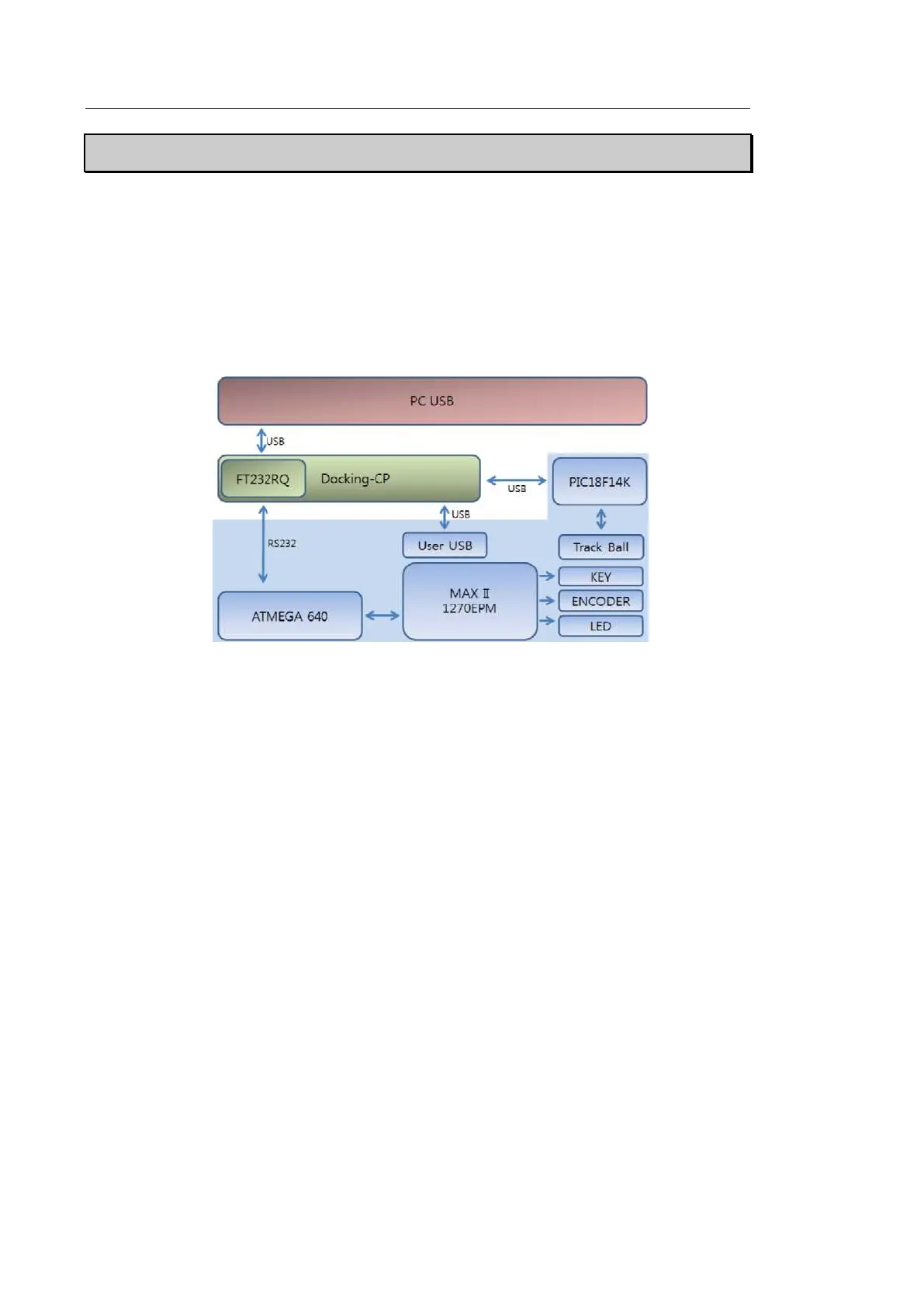
[Figure 5.16 Control Panel Block Diagram]
▐ Specification
• Docking Part - Supplies power and sends signals to CP Board (USB, reset, RS232).
• Input part - Consists of Switch, Encoder, and Trackball.
• Control part
1). ATMEGA640(8bit Microcontroller )
Processes input Data and relays it to Docking B/D.
2). MAX II EPM1270 (Altera CPLD)
- Touch Panel Backlight on/off Control
- LED outputs / Knob control
- Alpha Key, Trackball power on/off control
3). PIC18F14K50 (USB Mouse Controller)
- Track ball interface



 To Next Page