Chapter 10. Maintenance 10 - 3
Trackball
CAUTION
Make sure that liquids or other objects do not enter the system while
cleaning the trackball.
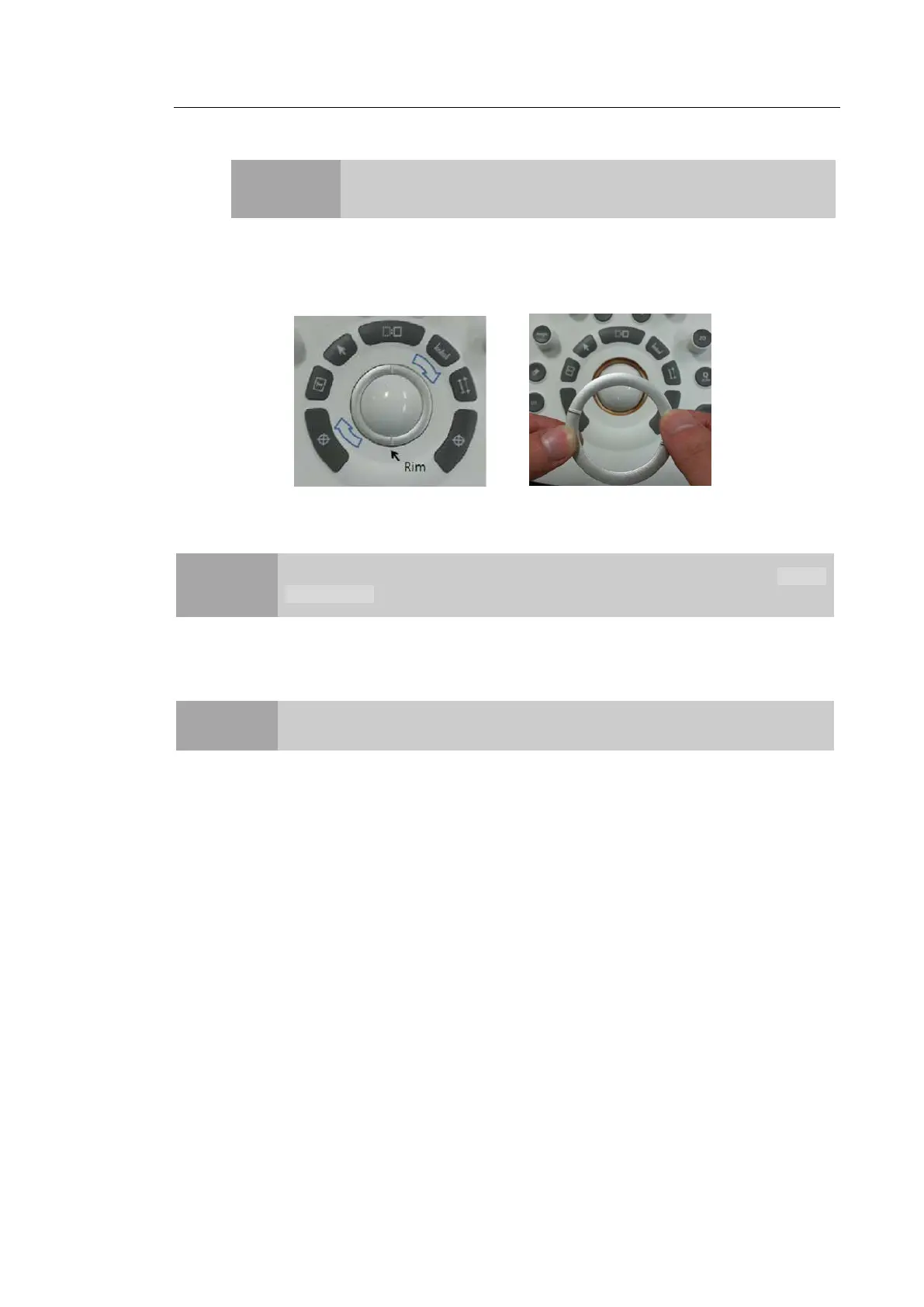
1. Turn the trackball rim counterclockwise to remove it from the control panel.
2. Wipe the trackball with a soft cloth and turn the trackball rim clockwise to reattach.
[Figure 10.1 Removing the trackball]
NOTE
For information on cleaning and disinfecting probes, please refer to HS70A
User Manual.
▐ Disinfecting
CAUTION
Use only recommended disinfectants on system surfaces.
For disinfecting the product, disinfectants certified through the FDA 510 (k) process are
recommended. For more information, please refer to 'Chapter 5. Probes' in the User Manual.
1. Turn off the system and disconnect the power cord from the wall outlet.
2. Mix the disinfectant solution that is compatible with your system to the solution strength
specified on the instruction label.
3. Wipe the system surfaces with the disinfectant solution, following the disinfectant’s
instructions for wipe durations, solution strength, and disinfectant contact duration.
4. Air dry or towel dry with a sterile cloth according to the instructions on the disinfectant’s
label.



 To Next Page