EasyManua.ls Logo

Santerno Sinus M - 5.5 Parameter setting; Frequency setting

Santerno Sinus M
219 pages
Print Icon
To Next Page IconTo Next Page
To Previous Page IconTo Previous Page
Loading...
5-8
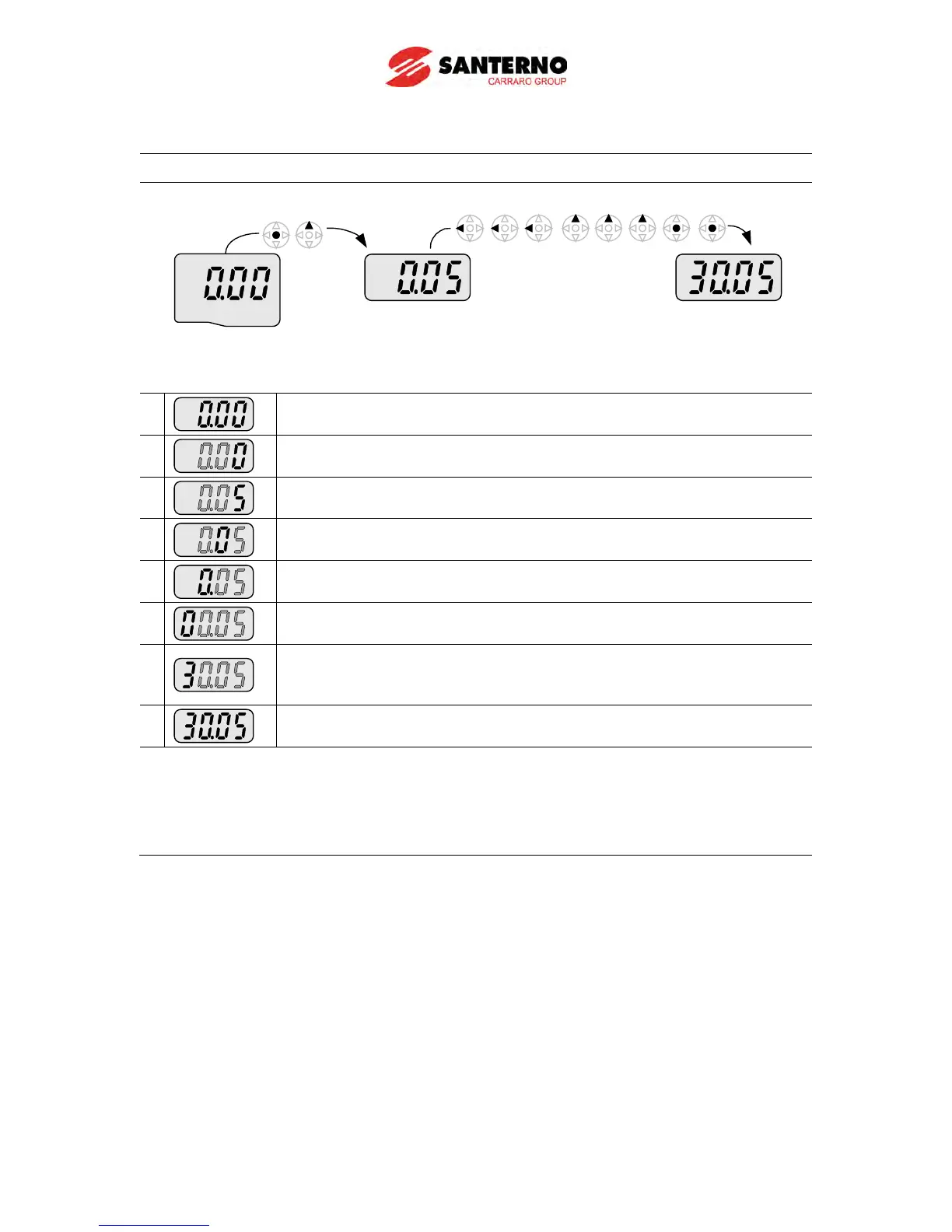
Frequency setting
When changing run frequency to 30.05 Hz in Drive group
Drive group
1
-. In “0.00”, press the Ent () key once.
2
-. The second decimal 0 becomes active.
-. Press the UP (
) key until 5 is displayed.
3
-. Press the Left () key once.
4
-. The first decimal 0 becomes active.
-. Press the Left (
) key once.
5
-. Press the Left () key once.
6
-. Set 3 using UP () key.
7
-. Press the Ent (
) key.
-. 30.05 is blinking.
-. Press the Ent (
) key.
8
-. 30.05 is entered into memory.
Sinus M display can be extended to 5 digits using left ()/right () keys.
Parameter setting is disabled when pressing other than Enter Key in step 7.

Table of Contents

Other manuals for Santerno Sinus M