5-9
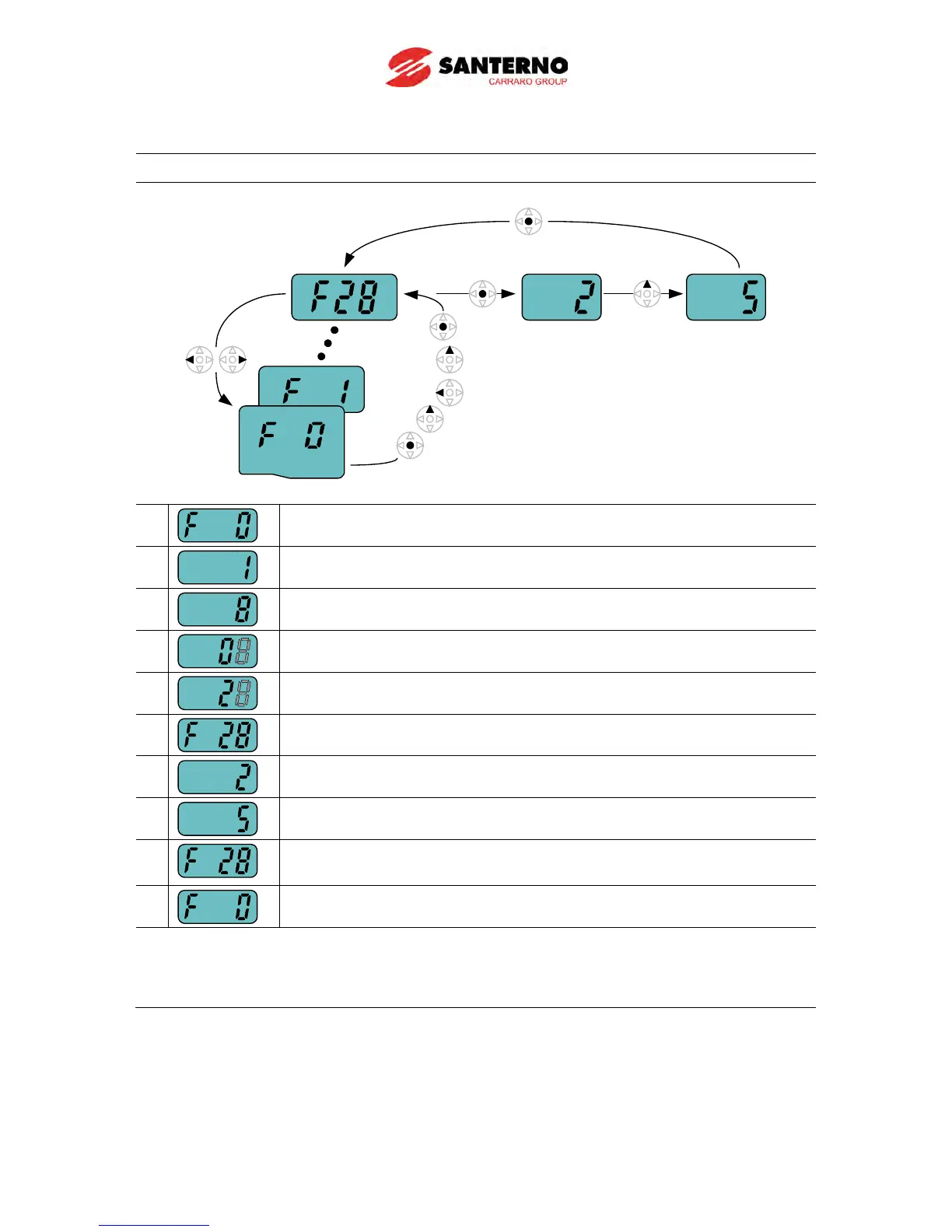
Changing parameter value in Input/Output group
When changing the parameter value of F28 from 2 to 5
-. In F0, press the Ent () key once.
2
-. Check the present code number.
-. Increase the value to 8 by pressing the Up (
-. When 8 is set, press the Left () key once.
4
-. 0 in 08 is active.
-. Increase the value to 2 by pressing the Up (
-. 28 is displayed
-. Press the Ent (
-. The parameter number F28 is displayed.
-. Press the Ent (
) key once to check the set value.
-. The preset value 2 is displayed.
-. Increase the value to 5 using UP key (
-. Press the Ent () key twice.
9
-. Parameter change is complete.
-. Press either the Left () or Right () key.
10
-. Moving to first code of Function group 1 is complete.
♣ The above setting is also applied to change parameter values in function group 2 and I/O
group.



 To Next Page