IPE100 indicator NU-IPE100-IO-USER-E-0212
17
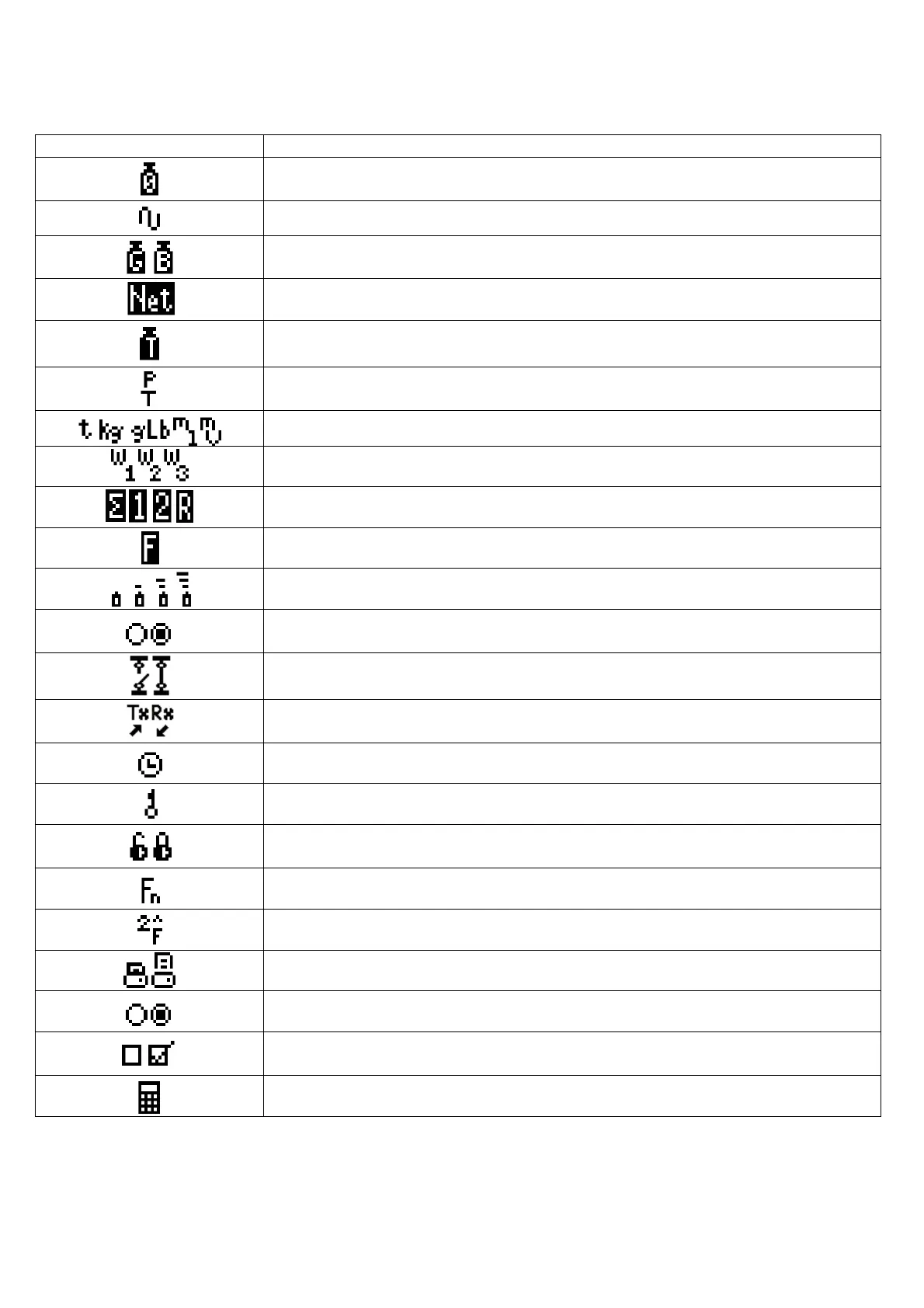
SYMBOLS SHOWN ON THE LCD DISPLAY
SYMBOL FUNCTION
The weight detected by the weighing system is near the zero, included within the interval
of –1/4 and +1/4 of the scale division.
The weight is unstable.
The displayed weight is a GROSS WEIGHT (depending on the software language).
The displayed weight is a NET WEIGHT.
A tare value has been acquired.
A manual tare value has been entered (preset tare).
Unit of measure in use: ton, kilogram, gram, pounds, millilitres, or millivolt.
Active measuring range (see section 8).
Active scale (see section 5).
Indicates that a specific function of the instrument is active.
Battery charge level: see section 5.2.1.
Status output, respectively non active and active. Icon viewable only with active
DIAGNOSTICS PERIPHERAL UNITS function, see section 15.5.
Status input, respectively non active and active. Icon viewable only with active
DIAGNOSTICS PERIPHERAL UNITS function, see section 15.5.
Serial communication status with external device. Icon viewable only with active
DIAGNOSTICS PERIPHERAL UNITS function, see section 15.5.
Active during the configuration of the date and time.
Locked keyboard, see section 4.3
In the HELP menu these respectively indicate whether a key is unlocked or locked in the
SETUP level (<< En.KEYS >> step, see section 4.4.)
The Fn key has been pressed.
The 2nd F key has been pressed.
Transmission of the data to the printer serial port under way.
Inside the step, these respectively indicate an unselected or selected parameter.
They indicate respectively if an element of archive is unselected or selected (see section
4.2.5).
Active calculator function, see section 15.1 CALCULATOR.



 To Next Page