IPE100 indicator NU-IPE100-IO-USER-E-0212
48
A.O.
OUT
IN
10.000 kg
SCALE 2
15.4.2 EXCLUSIVE FUNCTIONING MODE
By setting the SEtuP >> outPut >> r.ModE parameter on “EXCLuS”, one configures the exclusive use of the outputs:
- The check is made on all the set outputs starting from the last one (OUT16) to the first one (OUT1).
- When one of these is enabled the check on the previous ones is excluded.
By selecting this functioning mode and setting the set points in increasing order, one can create outputs activation ranges.
Example:
RELAY SETPOINT ACTIVATION RANGE
rL. 1 1.000 kg From 1.000 to 1.999
rL. 2 2.000 kg From 2.000 to 2.999
rL. 3 3.000 kg From 3.000 to 3.999
rL. 4 4.000 kg From 4.000 onwards.
In this case, if the weight reaches 2.500 kg, ONLY THE “rL. 2” OUTPUT IS ENABLED; if the weight reaches 4.500 kg,
ONLY THE “rL. 4” OUTPUT IS ENABLED.
15.4.3 QUICK MODIFICATION OF THE SETPOINTS
By linking the number of a specific setpoint to the function 202 (preamble function in the << F.KEYS >> step, TECHNICAL
MANUAL.), it is possible to access directly to the modification of it with a direct key, for example F1 key to quickly modify
the SETPOINT 1, and F2 key to quickly modify the SETPOINT 2.
15.5 DIAGNOSTIC PERIPHERALS
Through function 118 combinable with the desired key (<< F.KEYS >> step, TECHNICAL MANUAL.), one enables the
diagnostic peripherals function.
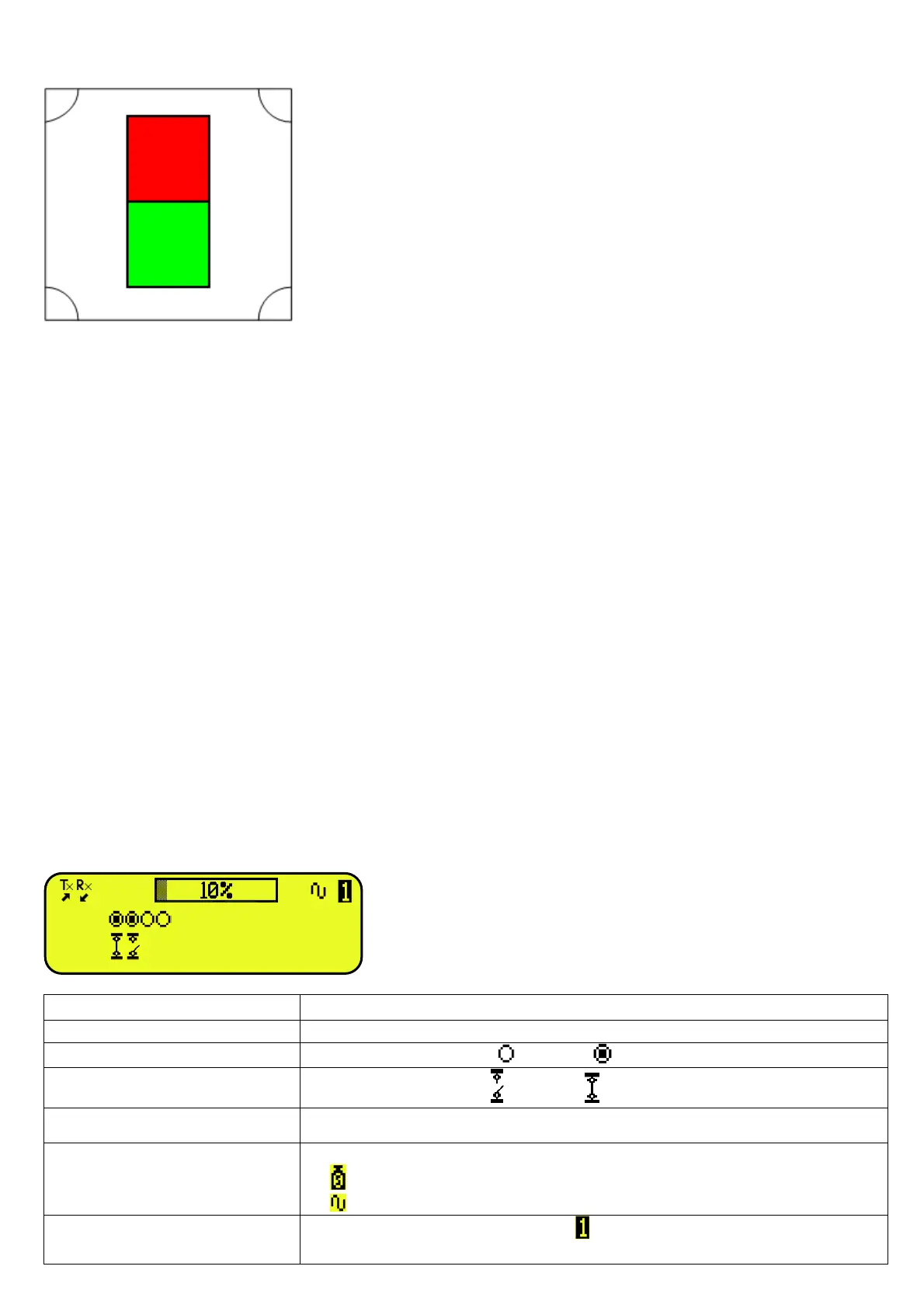
The display shows:
STATUS DESCRIPTION
ANALOGIC OUTPUT(A.O) Analogue output value express as a percentage.
OUTPUTS (OUT)
Status output, non active ( ) or active ( ).
INPUTS (IN)
Status input, non active ( ) or active ( ).
SERIAL COMUNICATIOS (Tx RX) The serial communication is active with external device.
WEIGHT
Status of the weight:
- unloaded scale;
- unstable weight;
SCALE
Number of the active scale ( example , see section 5 SCALE SELECTION) and
the relative weight loaded.
RED R3, functioning with control light for the second scale,
normally CLOSED, ENABLING SET POINT 10kg.
GREEN R4, functioning with control light for second scale,
normally OPEN, ENABLING SET POINT 10kg.



 To Next Page