IPE100 indicator NU-IPE100-IO-USER-E-0212
45
15.4.1 NORMAL FUNCTIONING MODE
By setting the SEtuP >> outPut >> r.ModE parameter on “norMAL”, one configures the independent use of the outputs:
- the check is always made on all the set outputs
- the enabling of one of these does not provoke the disabling of the others.
15.4.1.1 SETPOINT ON THE GROSS WEIGHT
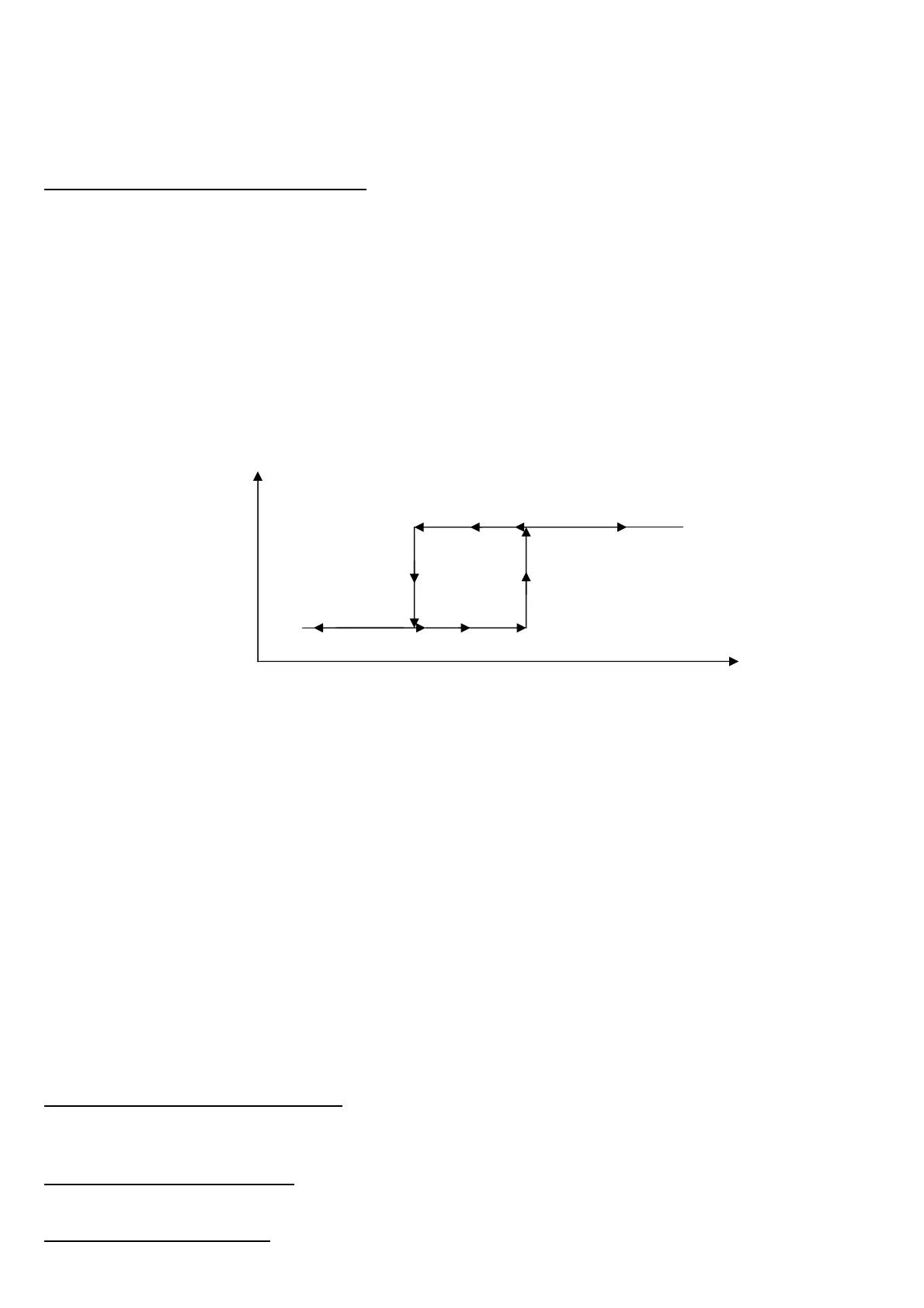
Functioning with hysteresis (rL.iSt “HYSTERESIS” parameter set as iSt.on)
By selecting this functioning mode the output function on the GROSS weight is activated; one enters two SET POINTS for
each output: a DISABLING one, which, when the gross weight is lower than it, disables the appropriate output; an
ENABLING one, which, when the gross weight is greater or equal than it, it enables the appropriate output. Through
function 202, combinable with the desired key (<< F.KEYS >> step, TECHNICAL MANUAL.), the SET POINT values are
entered (DISABLING and ENABLING) for each configured output:
- The display shows " S.1 on " (relay 1 ENABLING SETPOINT): press ENTER, enter the weight value with the keyboard
and confirm with ENTER (use the C key to quickly zero the current value).
- The display shows " S.1 oFF” (relay 1 DISABLING SETPOINT): press ENTER, enter the weight value with the keyboard
and confirm with ENTER (use the C key to quickly zero the current value).
- Proceed in the same way for the following outputs (if present).
- When finished programming the set points, exit with the C key.
Functioning without hysteresis (rL.iSt “HYSTERESIS” parameter set as iSt.oFF)
The operating mode is the same as the previous one, except that just one SETPOINT is entered for each output ("S.1 on“);
for this purpose the access to the " S.1 oFF " parameter is inhibited.
NOTES
- If all the outputs have the “NONE” (none) functioning mode, the enabling of the 202 function has no effect.
- The DISABLING SETPOINT must be less or equal to the ENABLING ones; if a value greater than the ENABLING one is
entered and confirmed in the DISABLING SETPOINT, the indicator will set at 0 the set point, until a correct value is
entered.
- If a value lower than the DISABLING one is entered and confirmed in the ENABLING SETPOINT, that value is
accepted, but the DISABLING SETPOINT is put at 0.
- The 0 value is valid on both the set point values.
- The SETPOINT check of the weight remains active on the present value even during the modification of the SET
POINT, until the new value is confirmed.
- At start-up, the relays are managed from when the weight is displayed and these take on the configuration set in the
SETUP environment. These are not managed inside the technical SETUP.
- In case of weight not valid (local or from remote scale) all the outputs will be disabled.
15.4.1.2 SETPOINT ON THE NET WEIGHT
By selecting this functioning mode, the output function on the NET weight is enabled; the entry of the SET POINTS and the
specifications are the same as the functioning mode on the gross weight.
15.4.1.3 GROSS WEIGHT AT ZERO
By selecting this functioning mode, the output function on the GROSS weight at 0 is enabled.
15.4.1.4 NET WEIGHT AT ZERO
By selecting this functioning mode, the output function on the NET weight at 0 is enabled.
ENABLED
DISABLED
S1on S1oFF
OUT1 STATUS
GROSS WEIGHT



 To Next Page