5 Defibrillation
5.2 General function
Page 82
Art. no.: 0-48-0227 Rev.: g
DEFIGARD/PHYSIOGARD Touch 7
5.2.1 Activating the manual defibrillation mode
Depending on start-up configuration (performed by the administrator see
12.6.1 General configuration), the device can start in Monitoring, AED or Manual
Defibrillation mode and confirmation is needed or not. Proceed as follows to activate
the Manual defibrillation mode when the device does not directly start in manual
defibrillation mode:
When the device starts in Monitoring or AED mode:
Switch to manual mode by pressing the soft key Manual Def and confirm with
Yes.
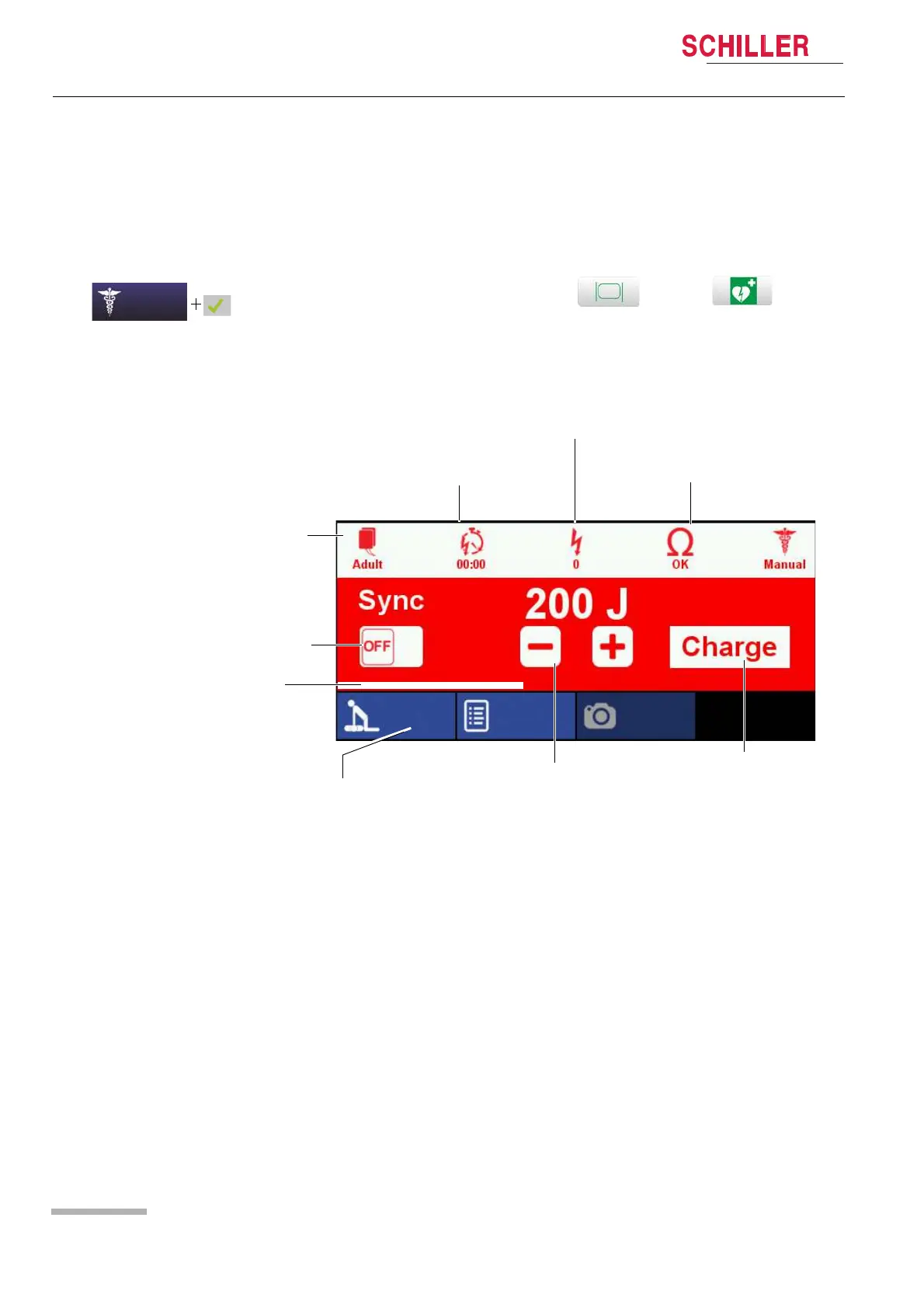
Number of released shocks
Low
Elapsed time since the last shock
Electrode impedance
Indication of pads type Child or
Adult
Switching operational modes:
asynchronous or synchronous
Selection of energy
via - or + button
Charging button
Manual adults.
OK
Opening CPR menu to activate/
deactivate metronome and activating
the Schiller feedback advisory system
when using the Schiller LifePoint
sensor or FreeCPR (based on
impedance).
Charging progress bar
CPR
Event Screenshot















 To Next Page