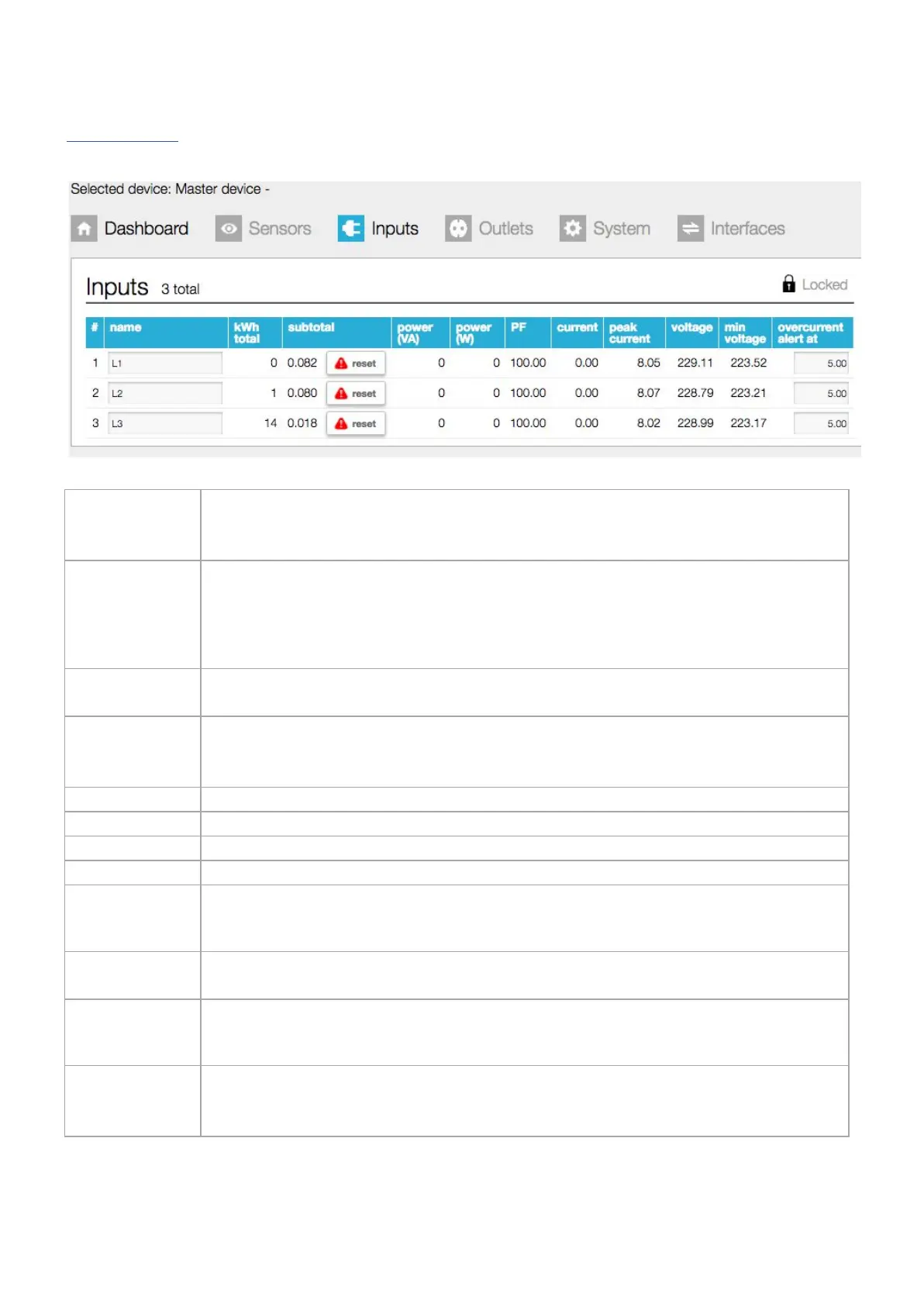
This indicates the number of input phases. In this example, a 3 phase PDU is shown therefore we
have 3 inputs.
A single phase PDU will show only 1 input.
By default, the name field has an 8 character limit. With the “extended name”-option enabled,
you can make use of 18 characters. Whether you are allowed to change the names, depends on
your role according to the “permission model”
➢
See also chapter: “web interface > permission model” & “System tab > Settings”
Total amount of energy per line: value cannot be reset during the lifetime of the devices!
Total amount of energy per line since the last reset. Resetting after “unlocking” and clicking the
“reset” button
Power factor per line [%] = real power [W] / apparent power [VA]
Actual current [A] per line
Highest current per line since the last “reset peaks and dips”
➢
See also chapter: System tab > Reset
Actual voltage [V] per line
Lowest measured voltage (dip) [V] since the last “reset peaks and dips”
➢
See also chapter: System tab > Reset
Field in which the maximum current [A] is configured for this line, what the actual current is
allowed to reach. Crossing this limit will lead to an alert
➢ See also chapter: System tab > Reset & Settings
V252_User manual
Schleifenbauer PDU



 To Next Page