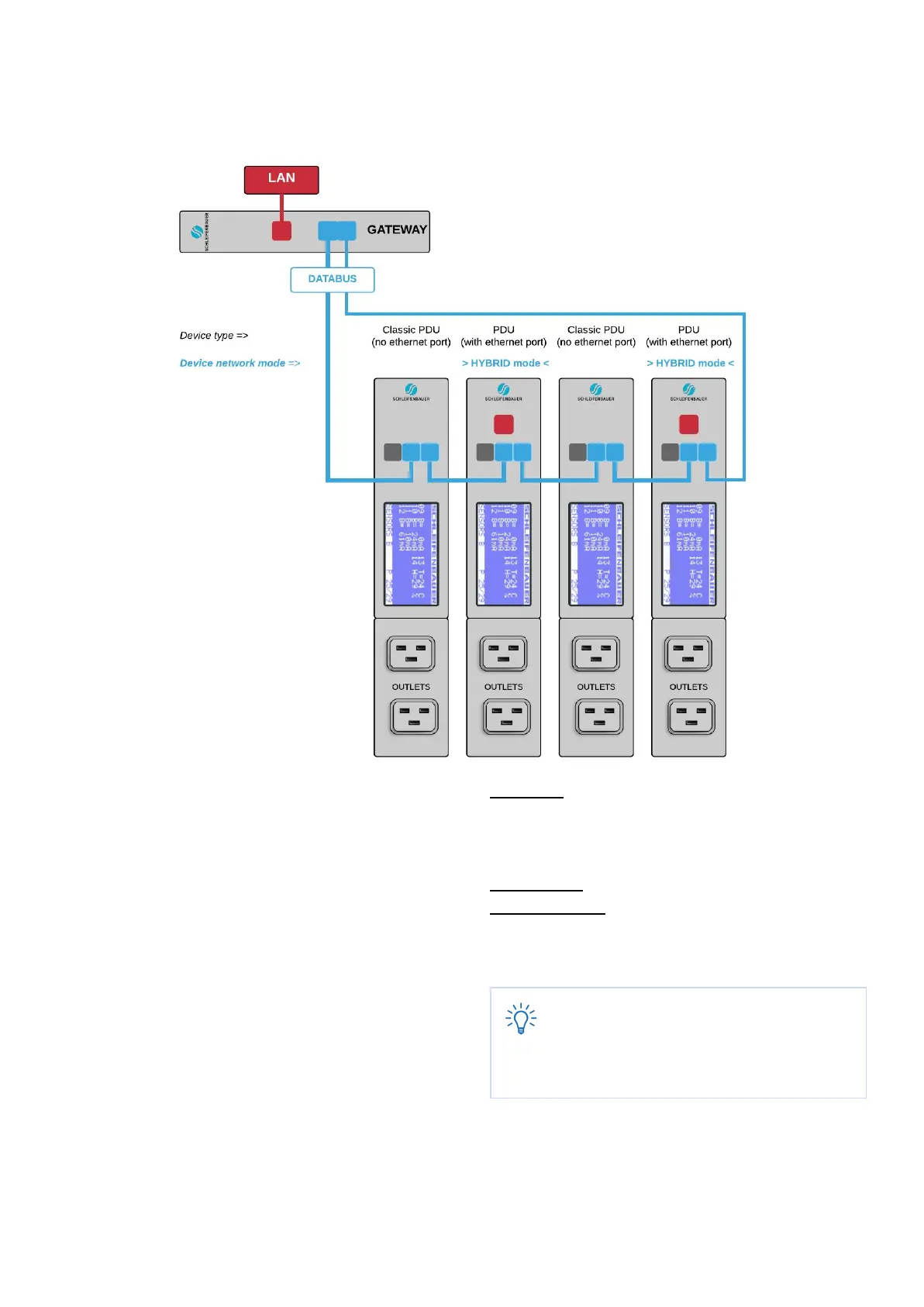
How to make a databus using Schleifenbauer Gateway?
In the figure above you see a small databus-ring with
four PDUs connected to the Schleifenbauer Gateway.
The Classic PDU has NO ethernet port, so a
(Schleifenbauer) Gateway is needed in order to get PDUs
connected to your LAN.
The sequence of devices does not affect the
performance of the Gateway or the databus. Though the
more devices you place in the databus, the slower data
transmission will be.
It is advised to close your databus-ring. To do so, you
connect the last device in the databus also to the
Gateway (blue lines in the figure). In a closed databus
ring the Gateway can reach all connected devices via IN
and OUT databus-ports (clockwise and anti-clockwise).
Advantage: with one IP-address you can collect data
from a number of connected Schleifenbauer-devices
(not only PDUs but also the Schleifenbauer DPM-range
(=energy meters)
Disadvantage: Gateway uses 1U
Problem solving: when the Gateway fails, you can
change to the next configuration: using the “bridge”
mode
Databus communication is 0,2 seconds per
query (e.g. input measures block). Therefore
we advice to make rings with a maximum of 50
devices which means that querying each
device once will last appr. 10 seconds



 To Next Page