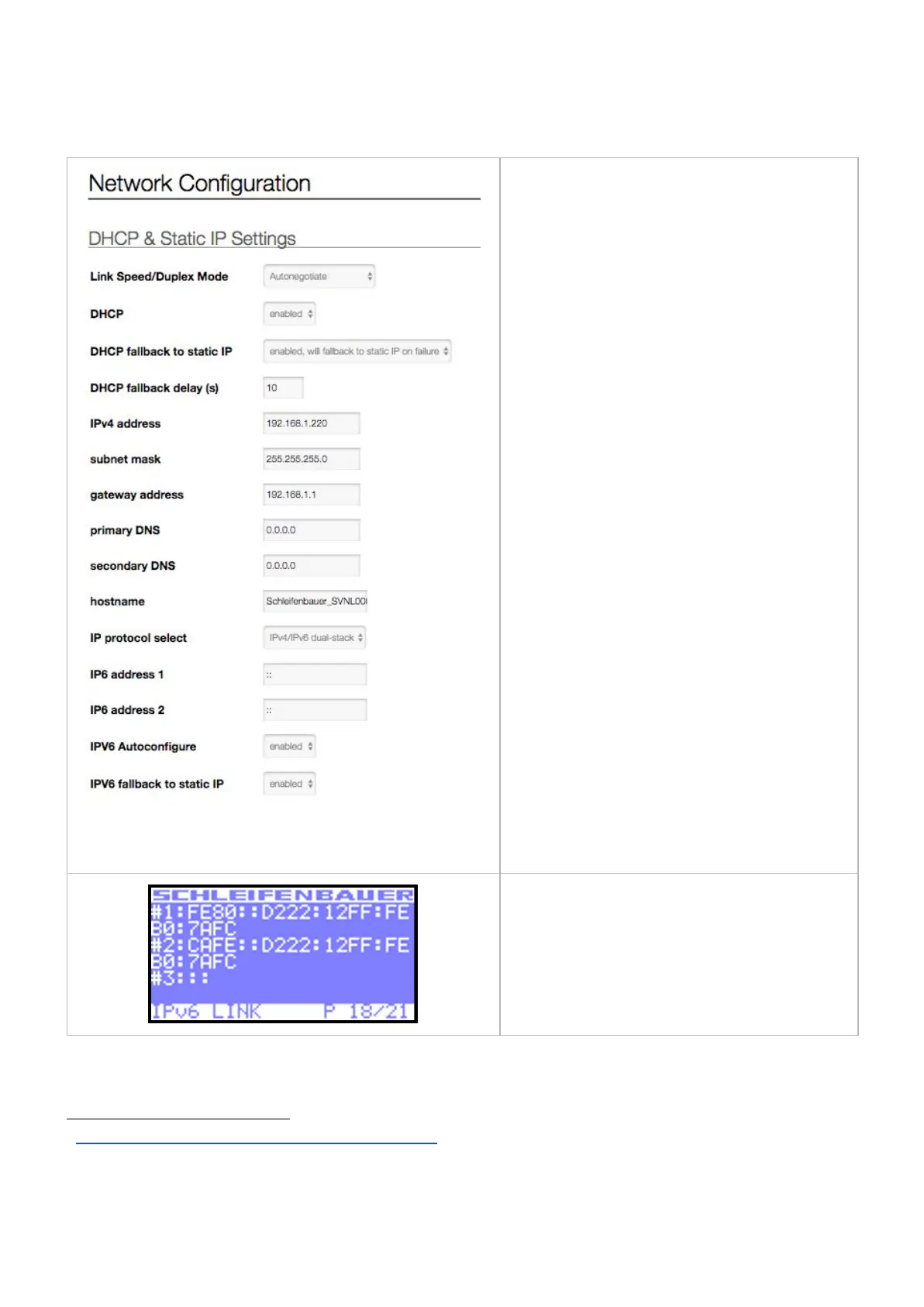
The IPv6 settings can be found in the PDUs web
interface at the tab < Interfaces> block < Network
Configuration >.
The PDU will always generate a Link-local address
which starts with "FE80::".
This address is auto-generated and loses its scope at
the first encountered network node.
3
The IP6 addresses can be found on the web interface
or on the "IPv6 Link" page on the PDU's built-in LCD
screen as shown in the image here..
To enable the user must login to the PDU using the
ipv4 address presented on the display. After logging
in onto the web page of the PDU, select the tab "⇌
4
interfaces". Under network configuration there's a
drop-down box called "IP Protocol select".
By default this will be set to "IPv4 only".
To enable IPv6 set this to either "IPv6 only" or
"IPv4/IPv6 dual-stack".
Note that selecting "IPv4 only" or "IPv6 only"
requires one of the filtering ranges to be all zero
(allow all addresses). This is to prevent users from
locking themselves out. Naturally filtering can be
configured afterwards when the user has connected
to the bridged and/or hybrid PDU using the protocol
previously specified.
Enabling IPv6 will also add an additional page on the
PDUs display (see image). The current IP Mode is
also displayed on the display; screen "IP
INTERFACES".



 To Next Page