How to use the ‘connected devices’ section in the web interface?
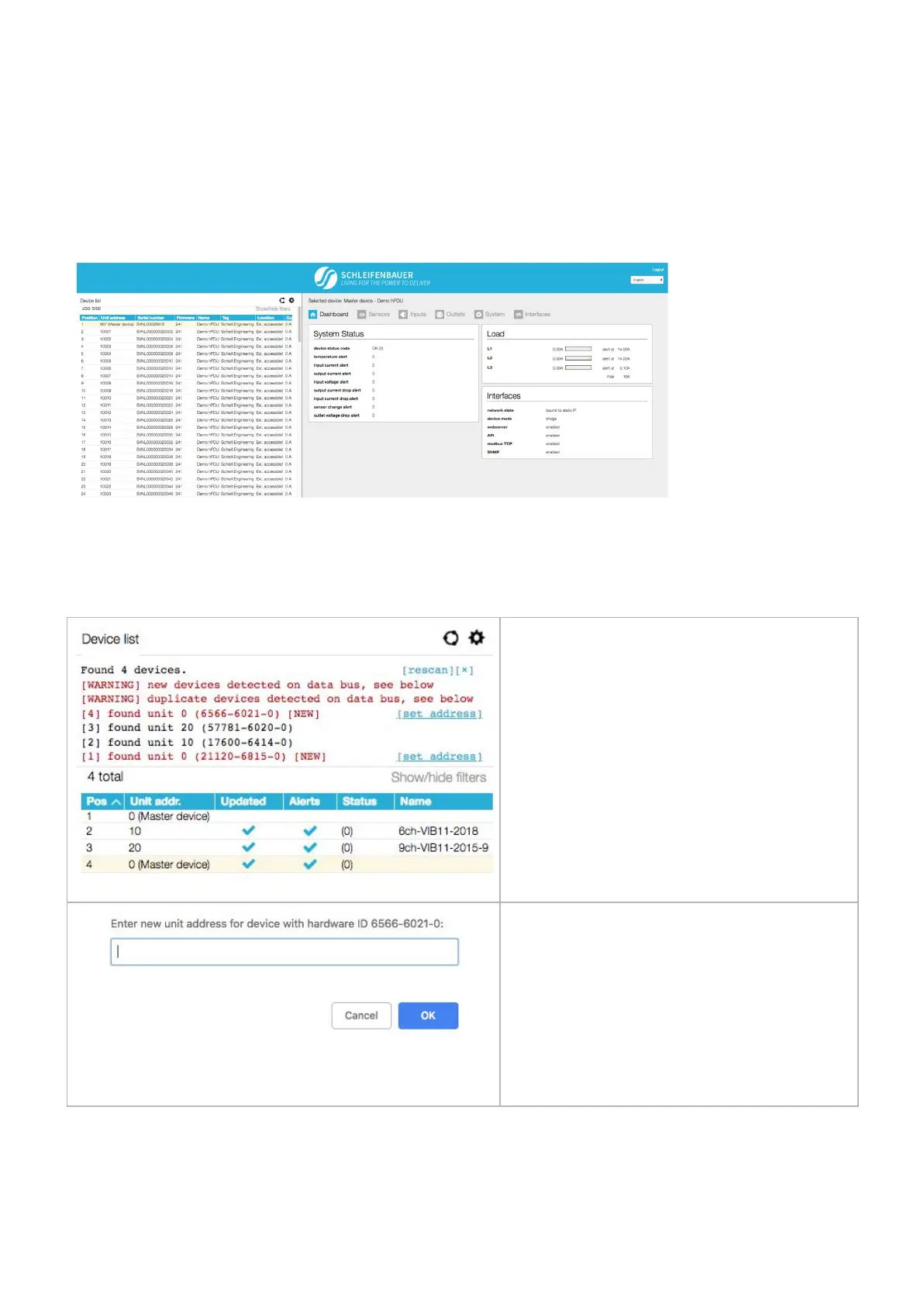
Only when the PDU is configured in Bridge mode the web interface will show a list of all devices connected to the
bridge-PDU on the left pane (or below the blue header when using narrower displays).
Initially this list is empty but will be filled while the web interface is loading data from the bridge-PDU. A selected device is
marked - yellow line - in the device list (left pane). You can switch to another device just by clicking the row in the device
list. Information and settings about the currently selected device can be seen on the right pane.
Device list only appears when
device the connected device is in
“bridge” mode.
How to add new devices on an existing ring? How to solve duplicate devices?
When new devices are added to a ring, the firmware
might find several devices with unit address 0.
This can cause problems so you CAN NOT ignore the
warnings!
It is not possible to set all addresses in one move!
4 devices are found. Device [1] is the bridged device
so it is best to set this unit address last. So start with
[4] which is the device on the top.
● click < set address >
● a new screen will appear; you can check if
the correct device is selected because
● fill in the new < unit address >
● Click < ok >
A “ write error” will occur which is correct: you just
changed the unit address so it can not be reached at
its old unit address. Please click <ok>
V252_User manual
Schleifenbauer PDU



 To Next Page