9-1
© 2014 SeaStar Solutions Optimus Installation Manual, Rev. E
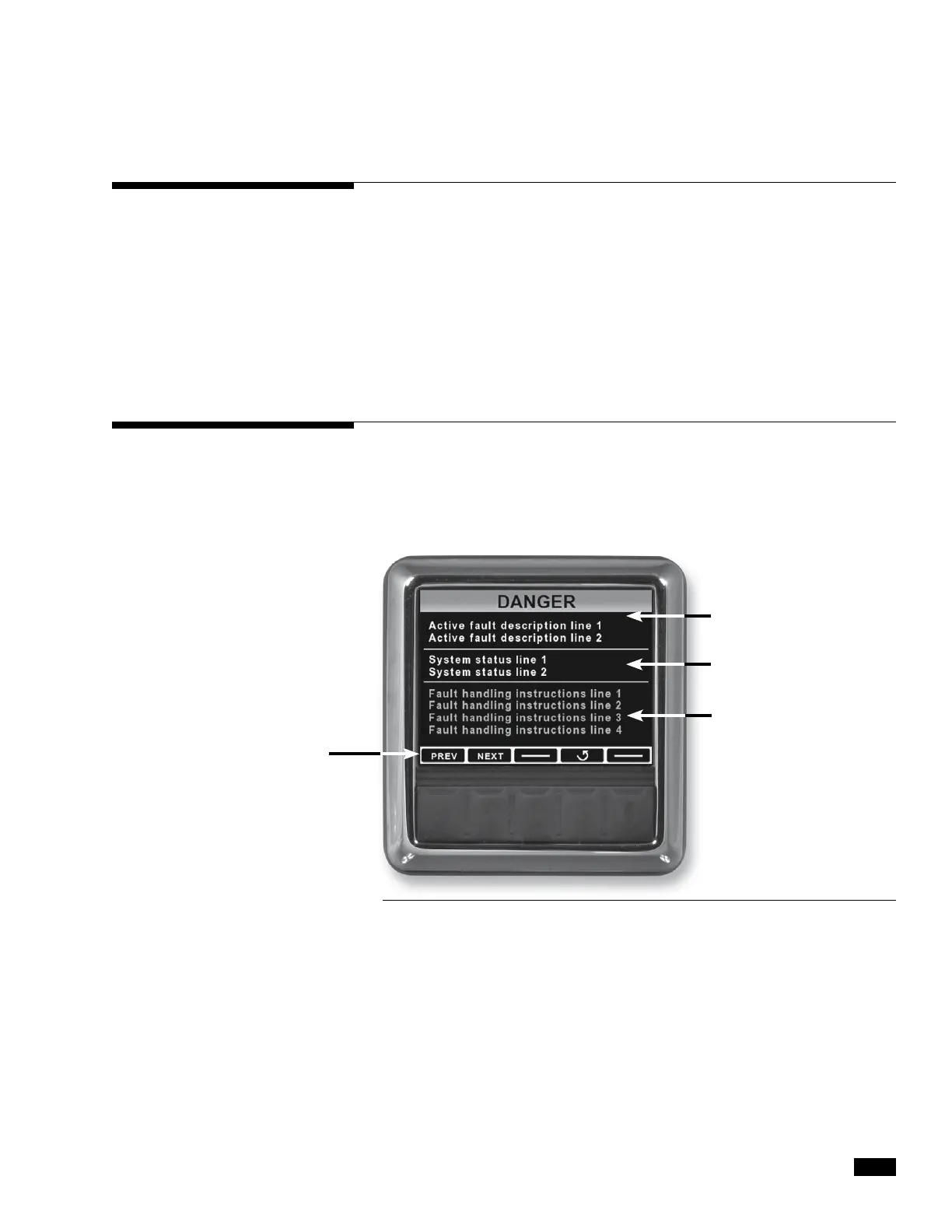
Will appear if multiple
faults are active to allow
user to scroll through
Active Fault
Description Zone
Fault Handling
Instructions Zone
System Status Zone
9.0 FAULT H ANDLING
The PCM has red LED fault indicators directly under the power LED
indicators. Flashing Red indicates a fault. System faults are saved
and can be read with Datalink.
Note: During an installation it is common to have some “occurred”
RFU related errors. These can be cleared.
1. Using Datalink navigate to the Faults tab.
2. Active and occurred faults will be listed.
A danger fault is a critical system fault which will result in limited steering
performance and requires immediate action and return to the nearest port.
During a danger fault, the CANtrak display will display DANGER across
the top, sound a continuous buzzer (until muted) and display fault
information and handling in three zones. See the figure below.
Active Fault Description Zone
Provides details specific to the system fault. These will include a brief
description of the fault and are primarily for troubleshooting purposes.
System Status Zone
Displays information about the status of the system and if the system
has automatically reacted to the fault.
Fault Handling Instructions Zone
Provides detailed instructions on how to proceed. In the case of a
danger fault, this will instruct the operator what to do and how to
proceed should Limp Home mode be required.
Figure 9-1. Danger Fault screen layout.
9.1 Danger Fault Handling


 To Next Page