© 2014 SeaStar Solutions Optimus Installation Manual, Rev. E
7-8
7.3 Calibrating the SmartCylinders
DURING THE CALIBRATION PROCEDURE THE ENGINES WILL MOVE
THE FULL TRAVEL OF THE STEERING RANGE. CONFIRM THERE ARE
NO OBSTRUCTIONS IN THE PATH OF THE ENGINES. IF THERE IS AN
OBSTRUCTION REQUIRING STROKE REDUCTION, THE CYLINDER MUST
FIRST BE CALIBRATED WITH THE SUPPORT BRACKETS REMOVED.
The Optimus EPS system must be fully purged of air before calibration
is attempted. Any air in the system will prohibit calibration and
will cause the system to exhibit faults.
WARNING
CAUTION
1. Open the starboard service valve, move the starboard engine
as far outboard as possible, then close the service valve again.
This will prevent collision when the port engine moves during
calibration.
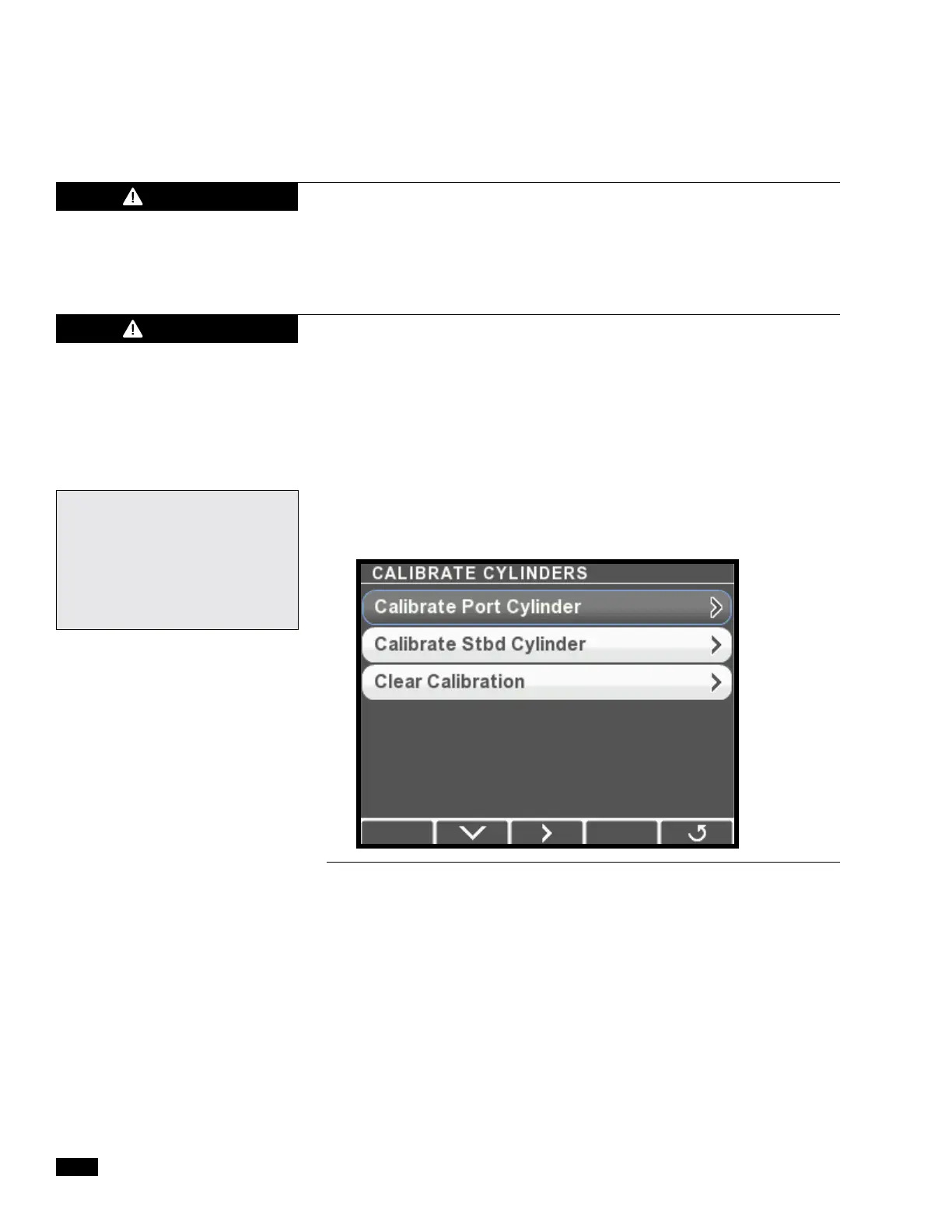
2. On the CANtrak display, navigate to Dealer Menu > Initial
Setup > Steering > Calibrate Cylinders to access the Calibrate
Cylinders menu.
Figure 7-9.
3. Select Calibrate Port Cylinder and press > to enter Calibration
Mode.
Single Engine Applications:
Disregard references to
additional engines/cylinders.
The cylinder is treated as the
Port cylinder on the CANtrak
display and in Datalink.


 To Next Page