© 2014 SeaStar Solutions Optimus Installation Manual, Rev. E
5-6
5.2 CANtrak Display
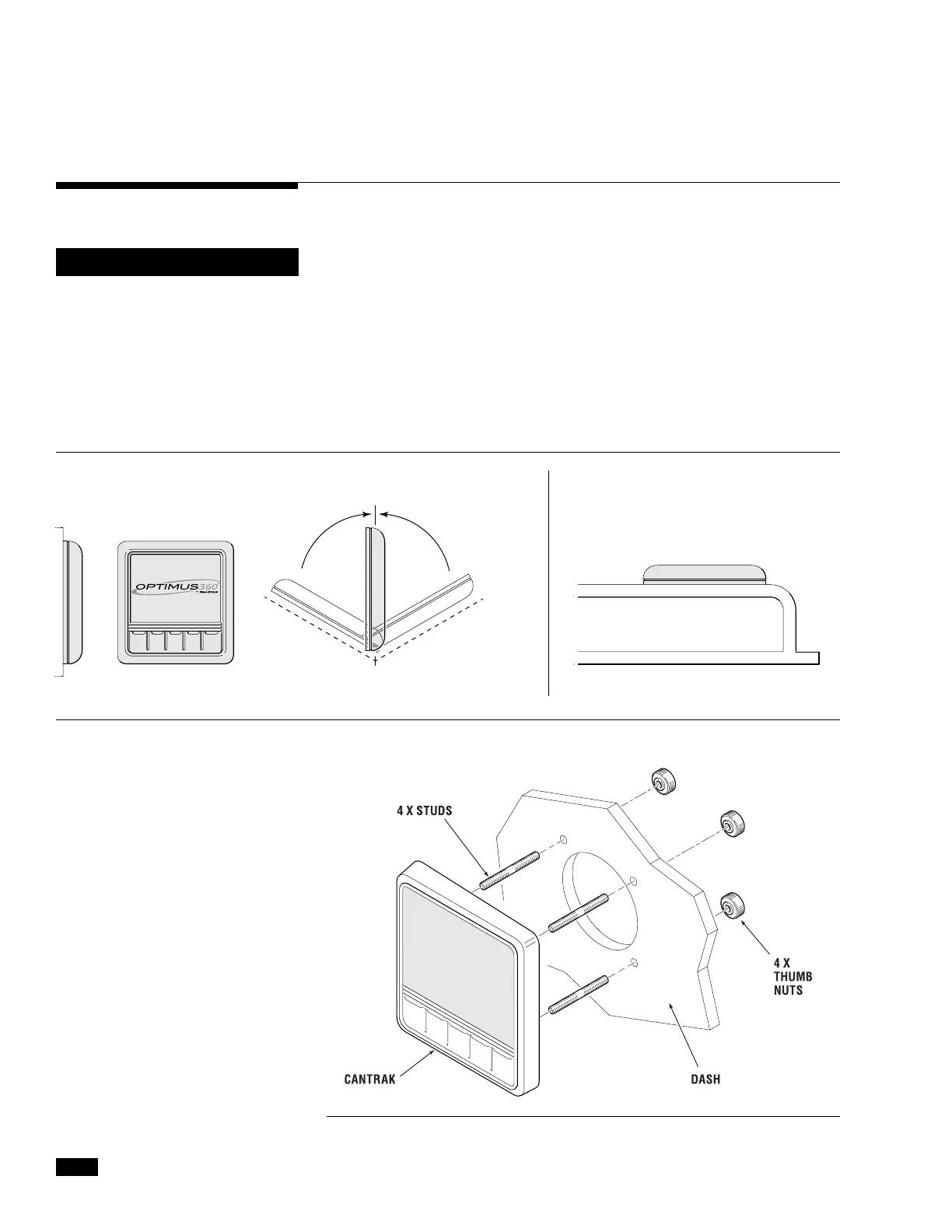
Mount the CANtrak display where it is easily visible from the helm
station. A mounting template can be found in Appendix A.
For best results:
• Mountthedisplayvertically,orwithin60degreesofvertical.
• Ensureadequateventilationaroundtheunit.
• Ensurethatyouareabletogettotherearoftheunitforharness
connections.
• DO NOT mount parallel to the boat deck, unless the helm is in a
completely enclosed wheelhouse where no water can accumulate
on the face of the CANtrak.
Figure 5-5.
Figure 5-6.
DO DO NOT
Mount vertical to hull or wall Mount at an angle less than 60° Mount parallel to boat deck
<60°<60°
On a dual station vessel the
CANtrak is optional at the second
station. If you don’t install a
CANtrak at the second station you
must install a buzzer kit (HA5493).
NOTICE


 To Next Page