© 2014 SeaStar Solutions Optimus Installation Manual, Rev. E
7-1
7.0 SETUP, PURGING, AND
CALIBRATION
7.1 Initial System Setup
The system setup is performed easily with the color CANtrak display.
It is designed to walk you through the following tasks:
• Congurethesystemtype
• Choosethenumberofhelmsanddisplaysinyoursystem
• Updatesystemsoftware
• Selectdevicelocations
• ChooseyourRPMsourceandtachometerPPR(ifapplicable)
You will need access to the CANtrak Dealer Menu for all setup
tasks. See Appendix D for instructions.
At this point you should have all your system components installed,
network harnesses connected, and your power source connected.
You will set up, purge, and calibrate the system using the color CANtrak
display. Refer to Appendix D for display navigation and instructions
for accessing dealer menus.
Procedure:
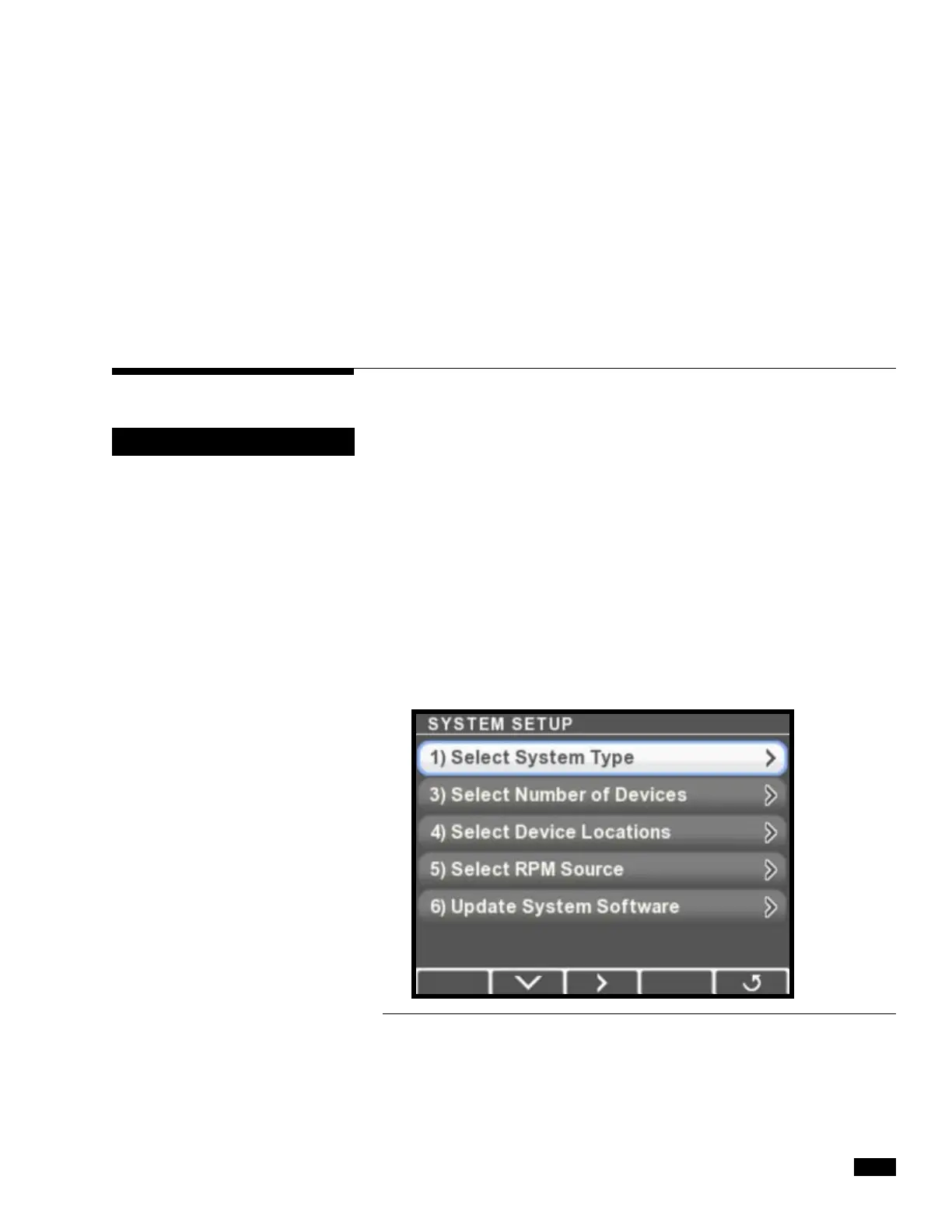
1. On the display, navigate to Dealer Menu > Initial Setup >
System to access the System Setup menu.
Figure 7-1.
It is important to perform these
system setup steps in the order
listed on the display.
NOTICE


 To Next Page