© 2014 SeaStar Solutions Optimus Installation Manual, Rev. E
7-10
THE OPTIMUS EPS SYSTEM MUST BE FULLY PURGED OF AIR
AND THE SMARTCYLINDER MUST BE CALIBRATED BEFORE THE
STEERING ANGLE IS ADJUSTED.
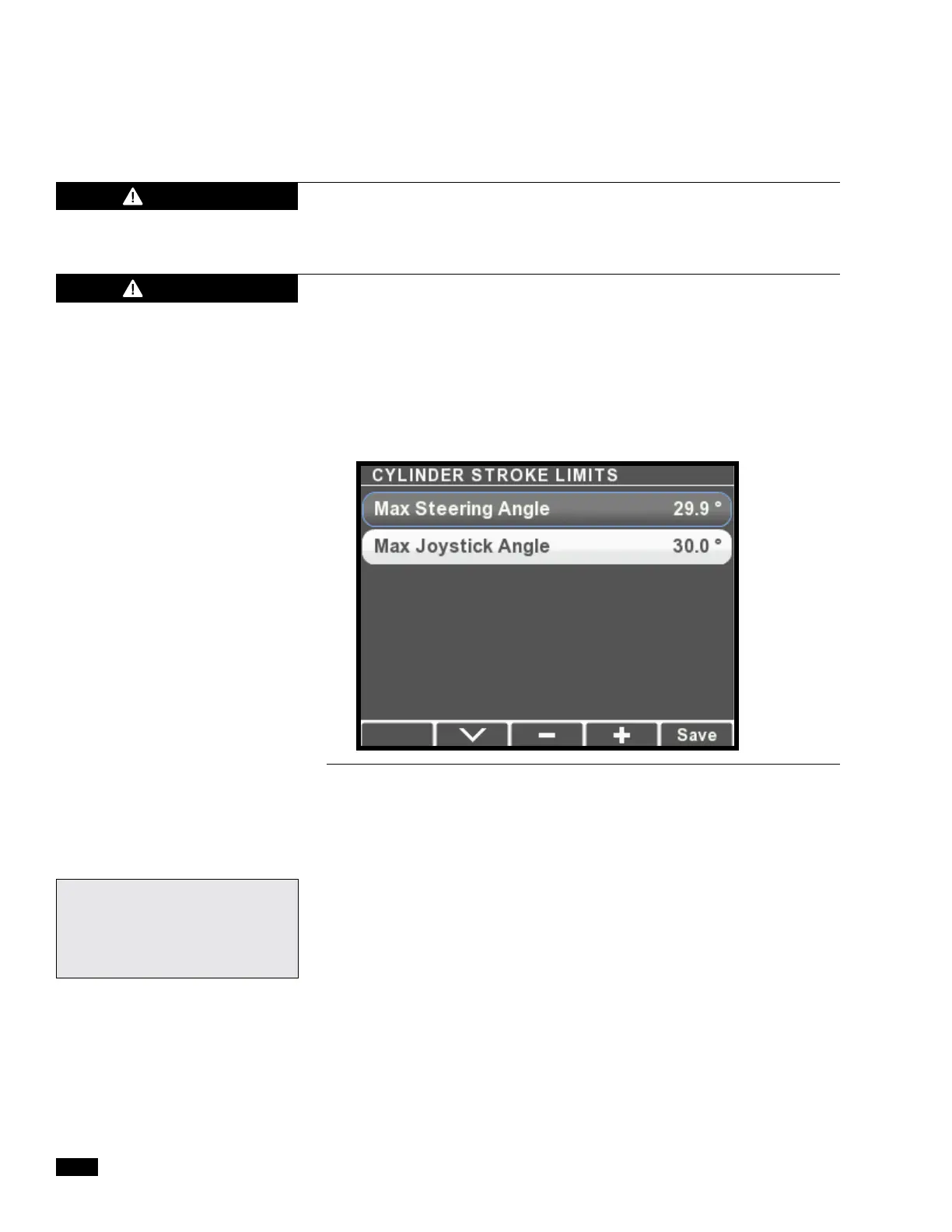
1. On the display, navigate to Dealer Menu > Initial Setup >
Steering > Set Cylinder Stroke Limits to access the adjustment
menu. There are parameters for Max Steering Angle and Max
Joystick Angle. Unless you are setting up an Optimus 360
system you can ignore the Max Joystick Angle parameter.
2. Select Max Steering Angle and use the – button to decrease the
Max Steering Angle. We recommend one degree to start. Each
press will reduce the steering angle by 0.1 degrees.
4. Press Save.
5. Check again for interference and adjust the Max Steering Angle
as necessary. For the best steering performance, restrict the
travel as little as possible.
WARNING
CHANGING PCM PARAMETERS MAY CAUSE THE ENGINE TO MOVE
AUTOMATICALLY AS SOON AS THE PARAMETERS ARE ENTERED.
WARNING
Figure 7-11.
For Datalink users: the Max
Steering Angle parameter is
found on the Configuration tab
of the PCM interface.


 To Next Page