Navigation (NAV)*132
Map scheme
The map representation can be changed according to driving
conditions (day or night).
– Press the ⇒ page 9 function button in the navigation
menu.
– Select Map scheme ⇒ page 131, fig. 160.
– Select day, night or auto as desired.
Day
The map representation contains all type of topographical details. The back-
ground is shown in light colours. This makes map features easy to recognise.
The daytime view is optimised for ambient light ⇒ page 101, fig. 117.
Night
The map representation contains all type of topographical details. The back-
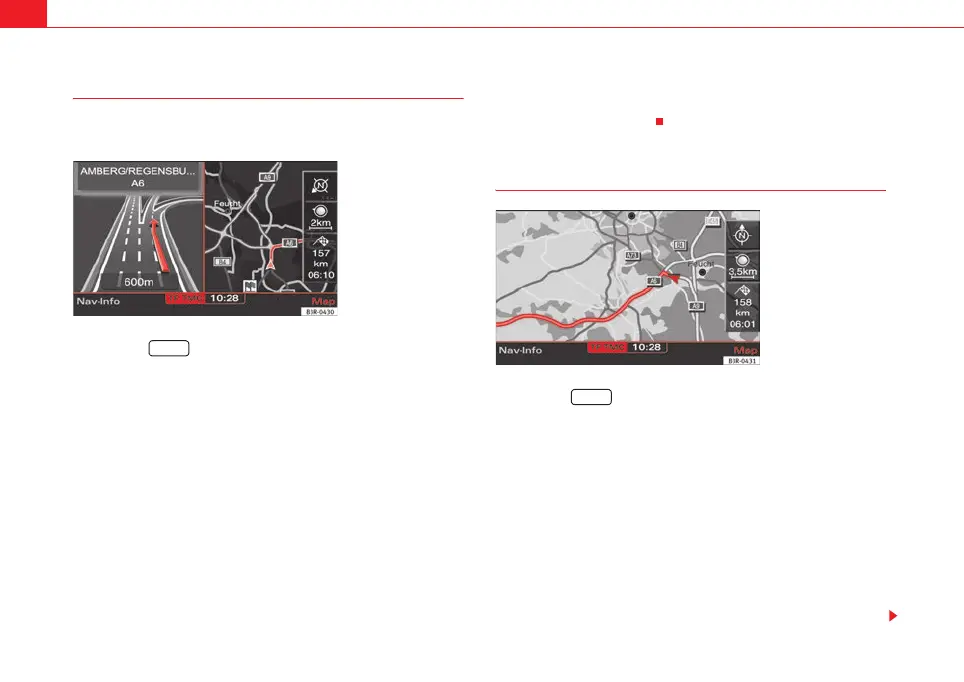
ground is shown dark ⇒ fig. 162. This provides a glare-free view of the map.
The street names and their layout, place names and map contents are in
contrasting light colours.
On
The map scheme changes automatically from day to night display when the
low-beam lights are turned on.
Map orientation
–Press the ⇒ page 9 function button in the navigation
menu.
– Select Orientation ⇒ page 131, fig. 160.
– Select north, vehicle or auto as desired.
North
The map display is set to always face north (i.e. upwards) and the arrow
symbolising the car will move and rotate corresponding to the actual move-
ment and direction ⇒ fig. 163.
Vehicle
The car symbol is set to always face upwards. The map then rotates around
the car in accordance with actual movement.
Fig. 162 Navigation
settings: Night map
SETUP
Fig. 163 Navigation
settings: Orientation -
north
SETUP
media_systemE_EN.book Seite 132 Montag, 21. September 2009 1:48 13



 To Next Page