Navigation (NAV)*136
The name beneath the three-line turn list is the name of the road you are
currently driving on.
Note
If you have activated both the turn list and the motorway information function
⇒ page 136, the motorway information list will be displayed when driving on
the motorway ⇒ fig. 168, and the turn list ⇒ page 135, fig. 167 will
be displayed on all other roads.
Motorway info
When driving on the motorway you will receive information
about parking areas, motorway exits, rest areas, etc. if the
function is activated.
– Press the ⇒ page 9 function button in the navigation
menu.
– Highlight Motorway info with a check mark
⇒ page 131,
fig. 161 to activate the function.
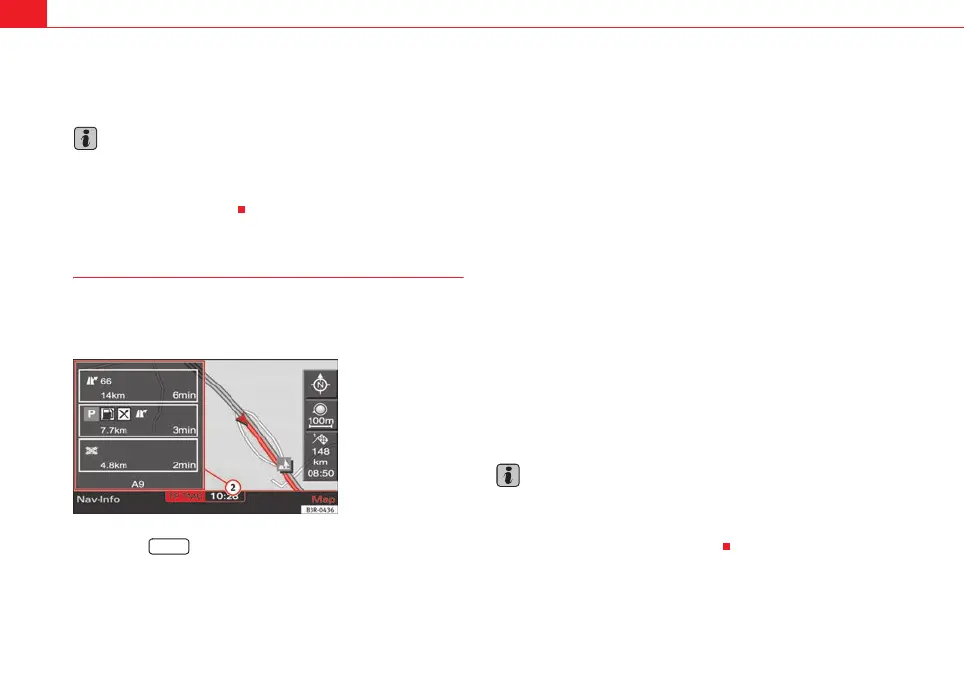
The relevant motorway information ⇒ fig. 168 along your route is
displayed.
If the motorway information function is activated, the next three points along
your route with relevant information will be displayed.
The next relevant point of information (e.g. upcoming motorway intersection)
is listed at the bottom of the list.
Once you have completed the manoeuvre, it will be removed from the list. The
next turn will drop down from above, etc.
The symbols for relevant points of information are displayed with the
distance and estimated time of arrival at the point (motorway exits are
displayed along with the exit number) ⇒ fig. 168.
The following motorway information can be displayed:
• Motorway intersections
• Motorway exits
• Parking areas
• Petrol stations and rest areas
Arrival times of less than one minute are not displayed.
The name shown beneath the list is the name of the motorway, major road or
street on which you are currently driving.
Note
If you have activated both the turn list ⇒ page 135 and the motorway infor-
mation function, the motorway information list ⇒ fig. 168 will be
displayed when driving on the motorway, and the turn list ⇒ page 135,
fig. 167 will be displayed on all other roads.
2
A
1
Fig. 168 Navigation
settings: Map display
showing motorway infor-
mation
SETUP
2
A
2
1
media_systemE_EN.book Seite 136 Montag, 21. September 2009 1:48 13



 To Next Page