Navigation (NAV)* 137
Operating RADIO, MEDIA (audiovisual
systems)
NAME, TEL NAV, INFO CAR, SETUP
Intersection map
– Press the ⇒ page 9 function button in the navigation
menu.
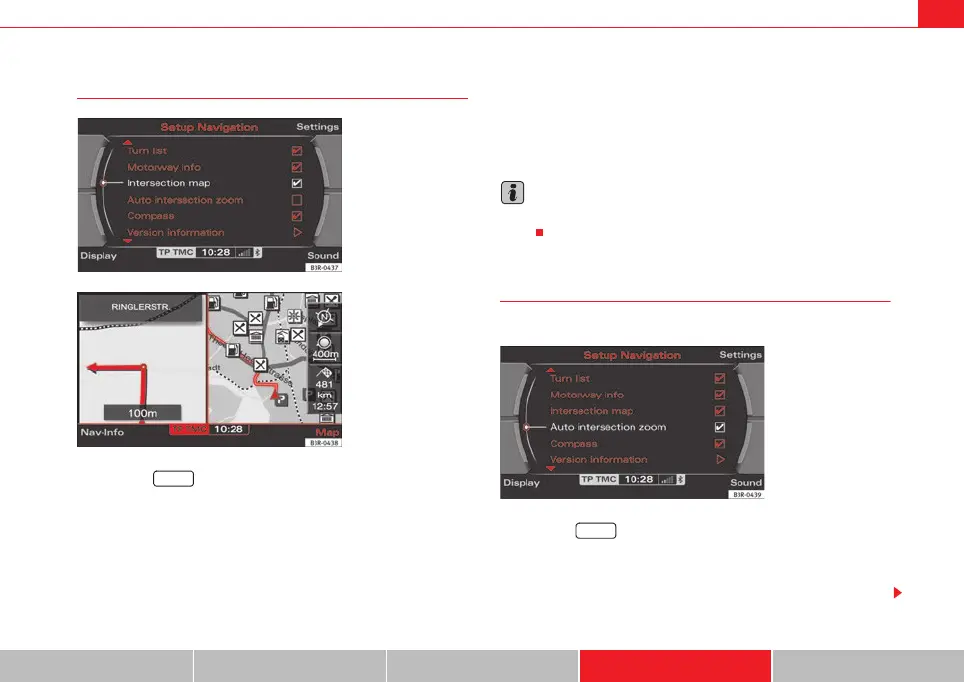
– Highlight the Intersection map with a check mark
⇒ fig. 169
to activate the function.
You can activate the function to have the map split at intersections for a better
overview. In the right section of the screen you will find the current overview
map (scale remains the same). In the left section of the screen a zoomed-in
map of the intersection is simultaneously displayed ⇒ fig. 170.
The distance to the upcoming turn-off is shown in the display. The name of
the road onto which you should turn is indicated at the top of the screen.
If you activate the Intersection map function, the Auto intersection zoom
function will be deactivated automatically. These two functions are mutually
exclusive.
Note
The map is oriented to driving direction ⇒ page 132 when switching to zoom
mode.
Auto intersection zoom
The map displays in zoom mode at intersections.
–Press the ⇒ page 9 function button in the navigation
menu.
– Highlight the Auto intersection zoom with a check mark
⇒ fig. 171 to activate the function.
Fig. 169 Navigation
settings: Active intersec-
tion map function
Fig. 170 Navigation
settings: Map display
with active intersection
map
SETUP
Fig. 171 Navigation
settings: Auto intersec-
tion zoom function acti-
vated
SETUP
media_systemE_EN.book Seite 137 Montag, 21. September 2009 1:48 13



 To Next Page