1 - 90
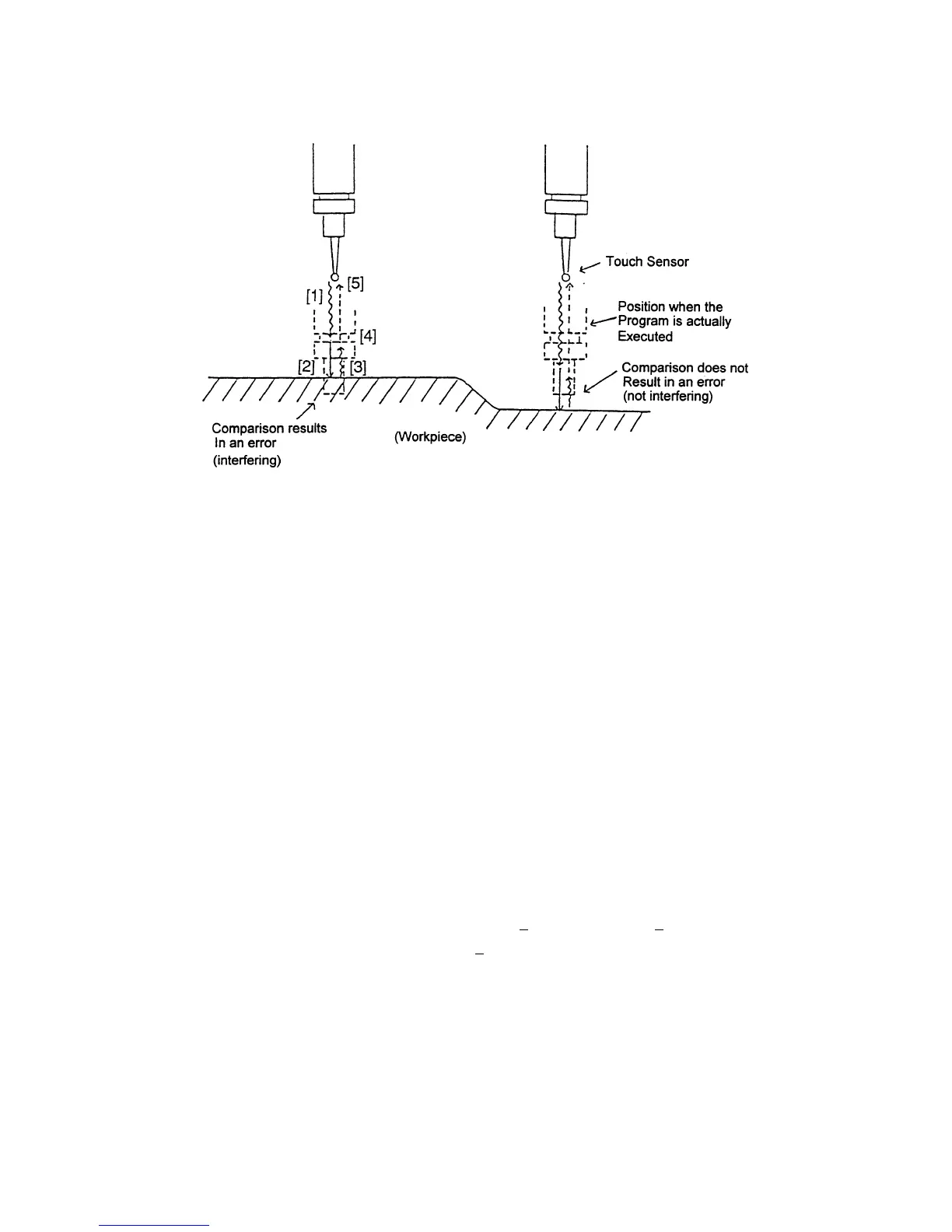
(3) Comparison movements
[1] Bring the Z axis close to workpiece by the [HANDLE] or [JOG] feed.
[2] Apply the Z axis to this workpiece by the [HANDLE] or [JOG] feed.
→The buzzer sounds and the work-piece profile is measured.
[3] Retreat from the block by the [HANDLE] or [JOG] feed until the buzzer goes off.
[4] Press the [PROGRAM START] switch. (execution of comparison)
→ A warning message if the position when the program is actually executed
interferes with the workpiece.
[5] The Z axis moves to the ATC (comparison start) position at rapid traverse rate
and the program proceeds to the next block.
* If the [PROGRAM START] switch is pressed after completing the movement [1],
the program proceeds to the next block, canceling the movement [2] on.
* If the [PROGRAM START] switch is pressed when a warning No. 215 (the tool
entered the disabled areas in safety guard comparison) occurred, operation can
be continued, canceling the warning.
(4) Parameters
No. 6243, #0 = 0 Compares only first G00 Z
coming after a (T ) command.
1 Compares all G00 Z
.
#1 = 0 The measurement position Z of comparison is the difference between
a command value and a measured value.
1 The measurement position Z of comparison is the work coordinates
of the touch position.
#2 = 0 Does not position to the 2nd reference point at comparison start time.
Positions to the 2nd reference point at comparison start time.



 To Next Page