3.4. HOW TO CONFIGURE SBF AND NMEA OUTPUT
3.4 How to configure SBF and NMEA output
The AsteRx-U can output position and GNSS data in both standard NMEA format and
Septentrio’s proprietary compact binary format SBF. This following sections detail how to
configure connections to other devices in order to send data.
3.4.1 Output over a serial COM connection
The AsteRx-U can be connected via a serial COM cable to an RS-232 compatible secondary
device
1
.
Step 1: Configure the serial COM port
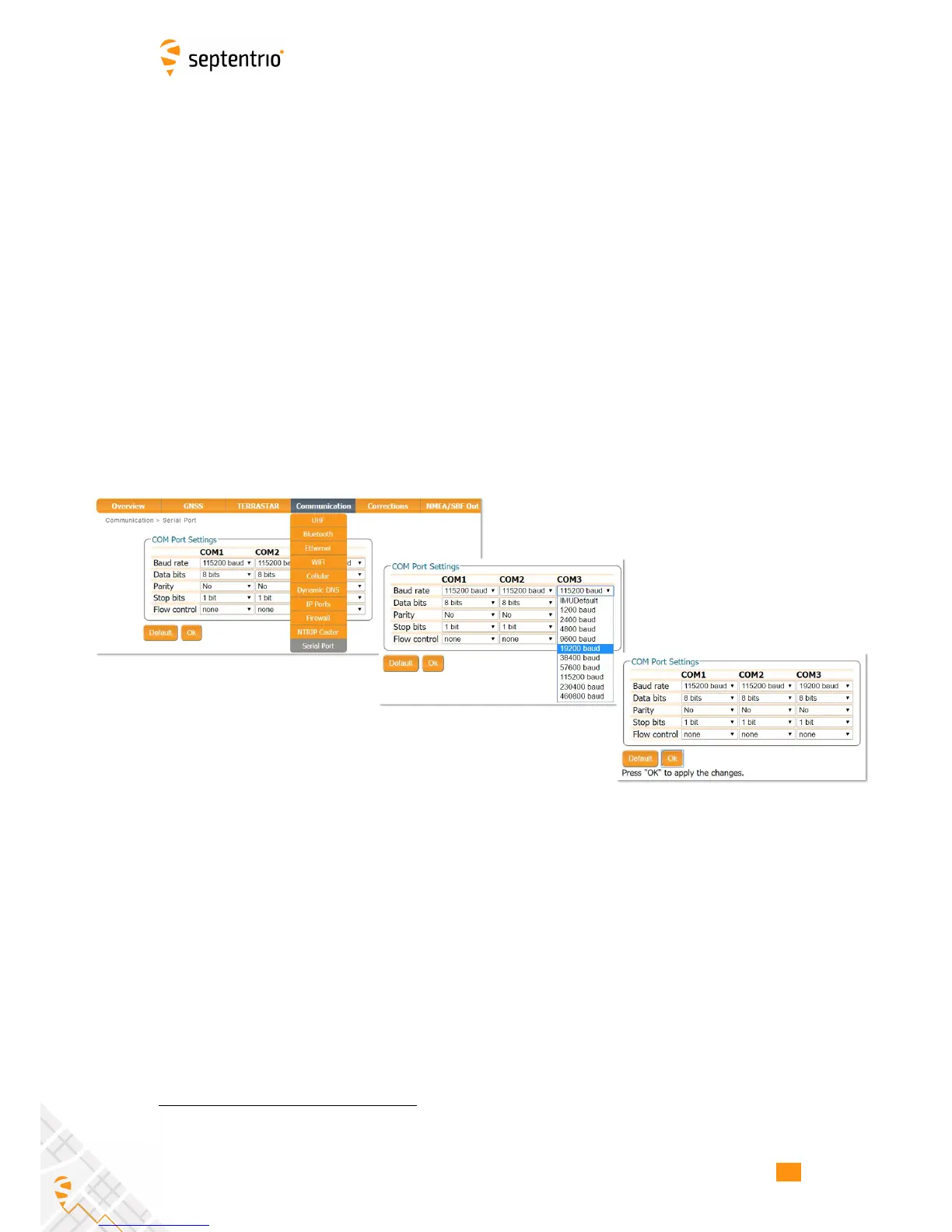
The COM port of the AsteRx-U should be configured with the same baud rate and flow control
setting of the coupled device. These settings can be configured via the ‘Communication’ tab
as shown in Figure 3-11. In this example, COM3 is set with a speed of 19200 baud.
Figure 3-11: Configure the baud rate and flow control of the AsteRx-U
1
The performance at the highest setting of 460800 baud has not yet been fully validated. Users are therefore
recommended not to use this setting for AsteRx-U firmware versions 4.2.0 and earlier.
21



 To Next Page