5 Base station operation
5.1 How to configure the AsteRx-U as an RTK
base station using the UHF radio
The AsteRx-U can itself also be configured to work as a base station and provide differential
correction data to one or more rover receivers.
Step 1: Setting the AsteRx-U base station position
Set the position as static
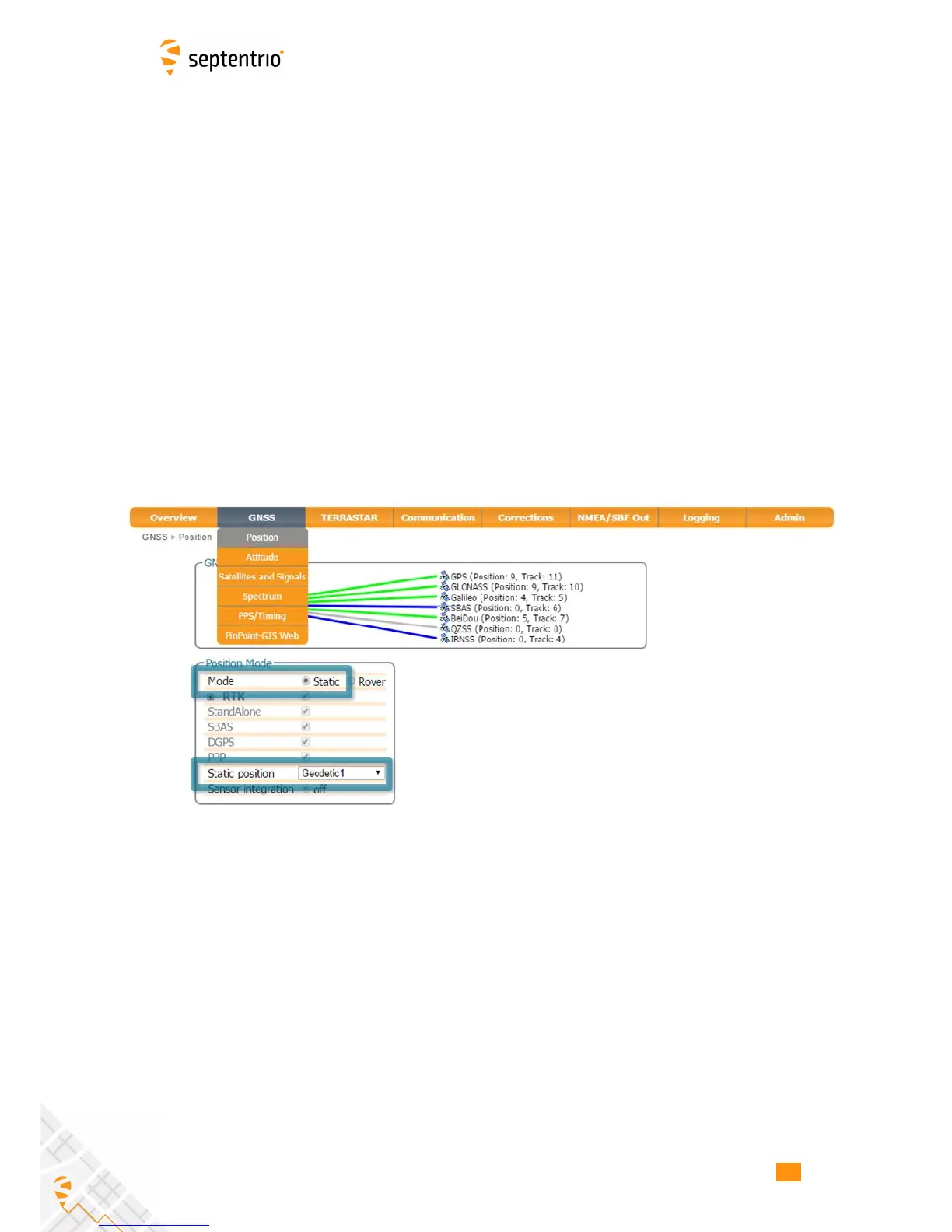
To work as a base station, the position of the AsteRx-U should be set to static. If not, the
AsteRx-U will still work as a base station however the position of the rover may show more
variation. The ‘Static’ position mode can be selected in the ‘Position’ window of the ‘GNSS’
menu as shown in Figure 5-1.
Figure 5-1: Setting the AsteRx-U base station position to static
Set the correct position
An accurate position of the antenna that is connected to the AsteRx-U should also be set. The
default setting of ‘auto’ can be used for demonstrations however, for most other purposes,
a properly surveyed position is advisable. In the example shown in Figure 5-2, the position
stored under ‘Geodetic1’ is used. The stored positions can be entered via the ‘Advanced
Settings’ menu on the same page. Pre-set positions can be entered in either Geodetic or
Cartesian coordinates as shown.
53



 To Next Page