5.1. HOW TO CONFIGURE THE ASTERX-U AS AN RTK BASE STATION USING THE UHF RADIO
Select the Datum of the antenna position
In the Datum field, you can select the datum to which the antenna coordinates refer.
The selected value is stored in the Datum field of position-related SBF blocks (e.g.
PVTCartesian) and also in any output differential corrections. Please note that the Datum
setting does not apply any datum transformation to the antenna position coordinates.
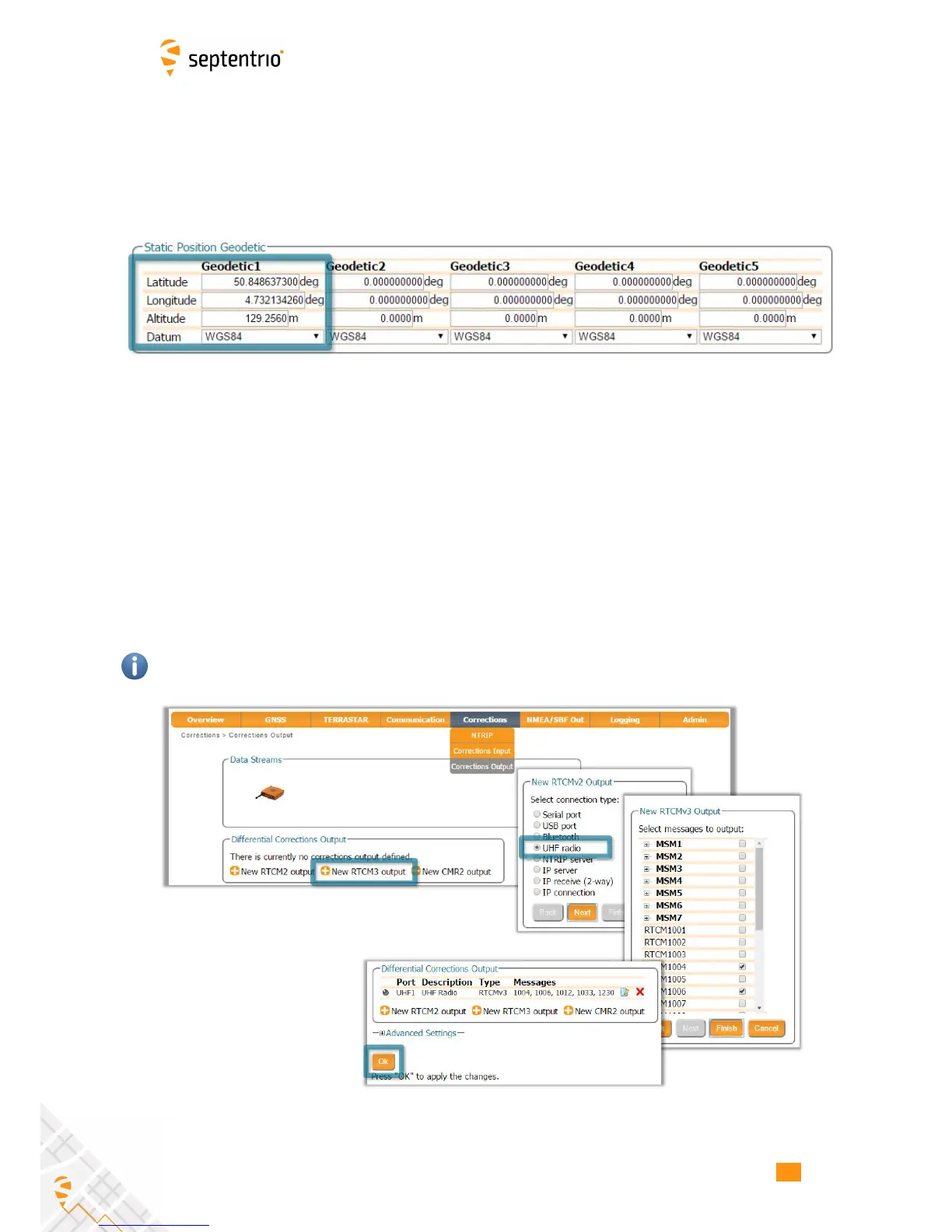
Figure 5-2: Setting the static position to the pre-set ‘Geodetic1’ position
Click ‘OK’ to apply the new settings
Step 2: Configure output of differential corrections
Selecting the correction format and connection type
Output of differential corrections can be configured in the Corrections Output window as
Figure 5-3 shows. Click on New RTCM3 output to start the sequence of configuration steps.
The messages needed for RTK are selected by default.
RTCMv3 is the most compact and robust correction format. It is recommended to use this
format wherever possible.
Figure 5-3: Selecting to output RTCM3 RTK corrections over the UHF radio
54



 To Next Page