8.3. USER ACCESS: AN EXAMPLE
8.3.1 Using SSH key authentication
By default, anonymous users have full access over FTP, SFTP and rsync to the files logged
on the AsteRx-U. FTP, SFTP and rsync access can be limited by configuring user access, as
described in Section 8.1. For added security, user authentication for SFTP and rsync access
can be configured using an SSH public key. When an SSH key is defined, the configured user
can download files using SFTP or rsync without entering a password provided of course, that
the matching private key is known by the key agent running on the same PC.
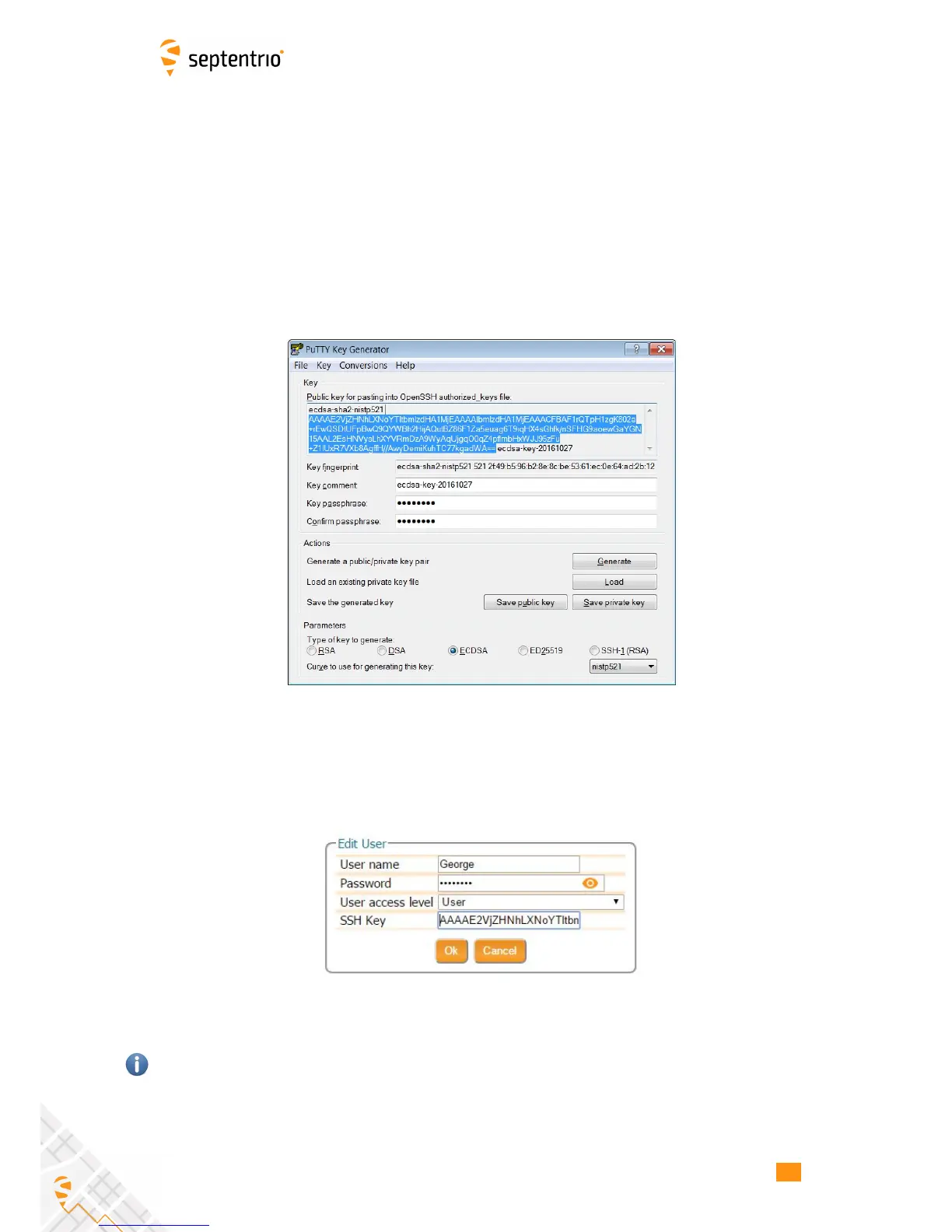
You can generate public and private keys using for example, PuTTY Key Generator as shown
in Figure 8-5.
Figure 8-5: Generating SSH keys using the PuTTY Key Generator. The public key is
highlighted.
The generated public key is the highlighted text that can be pasted directly into the SSH Key
field of the AsteRx-U Web Interface as shown in Figure 8-6.
Figure 8-6: Using an SSH Key
521-bit ECSDA keys offer the best security however, ECSDA 256 and 384-bit keys can also be
used. Alternatively, RSA 512 and 1024 key encryption is also supported.
79



 To Next Page