7 Receiver Administration Operations
7.1 How to change IP settings of the AsteRx-U
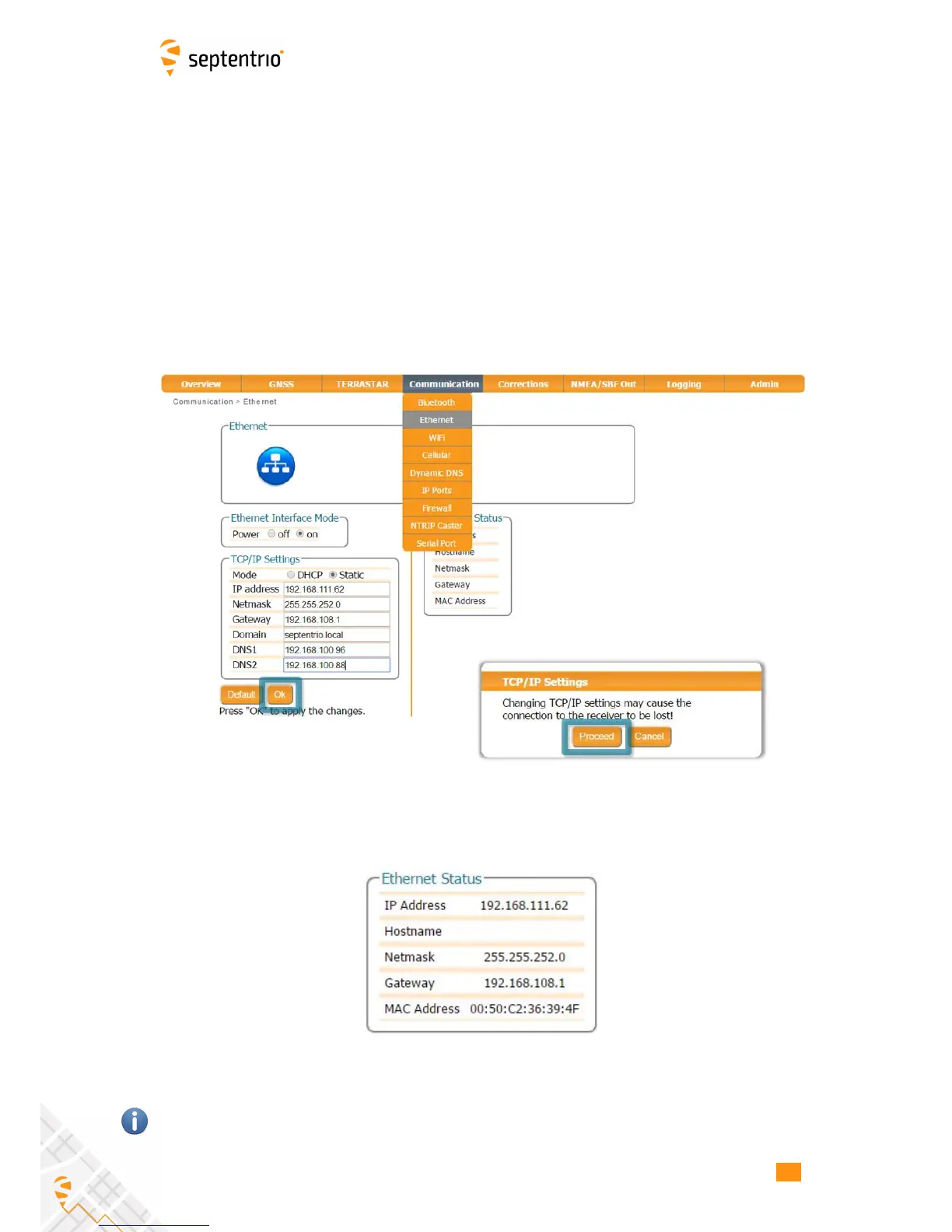
The IP settings of the AsteRx-U can be configured on the Ethernet window of the Web
Interface. By default, the AsteRx-U is configured to use DHCP to obtain an IP address but, a
static IP address can also be configured as shown in Figure 7-1.
In Static mode, the receiver will not attempt to request an address via DHCP but will use the
specified IP address, netmask, gateway, domain name and DNS. DNS1 is the primary DNS,
and DNS2 is the backup DNS. In DHCP mode, the arguments IP, Netmask, Gateway, Domain,
DNS1, and DNS2 are ignored.
Figure 7-1: Configuring a static IP address
The new IP address should now appear in the Ethernet Status field as shown in Figure 7-2.
Figure 7-2: TCP/IP settings
Note that the IP settings will keep their value after a power cycle and even after a reset to
factory default in order to avoid accidentally losing an Ethernet connection to the receiver.
69



 To Next Page
 Loading...







