4.1. HOW TO CONFIGURE THE ASTERX-U FOR RTK
4.1.3 How to configure the AsteRx-U in RTK rover
mode using TCP/IP in a closed network
Step 1: Configure the Base station receiver
Set the Base station position as static
Section 5.1 describes how to configure the AsteRx-U as an RTK base station.
Configure the Ethernet connection and diff corr output from the Base
station receiver
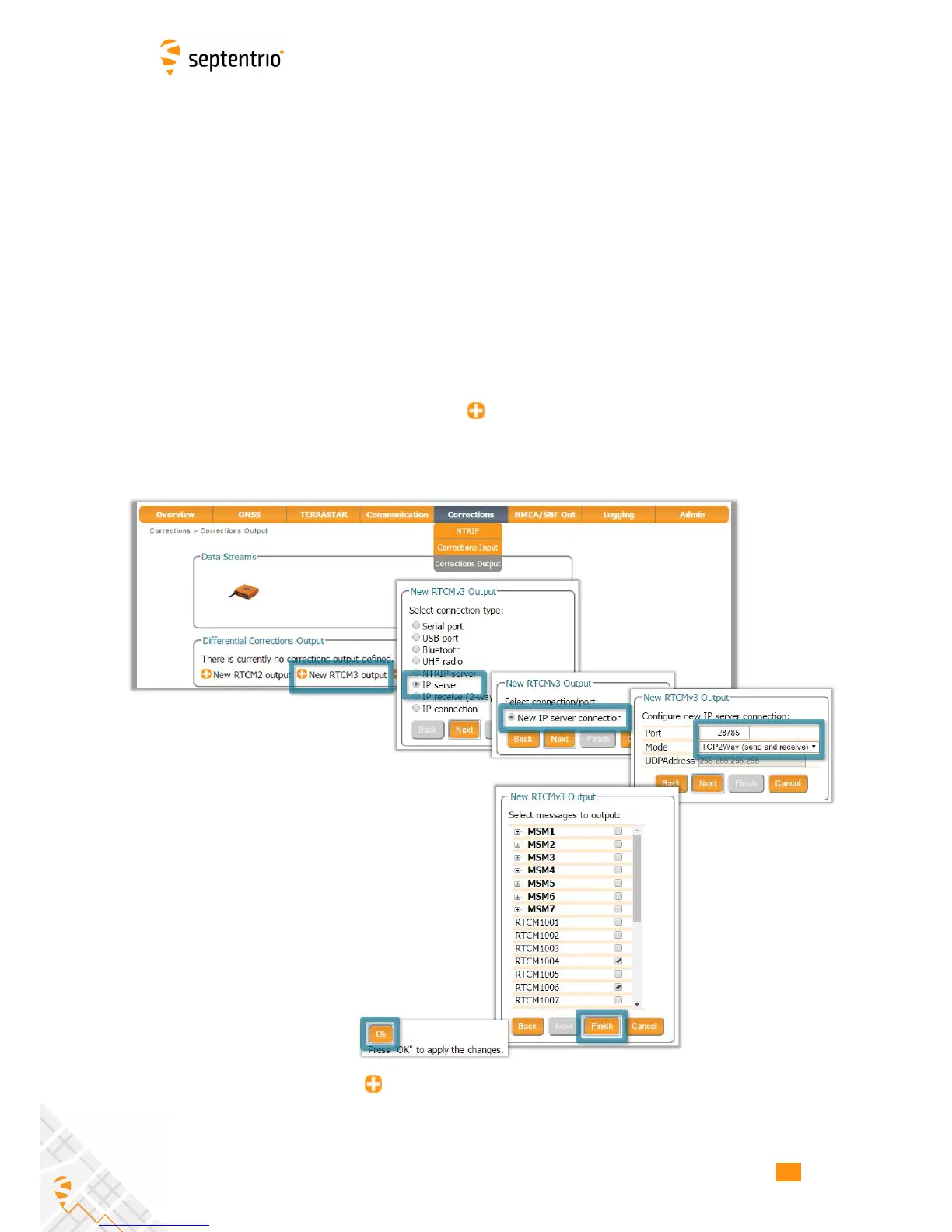
In the Corrections Output window click on New RTCM3 output to start the sequence of
steps to configure the RTK diff corr stream and Ethernet connection over which the diff corr
will be sent. In the example shown in Figure 4-10, RTCMv3 correction data are sent out over
port 28785. The RTCMv3 messages necessary for RTK positioning are selected by default.
Figure 4-10: Click on New RTCM3 output to configure RTK diff corr output
over an Ethernet connection
39



 To Next Page